Skip to content
View in the app

A better way to browse. Learn more.

Unraid

A full-screen app on your home screen with push notifications, badges and more.

To install this app on iOS and iPadOS
  1. Tap the Share icon in Safari
  2. Scroll the menu and tap Add to Home Screen.
  3. Tap Add in the top-right corner.
To install this app on Android
  1. Tap the 3-dot menu (⋮) in the top-right corner of the browser.
  2. Tap Add to Home screen or Install app.
  3. Confirm by tapping Install.

BliBlu

Members
  • Joined

  • Last visited

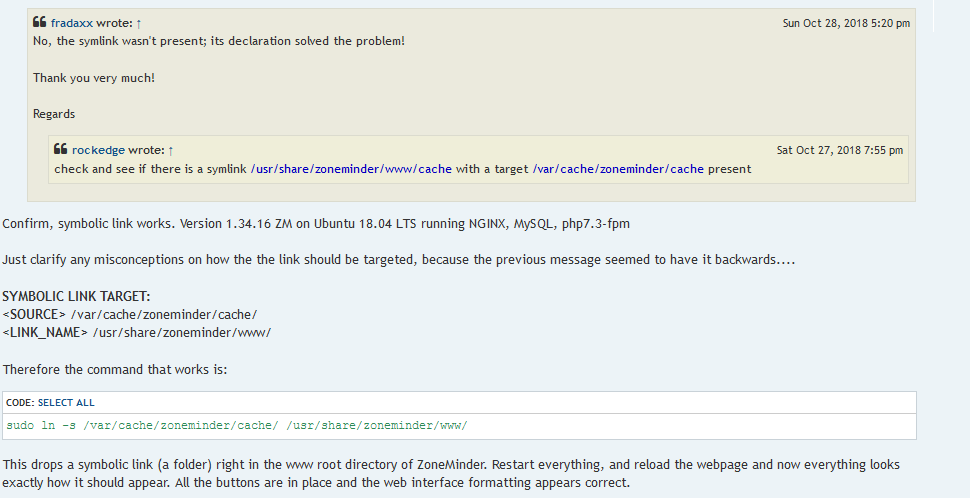
  1. regarding my question above: i found this in the Zoneminder forum. i think this might be the solution, but since my linux knowledge is limited unfortunately, iam not not sure how to translate this to my setup
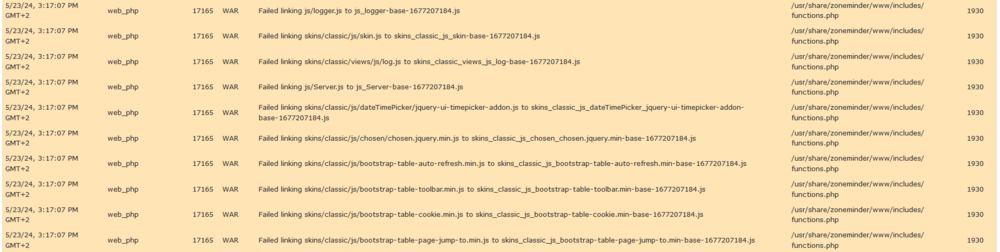
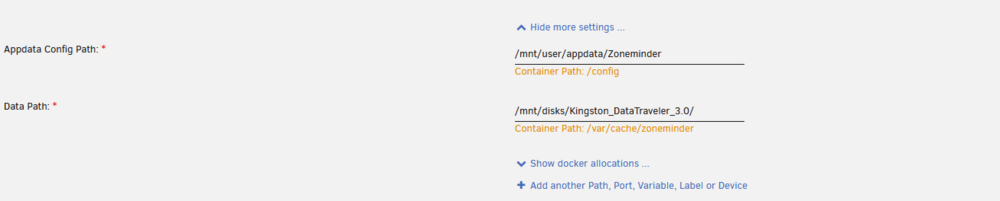
  2. Sorry, i couldn't find the answer to my problem in this thread. Problably iam just overseeing something since iam relativlely new to unraid: i installed Zoneminder. i chose an unassigned device as my data path (for testing its just a USB drive, which will later be replaced by something stable). The "data folders" are created in the USB drive. here is my problem: When i open the WEB GUI some symbols are not shown: the logs in zoneminder look like this: If i install Zoneminder in default settings, the symbols show normal. What am i missing? Thank you in advance!

Account

Navigation

Search

Search

Configure browser push notifications

Chrome (Android)
  1. Tap the lock icon next to the address bar.
  2. Tap Permissions → Notifications.
  3. Adjust your preference.
Chrome (Desktop)
  1. Click the padlock icon in the address bar.
  2. Select Site settings.
  3. Find Notifications and adjust your preference.