





moses19850
Members
-
Joined
-
Last visited
-
Hi, during holiday season I was able to continue the story for static ip and went with a different solution: In the config file of the LXC I add the line: lxc.net.0.hwaddr = xx:xx:xx:xx:xx:xx You can get there, when you stop the container and click again on the icon and select show/edit config. And then based on the static mac, I set up static IP in my router. Maybe somebody is looking for this information.
-
Hi @cz13 , danke für Deine Rückmeldung. Zu Deinen Fragen: Verbindung war zu dem Zeitpunkt über LAN-Kabel Ich verwende Windows Explorer Die Dateien liegen direkt auf meinem Laptop Ich muss gestehen ich hab mir das Log nicht angesehen. ABER: Ich habe in der Zwischenzeit eine Umgehungslösung gefunden: Ich habe eine unbenutzte 2,5 Platte mit exFAT formatiert, die Musiksammlung hinkopiert. Windows hat mich während des Kopiervorgangs gefragt, ob ich die Dateien ohne zusätzliche Attbiute kopieren möchte, und ich hab dies Bestätigt. Festplatte an UNRAID angestöpselt und ohne Fehlermeldung kopiert. Heißt jetzt für mich, dass ich immer den Umweg über eine exFAT Platte gehen werde
-
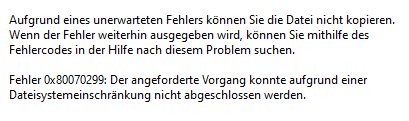
Hallo, ich habe heute mal versucht meine komplette mp3 Sammlung von meinen Laptop auf unraid zu kopieren, leider bekomme ich folgende Fehlermeldung: Das Problem tritt aber nicht bei allen mp3-Dateien auf, hab danach mit Powershell zwei Dateien verglichen, wo es einmal funktioniert hat und einmal nicht. Leider konnte ich hier keinen Unterschied feststellen. Wisst Ihr vielleicht Rat oder könnt mich in die richtige schubsen? Danke
-
@ich777 Thank you. Will try it. To this I have not been guided, it always somehting like networks in var lib
-
sorry, but how do I change the ip? I did some research but nothing helped me to get a proper result. I also was not able to find the file where the ip address is stored
-
No the containers don't share the same IP, so you are right, it's on the whole network. And yes I'm sure, I did not assign any ip in the script. Would it be possibe to do it within the script as well? Or can I change it afterwards?
-
Again me, first with scripts this makes my life so much easier. And as I have now more containers running, I came across the issue, that ip addresses are given twice on my whole network, can I change the ip address of a container? In the config I did not see anyhting. thanks
-
After some research I stick to cat and it works so far. Important to know, and this I got from this link: https://stackoverflow.com/questions/2500436/how-does-cat-eof-work-in-bash \ must be used to quote the characters \, $, and `. With this in mind, also a line like this: sed -i "s/\$cfg\['Servers'\]\[\$i\]\['auth_type'\] = 'cookie';/\$cfg\['Servers'\]\[\$i\]\['auth_type'\] = 'config';/" $CONFIG_FILE is no problem anymore Maybe this helps others
-
I fully understand this approach. I will investigate a little more, and if I'm not able to manage, for sure I need to use multiple files and in that case, your github is a good source to continue my journey
-
Hi, thanks for your fast answer, as always. Yes, I took one of yours. Why I don't want to do it like in your repository, I don't want to have to many files. I want to have as less as possible files to deal with in case, I need to move. Therefore I had the idea, to let the script create the other scripts. Thanks for the hint with the bash, but as the script was not working with the full content, I took one line to see what causes the error. Will do it with echo as you suggested.
-
Again me, based on the availble scripts created by @ich777 , I wanted to create my own script to automatically set up a container. Everything is fine until I start the container. Script: #!/bin/bash if [ ! -f /boot/config/plugins/lxc.plg ]; then echo "ERROR: LXC plugin not found!" exit 1 fi LXC_PATH=$(cat /boot/config/plugins/lxc/lxc.conf | grep "lxc.lxcpath" | cut -d '=' -f2) LXC_PACKAGE_NAME=testlxc LXC_PACKAGE_DIR=${LXC_PATH}/cache/build_cache LXC_DISTRIBUTION=debian LXC_RELEASE=bookworm LXC_ARCH=amd64 LXC_BUILD_ROOT=$(cd "$(dirname "$0")" && pwd) LXC_CONT_NAME=testlxc if echo ${LXC_PATH} | grep -q "/mnt/user" ; then echo "ERROR: LXC path /mnt/user is not allowed!" exit 1 fi echo "Creating ${LXC_CONT_NAME}" lxc-create --name ${LXC_CONT_NAME} \ --template download -- \ --dist ${LXC_DISTRIBUTION} \ --release ${LXC_RELEASE} \ --arch ${LXC_ARCH} echo "Starting ${LXC_CONT_NAME}" lxc-start -n ${LXC_CONT_NAME} echo "Waiting 10 seconds for ${LXC_CONT_NAME} to become online" sleep 10 cat >> "EOF" >/mnt/vecna/lxc/${LXC_CONT_NAME}/rootfs/tmp/"${LXC_CONT_NAME}_installer.sh" hello world EOF echo "installer file created" This is what I get as response from the terminal: Creating testlxc Using image from local cache Unpacking the rootfs --- You just created a Debian bookworm amd64 (20250918_05:24) container. To enable SSH, run: apt install openssh-server No default root or user password are set by LXC. Starting testlxc Waiting 10 seconds for testlxc to become online After starting the container and the stated echo, the terminal stays black "forever". I killed it after couple of minutes. Can somebody please help me? thanks
-
Perfect, will check it out. Again anothe question: How can I change the icon for an lxc? I have many of them and it would be nice to distingish not only on the name, but as well on the icon?
-
Good evening, is there a way to use a backup and restore it on another unraid machine? I want to move to a newer machine. Thanks.
-
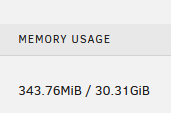
Forget it, I missread the line memory usage. My bad.
-
question again: Maybe I did not see it, but is it possible to change the size of the LXC? 30GB is a little bit of an overkill for my puporse.
