





recreational-regulation8230
Members
-
Joined
-
Last visited
Everything posted by recreational-regulation8230
-
Yea temp should be in 20s when i look at the bios. Thanks for all your help but will just forget about this, will keep an eye on this thread in case someone comes up with another idea. Bye
-
is this correct

-
seems to look the same with drop down, did press detect drivers.
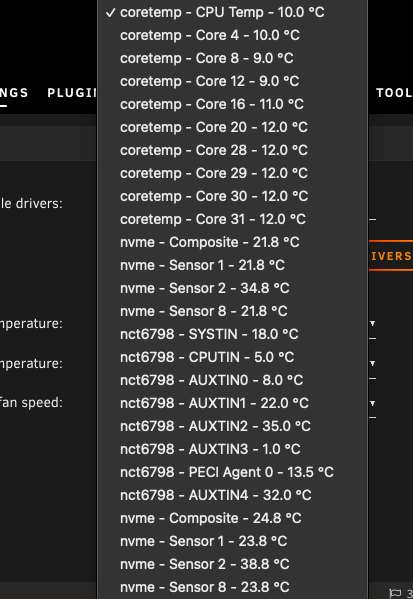
-
I am new to unraid having come from synology, so still learning. So far i am impressed just seems to be a-lot of fiddling about like this :). The forums are very good with people like yourself who are available to help. rebooting now but i dont have high hopes this will work.
-
ok i did not reboot and done the above included a screenshot, now i will reboot
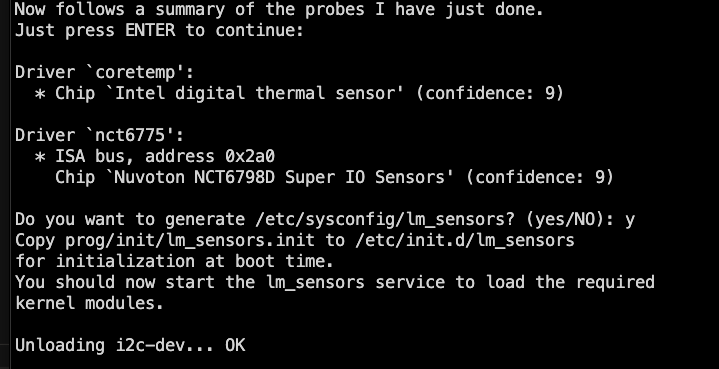
-
ok this is the screenshot
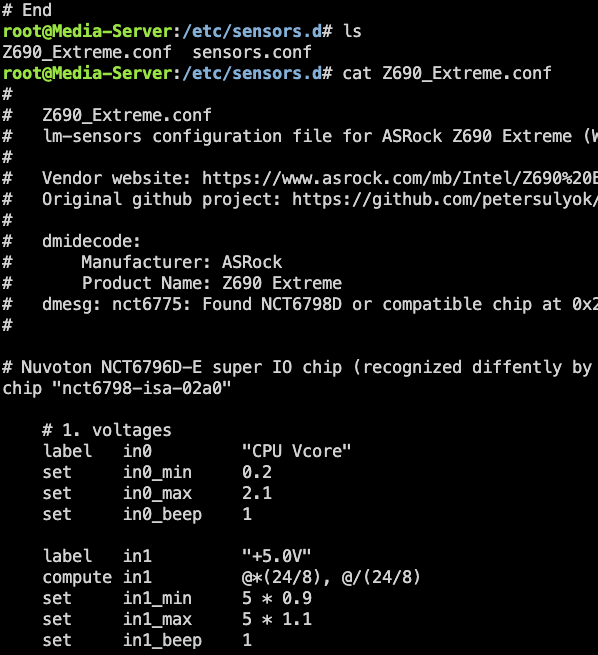
-
is the above correct shall i keep goingThank you for all your time with this, i appreciate it.
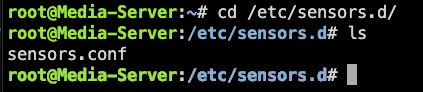 chmod: cannot access 'Z690_Extreme.conf': No such file or directorystill the sameJust tried to start again but when i enter this command i get the following: rm Z690_Extreme.conf rm: cannot remove 'Z690_Extreme.conf': No such file or directorysorry not understand, i entered the above in terminal and go the below chmod --reference=sensors.conf Z690_Extreme.conf chmod: failed to get attributes of 'sensors.conf': No such file or directoryyes i did that firstHi again, done the above and did the sensors detect also: coretemp-isa-0000 Adapter: ISA adapter MB Temp: +21.0°C (high = +80.0°C, crit = +100.0°C) Core 0: +20.0°C (high = +80.0°C, crit = +100.0°C) Core 4: +14.0°C (high = +80.0°C, crit = +100.0°C) Core 8: +19.0°C (high = +80.0°C, crit = +100.0°C) Core 12: +16.0°C (high = +80.0°C, crit = +100.0°C) Core 16: +17.0°C (high = +80.0°C, crit = +100.0°C) Core 20: +21.0°C (high = +80.0°C, crit = +100.0°C) Core 28: +17.0°C (high = +80.0°C, crit = +100.0°C) CPU Temp: +17.0°C (high = +80.0°C, crit = +100.0°C) Core 30: +17.0°C (high = +80.0°C, crit = +100.0°C) Core 31: +17.0°C (high = +80.0°C, crit = +100.0°C) nvme-pci-0100 Adapter: PCI adapter Composite: +20.9°C (low = -0.1°C, high = +84.8°C) (crit = +94.8°C) Sensor 1: +20.9°C (low = -273.1°C, high = +65261.8°C) Sensor 2: +31.9°C (low = -273.1°C, high = +65261.8°C) Sensor 8: +20.9°C (low = -273.1°C, high = +65261.8°C) nct6798-isa-02a0 Adapter: ISA adapter in0: 1.17 V (min = +0.00 V, max = +1.74 V) in1: 1.67 V (min = +0.00 V, max = +0.00 V) ALARM in2: 3.44 V (min = +0.00 V, max = +0.00 V) ALARM in3: 3.33 V (min = +0.00 V, max = +0.00 V) ALARM in4: 1000.00 mV (min = +0.00 V, max = +0.00 V) ALARM in5: 896.00 mV (min = +0.00 V, max = +0.00 V) in6: 1.34 V (min = +0.00 V, max = +0.00 V) ALARM in7: 3.44 V (min = +0.00 V, max = +0.00 V) ALARM in8: 3.23 V (min = +0.00 V, max = +0.00 V) ALARM in9: 1.06 V (min = +0.00 V, max = +0.00 V) ALARM in10: 1.06 V (min = +0.00 V, max = +0.00 V) ALARM in11: 832.00 mV (min = +0.00 V, max = +0.00 V) ALARM in12: 1.02 V (min = +0.00 V, max = +0.00 V) ALARM in13: 488.00 mV (min = +0.00 V, max = +0.00 V) ALARM in14: 1.51 V (min = +0.00 V, max = +0.00 V) ALARM Array Fan: 477 RPM (min = 0 RPM) SYSTIN: +18.0°C (high = +80.0°C, hyst = +75.0°C) (crit = +100.0°C) sensor = thermistor CPUTIN: +6.0°C (high = +127.0°C, hyst = +110.0°C) (crit = +100.0°C) sensor = thermistor AUXTIN0: +8.0°C (high = +80.0°C, hyst = +75.0°C) (crit = +100.0°C) sensor = thermistor AUXTIN1: +23.0°C (high = +80.0°C, hyst = +75.0°C) (crit = +100.0°C) sensor = thermistor AUXTIN2: +35.0°C (high = +80.0°C, hyst = +75.0°C) (crit = +100.0°C) sensor = thermistor AUXTIN3: -1.0°C (high = +80.0°C, hyst = +75.0°C) (crit = +100.0°C) sensor = thermistor PECI Agent 0: +18.0°C (high = +80.0°C, hyst = +75.0°C) AUXTIN4: +31.0°C (high = +80.0°C, hyst = +75.0°C) (crit = +100.0°C) intrusion0: ALARM intrusion1: ALARM beep_enable: disabled nvme-pci-0200 Adapter: PCI adapter Composite: +23.9°C (low = -0.1°C, high = +84.8°C) (crit = +94.8°C) Sensor 1: +23.9°C (low = -273.1°C, high = +65261.8°C) Sensor 2: +34.9°C (low = -273.1°C, high = +65261.8°C) Sensor 8: +23.9°C (low = -273.1°C, high = +65261.8°C) The drop down in system temp settings seems to be no different.As an update, i watched awhile ago a spaceinvaderone on youtube, he used the same motherboard i have, just a different cpu above mine. Be interested to know if he got it working, no idea how to get in touch.Intel Core i5 12600K coretemp-isa-0000 Adapter: ISA adapter MB Temp: +12.0°C (high = +80.0°C, crit = +100.0°C) Core 0: +8.0°C (high = +80.0°C, crit = +100.0°C) Core 4: +8.0°C (high = +80.0°C, crit = +100.0°C) Core 8: +5.0°C (high = +80.0°C, crit = +100.0°C) Core 12: +7.0°C (high = +80.0°C, crit = +100.0°C) Core 16: +8.0°C (high = +80.0°C, crit = +100.0°C) Core 20: +9.0°C (high = +80.0°C, crit = +100.0°C) Core 28: +11.0°C (high = +80.0°C, crit = +100.0°C) Core 29: +11.0°C (high = +80.0°C, crit = +100.0°C) Core 30: +11.0°C (high = +80.0°C, crit = +100.0°C) CPU Temp: +11.0°C (high = +80.0°C, crit = +100.0°C) nvme-pci-0100 Adapter: PCI adapter Composite: +18.9°C (low = -0.1°C, high = +84.8°C) (crit = +94.8°C) Sensor 1: +18.9°C (low = -273.1°C, high = +65261.8°C) Sensor 2: +32.9°C (low = -273.1°C, high = +65261.8°C) Sensor 8: +18.9°C (low = -273.1°C, high = +65261.8°C) nct6798-isa-02a0 Adapter: ISA adapter in0: 736.00 mV (min = +0.00 V, max = +1.74 V) in1: 1.67 V (min = +0.00 V, max = +0.00 V) ALARM in2: 3.44 V (min = +0.00 V, max = +0.00 V) ALARM in3: 3.34 V (min = +0.00 V, max = +0.00 V) ALARM in4: 1000.00 mV (min = +0.00 V, max = +0.00 V) ALARM in5: 896.00 mV (min = +0.00 V, max = +0.00 V) in6: 1.34 V (min = +0.00 V, max = +0.00 V) ALARM in7: 3.44 V (min = +0.00 V, max = +0.00 V) ALARM in8: 3.23 V (min = +0.00 V, max = +0.00 V) ALARM in9: 1.06 V (min = +0.00 V, max = +0.00 V) ALARM in10: 1.06 V (min = +0.00 V, max = +0.00 V) ALARM in11: 832.00 mV (min = +0.00 V, max = +0.00 V) ALARM in12: 1.02 V (min = +0.00 V, max = +0.00 V) ALARM in13: 488.00 mV (min = +0.00 V, max = +0.00 V) ALARM in14: 1.52 V (min = +0.00 V, max = +0.00 V) ALARM Array Fan: 385 RPM (min = 0 RPM) SYSTIN: +17.0°C (high = +80.0°C, hyst = +75.0°C) (crit = +100.0°C) sensor = thermistor CPUTIN: +3.0°C (high = +127.0°C, hyst = +110.0°C) (crit = +100.0°C) sensor = thermistor AUXTIN0: +8.0°C (high = +80.0°C, hyst = +75.0°C) (crit = +100.0°C) sensor = thermistor AUXTIN1: +23.0°C (high = +80.0°C, hyst = +75.0°C) (crit = +100.0°C) sensor = thermistor AUXTIN2: +35.0°C (high = +80.0°C, hyst = +75.0°C) (crit = +100.0°C) sensor = thermistor AUXTIN3: -1.0°C (high = +80.0°C, hyst = +75.0°C) (crit = +100.0°C) sensor = thermistor PECI Agent 0: +12.5°C (high = +80.0°C, hyst = +75.0°C) AUXTIN4: +32.0°C (high = +80.0°C, hyst = +75.0°C) (crit = +100.0°C) intrusion0: ALARM intrusion1: ALARM beep_enable: disabled nvme-pci-0200 Adapter: PCI adapter Composite: +21.9°C (low = -0.1°C, high = +84.8°C) (crit = +94.8°C) Sensor 1: +21.9°C (low = -273.1°C, high = +65261.8°C) Sensor 2: +33.9°C (low = -273.1°C, high = +65261.8°C) Sensor 8: +21.9°C (low = -273.1°C, high = +65261.8°C)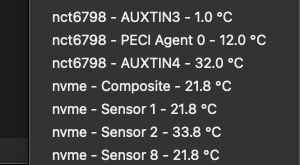
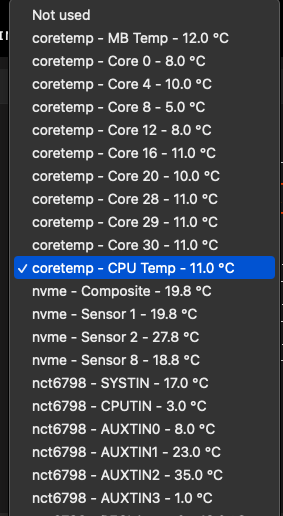 googling comes up with: The nct6775 driver is associated with the Nuvoton NCT6798D Super IO Sensors chip, which is used on ASRock Z690 Extreme motherboards to control temperature sensors. The temp7 sensor is specifically mapped to the CPU temperature in the lm-sensors configuration. i have no sensor 7 on the drop down listnearly every sensor is between 10-12c seems low to me ok not doing anythingThank you for your help but how do you find which sensor to use?just done the sensors detect again: Driver `nct6775': * ISA bus, address 0x2a0 Chip `Nuvoton NCT6798D Super IO Sensors' (confidence: 9) Do you want to generate /etc/sysconfig/lm_sensors? (yes/NO): y Copy prog/init/lm_sensors.init to /etc/init.d/lm_sensors for initialization at boot time. You should now start the lm_sensors service to load the required kernel modules. Unloading i2c-dev... OK so how to start sensor or just a reboot do that.


Account
Navigation
Search
Configure browser push notifications
Chrome (Android)
- Tap the lock icon next to the address bar.
- Tap Permissions → Notifications.
- Adjust your preference.
Chrome (Desktop)
- Click the padlock icon in the address bar.
- Select Site settings.
- Find Notifications and adjust your preference.
Safari (iOS 16.4+)
- Ensure the site is installed via Add to Home Screen.
- Open Settings App → Notifications.
- Find your app name and adjust your preference.
Safari (macOS)
- Go to Safari → Preferences.
- Click the Websites tab.
- Select Notifications in the sidebar.
- Find this website and adjust your preference.
Edge (Android)
- Tap the lock icon next to the address bar.
- Tap Permissions.
- Find Notifications and adjust your preference.
Edge (Desktop)
- Click the padlock icon in the address bar.
- Click Permissions for this site.
- Find Notifications and adjust your preference.
Firefox (Android)
- Go to Settings → Site permissions.
- Tap Notifications.
- Find this site in the list and adjust your preference.
Firefox (Desktop)
- Open Firefox Settings.
- Search for Notifications.
- Find this site in the list and adjust your preference.