




Skip to content
View in the app

A better way to browse. Learn more.

Unraid

A full-screen app on your home screen with push notifications, badges and more.

To install this app on iOS and iPadOS
  1. Tap the Share icon in Safari
  2. Scroll the menu and tap Add to Home Screen.
  3. Tap Add in the top-right corner.
To install this app on Android
  1. Tap the 3-dot menu (⋮) in the top-right corner of the browser.
  2. Tap Add to Home screen or Install app.
  3. Confirm by tapping Install.

enlarged-telegraph8407

Members
  • Joined

  • Last visited

Everything posted by enlarged-telegraph8407

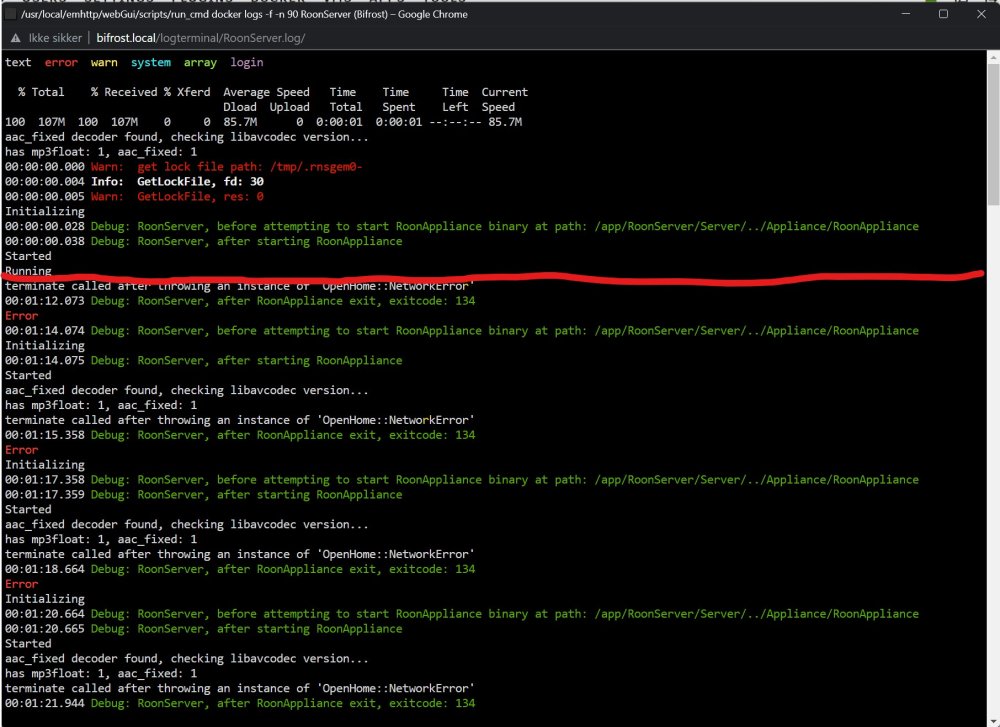
  1. Hi guys. Having a huge problem here. I installed the docker as per the guide. Then followed up with connecting to the new server in the Roon software on my Windows laptop. It found it right away and asked for my login. I did that, and then nothing really happened. Roon just times out and report a network error. Looking at the logs, something defenitely is wrong. Looking above the red line, is after I installed the docker, but before I logged in in the Roon program. Below the red line is after I log in. As you see, it just start looping the same 10 or so lines again and again. What the hell is wrong here?
Account

Navigation

Search

Search

Configure browser push notifications

Chrome (Android)
  1. Tap the lock icon next to the address bar.
  2. Tap Permissions → Notifications.
  3. Adjust your preference.
Chrome (Desktop)
  1. Click the padlock icon in the address bar.
  2. Select Site settings.
  3. Find Notifications and adjust your preference.