




-
just booted into safe mode now. had a deeper look into the logs and i think it might be the nut plugin. Its showing as unhealthy so its initiating the shutdown. Il try to remove that for now, even though my nut server should be up.. Jun 27 17:03:55 VIENNA plugin-manager: nut-dw.plg installed Jun 27 17:03:55 VIENNA upsmon[9362]: UPS [email protected]: forced shutdown in progress Jun 27 17:03:55 VIENNA upsmon[9362]: Too few UPS(es) are healthy (0<1), initiating forced shutdown Jun 27 17:03:55 VIENNA upsmon[9362]: Executing automatic power-fail shutdown Jun 27 17:03:55 VIENNA upsmon[9362]: Auto logout and shutdown proceeding
-
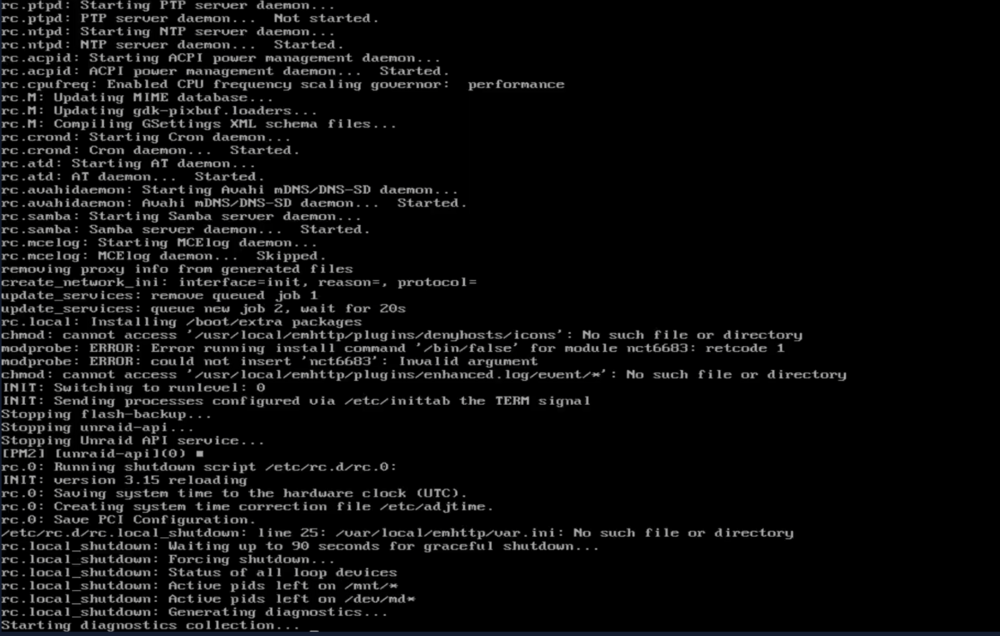
Something happened on my unraid server this afternoon and I cant seem to get around it. The JetKVM stopped responding and I could not see what happened when I lost access. I also had to force shutdown as it wasnt responding to the power button. When I booted it again with the KVM active and working. I saw that it was just shutting down again and collecting diagnostics. Is this a USB flash drive corruption/issue? Thank you for any advice on some direction. Ive had no issues as bad as this before. Attached are the generated diagnostics. Jun 27 17:04:04 VIENNA rc.local_shutdown: Generating diagnostics... Jun 27 17:04:04 VIENNA webgui: curl error: Failed to connect to localhost over /var/run/nginx.socket after 0 ms: Could not connect to server endpoint: diagnostics Jun 27 17:04:04 VIENNA publish: curl to diagnostics failed Jun 27 17:04:04 VIENNA webgui: curl error: Failed to connect to localhost over /var/run/nginx.socket after 0 ms: Could not connect to server endpoint: diagnostics Jun 27 17:04:04 VIENNA publish: curl to diagnostics failed Jun 27 17:04:04 VIENNA root: Fix Common Problems Version 2026.05.16 Jun 27 17:04:53 VIENNA root: Fix Common Problems: Other Warning: Array is not started Jun 27 17:04:53 VIENNA root: Fix Common Problems: Error: Unable to communicate with GitHub.com Jun 27 17:04:53 VIENNA root: Fix Common Problems: Other Warning: Could not check for blacklisted plugins Jun 27 17:04:54 VIENNA root: Fix Common Problems: Warning: Blank TLD Jun 27 17:04:54 VIENNA root: Fix Common Problems: Other Warning: Could not perform unknown plugins installed checks Jun 27 17:04:54 VIENNA webgui: curl error: Failed to connect to localhost over /var/run/nginx.socket after 0 ms: Could not connect to server endpoint: diagnostics Jun 27 17:04:54 VIENNA publish: curl to diagnostics failed tower-diagnostics-20260627-1708.zip tower-diagnostics-20260627-1704.zip
-
Just upgraded yesterday and started having issues with my gitea actions/runner. Looks related to Docker 29.5.1. Maybe I should go on to 7.3.0 with Docker 29.4.3 included. Runner breaks when using docker 29.5.1 Fix is in Docker 29.5.2

View in the app
A better way to browse. Learn more.
