aquariuz23
Members
-
Joined
-
Last visited
Everything posted by aquariuz23
-
Bump. Anyone?
-
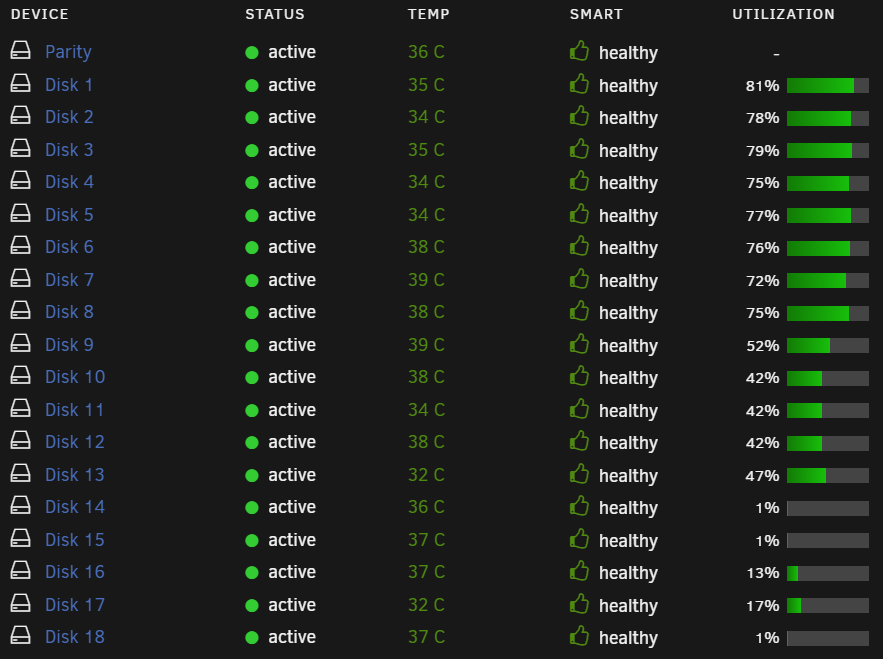
Hello again. Bumping this back up. So I noticed that today a few changes happened to the array. Now with a point of reference from my previous screenshot, I can see that Disk 1 utilization dropped by 1% down to 81%, and Disk 3 also dropped by 1% down to 79%. Disk 13 went up by 2% to 47%. Now I'm not sure if some files were moved to Disk 13 from the other two disks. I also failed to mention previously that I set up the Warning disk utilization threshold percentage on all my drives at 88.
-
I can't seem to find anything private I should be concerned about, but please let me know if I should remove something and reupload. magi-unraid-diagnostics-20231024-1044.zip
-
Thanks for your reply itimpi. Let me provide the diagnostics for you to view. Anything I should do with the zip file, such as remove any private info that it might collect? I see that there's an "anonymize diagnostic" option, but I'm not sure if I should remove anything specific.
-
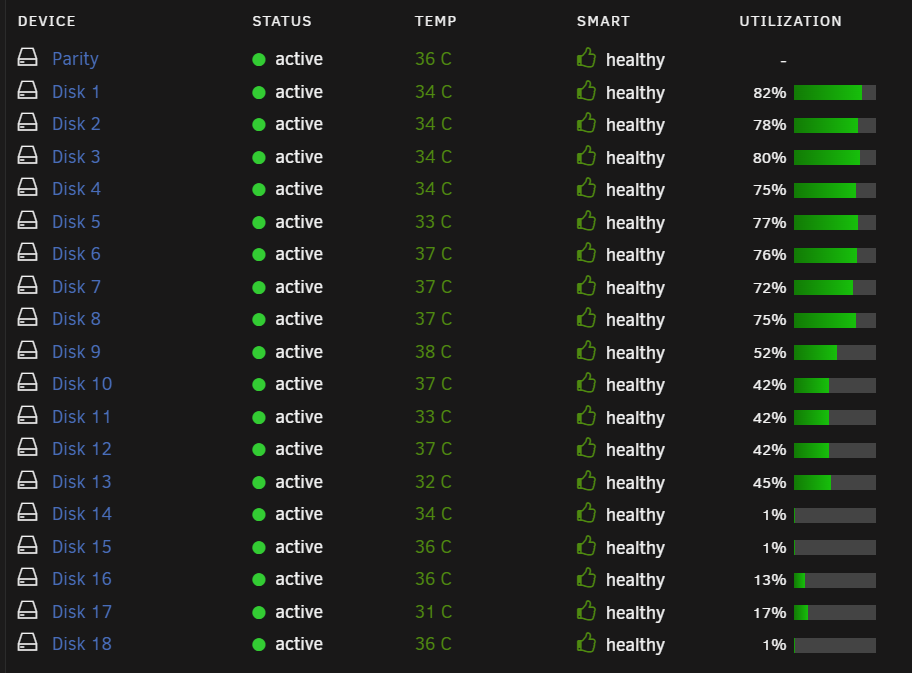
Hello all, Good day to you. I'm very new to the Unraid world, no more than a few months in, and this is the first unraid setup I've cobbled up together. I have a question that potentially is a silly one but hopefully it is just a silly question and not a concern I should be worried about. First off, a bit of context. I migrated over from Windows to Unraid, and so I already had all these files ahead of time. Once I got my Unraid Server up and running, I transferred all the files over to Unraid in large chunks, enough to fill one or two drives in the array simultaneously. The array consists of 18 drives and my main concern is regarding Disk 1. When I started this array, Disk 1 was pegged at 88% before Unraid cascaded the files down to the next drive and so on. However, as time goes by, the utilization on Disk 1 continues to drop, and currently it is at 82%. I don't really pay attention to the rest of the Disks' utilization, but I won't be surprised if they go up since I constantly add files to the array as well. My question is, does Unraid continue to move files around the array to spread the load, or does it fill up a single drive to its maximum before cascading down to the next drive? I understand that the process behind the array is pretty complicated so a detailed explanation isn't necessary. I'm just concerned that something is happening to my files in Disk 1 that I might not be aware of. I haven't been alerted to any lost of files, but I do have a lot of files, so I may not notice it yet. I don't, to the best of my knowledge, have any special setting or plugin enabled to continuously load balance the array, but I may be wrong. Thank you up front for any advice or insight provided