





raj_v
Members
-
Joined
-
Last visited
-
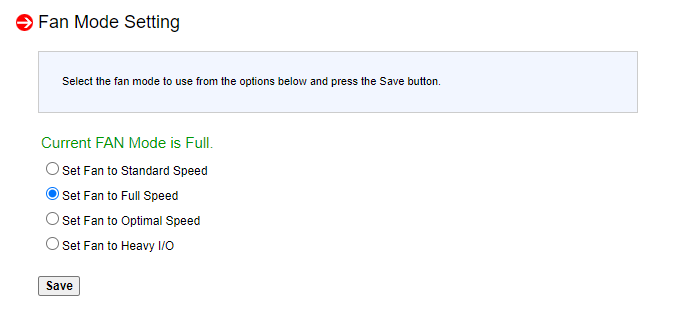
Here is what my IPMI WebUI looks like: This is what my UnRAID IPMI Tool settings page looks like. IPMI.cfg IPMISELD="enable" IPMIPOLL="180" NETWORK="enable" LOCAL="disable" IPADDR="192.168.X.XXX" USER="XXXXXX" PASSWORD="XXXXXXX" DISP_SENSOR1="0" DISP_SENSOR2="0" LOADCFG="enable" IGNORE="" DIGNORE="" DASH="enable" DEVIGNORE="" DEVS="enable" OVERRIDE="enable" OBOARD="" OCOUNT="0" OMODEL="9" IPMILAN="LAN" fan.cfg FANCONTROL="enable" FANPOLL="6" FANIP="192.168.X.XXX" HDDPOLL="18" HDDIGNORE="" HARDDRIVES="enable" Board.json is blank
-
HI All, Many thanks to everyone for sharing your valuable insights. I have a SuperMicro X9DR3-F MoBo which I bought as a replacement to my bricked Asus MoBo. I have been trying to get IPMI Tool work to get the fan control ability, and have not been able to do so. When I open the settings page of the tool, I can see that it auto-detects my board as ASRock when it is a SuperMicro. I suspect this could be the reason it is not detecting my fans. Any insights of how this could be solved. Also, is there a good guide on how to set fan control on SuperMicro X9DR3-F boards? Note: IPMI WebUI gives me only 4 options - Standard, Full, Optimal and Heavy I/O. Many thanks guys for trying to help me here.
