





Greenbandent
Members
-
Joined
-
Last visited
Everything posted by Greenbandent
-
Sorry for the delay, this did turn out to be the issue, I ended up getting a case with a backplane after testing and now the issue is fully gone and seems to be working without issues.
-
I've ran into this online a couple times but a bunch of these mention it's related to the drives being shucked from external drives. All mine should be ultra stars but I think one I did get from Amazon referb so that could be the issue. I'll order some tape and test and report back
-
Interestingly enough... if I use the Sata cables from the new Power supply, I drop a couple drives. if I use the Molex to sata power they show up. which at the moment i'm a tad lost on
-
Hi everyone, another dumb one from me but I have been battling some strange disk power up issues or disk responding in time to be read in Unraid. Previous setup I had a total of nine (9) drive two 14tb Parity 2 - 14 tb data and 5 - 6tb drives. I i also have a nvme drive for cache 1tb and a 500gb misc drive for various tasks and vdisks. I also have a P2200 and 8 fans Every time I reboot one of my drives doesn't come up. I played around a ton with different configurations on how to get it working from swapping cables to molex to sata power, new power supply and still cant seem to figure out why I cant use my 850W power supply and get all my drives to come up. if I use my PS I have (this is new, I had a 750W before) some times even in the configuration I have it currently if I reboot it doesnt always have all the disks, which makes it a bit annoying if I'm doing anything and want to reboot (i'm probably rebooting more often than most) but hoping that someone might be able to help guide me and find the dang problem. I should also say I have replaced the following since it started... Power supply, Mobo, CPU, Mini-sas to sata cables, sata cables, and also removed two of the 9 drives to see if it would help. any thoughts would be appreciated
-
after upgrade I am unable to edit VM's with the Linux icon (Penguin) the others i've tried seem to work fine so not 100% whats going on. I've rebuilt the vm with a couple icons and it works and rebuilt with the same icon and wont work. I've tried to see if I could provide logs however, it seems like the icon link for the drop down menu is just broken.
-
yeah, he was for sure right. After doing a USB swap it broke again after the Array started. While I don't recall actually enabling this one of my other Linux VM's was getting this passed to it. I removed this and it then started working. I am a bit mad about using a USB migration to find this but at this point it is what it is. just going to make sure to do regular backups of this USB
-
Thanks everyone for helping! I'm not sure when this happened, as I really don't recall making this change, but last night, I made a USB and moved it over to it. After the Array started, it broke again, so I started looking and found that one of my VMs was, in fact, passing this over. So, I'm the issue here.* I'm also not 100% sure why after I swapped the CPU, this happened. either way, thanks again.
-
@Veah So yes here is the screenshot. it does looks like the USBs work fine in the trail at least basic like that.
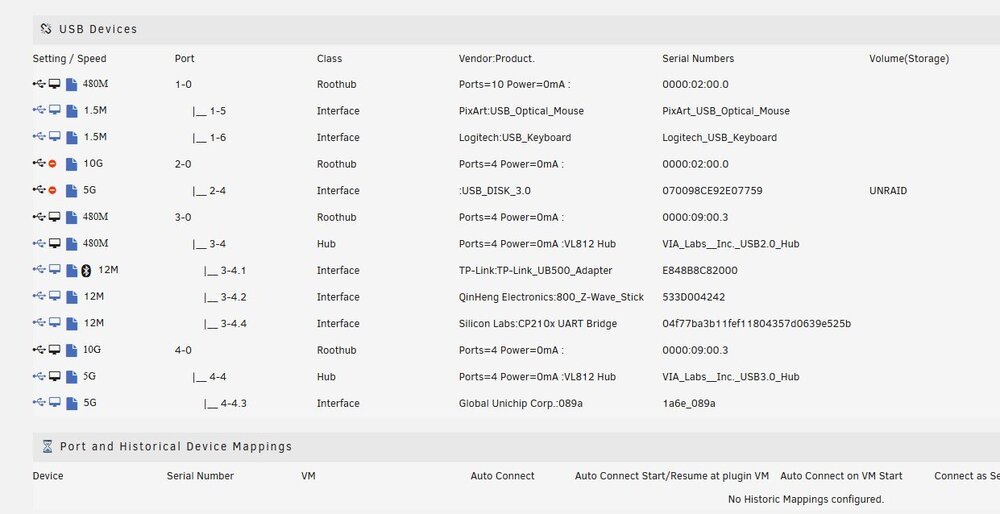
-
not specifically the controller no, I only need three of the USBs passed to HA
-
ah, this is a great idea! I'll do this here shortly to see what I can see and keep you posted.
-
thanks @SimonF! not 100% what i'm looking at but does look like it does some removed things, here is the output if you wouldn't mind validating. Currently for this I'm looking at the TP-Link_UB500 as I have that in a 3.0 for testing this (HA doesn't need this for too much in the house right now) Dec 16 14:54:09 Tower usb_manager: Info: rc.usb_manager Building Connected Status Dec 16 14:54:32 Tower usb_manager: Info: rc.usb_manager vm_action Ubuntu prepare begin - Dec 16 14:54:32 Tower usb_manager: Info: rc.usb_manager Reset Connected Status Dec 16 14:54:32 Tower usb_manager: Info: rc.usb_manager usb_remove Linux_6.1.118-Unraid_xhci-hcd_xHCI_Host_Controller_0000:09:00.3 /dev/bus/usb/004/001 004 001 Dec 16 14:54:32 Tower usb_manager: Info: rc.usb_manager usb_remove _TP-Link_UB500_Adapter_E848B8C82000 /dev/bus/usb/003/002 003 002 Dec 16 14:54:32 Tower usb_manager: Info: rc.usb_manager Device Match 003/002 vm: 003 002 Dec 16 14:54:32 Tower usb_manager: Info: rc.usb_manager Device Match 004/001 vm: 004 001 Dec 16 14:54:32 Tower usb_manager: Info: rc.usb_manager Removed 003/002 vm: nostate 003 002 Dec 16 14:54:32 Tower usb_manager: Info: rc.usb_manager Removed 004/001 vm: nostate 004 001 Dec 16 14:54:32 Tower usb_manager: Starting usbip config check... Dec 16 14:54:32 Tower usb_manager: Info: rc.usb_manager usb_remove Linux_6.1.118-Unraid_xhci-hcd_xHCI_Host_Controller_0000:09:00.3 /dev/bus/usb/003/001 003 001 Dec 16 14:54:32 Tower usb_manager: Info: rc.usb_manager Device Match 003/001 vm: 003 001 Dec 16 14:54:32 Tower usb_manager: Info: rc.usb_manager Removed 003/001 vm: nostate 003 001 Dec 16 14:54:32 Tower usb_manager: info: Loading kernel module usbip_host Dec 16 14:54:32 Tower usb_manager: info: Loading kernel module vhci_hcd Dec 16 14:54:32 Tower usb_manager: Info: rc.usb_manager usb_add Linux_6.1.118-Unraid_vhci_hcd_USB_IP_Virtual_Host_Controller_vhci_hcd.0 /dev/bus/usb/004/001 004 001 Dec 16 14:54:32 Tower usb_manager: Info: rc.usb_manager usb_add Linux_6.1.118-Unraid_vhci_hcd_USB_IP_Virtual_Host_Controller_vhci_hcd.0 /dev/bus/usb/003/001 003 001 Dec 16 14:54:33 Tower usb_manager: Info: rc.usb_manager Autoconnect No Mapping found Linux_6.1.118-Unraid_vhci_hcd_USB_IP_Virtual_Host_Controller_vhci_hcd.0 /dev/bus/usb/004/001 004 001 port usb4 Dec 16 14:54:33 Tower usb_manager: Info: rc.usb_manager Autoconnect No Mapping found Linux_6.1.118-Unraid_vhci_hcd_USB_IP_Virtual_Host_Controller_vhci_hcd.0 /dev/bus/usb/003/001 003 001 port usb3
-
I've seen a couple of threads on various forums about the possibility of USB might be trying to map to a used port. I've not been able to really figure out yet what they're referring to. but I think I do see a potential issue Bus 004 Device 001: ID 1d6b:0003 Linux Foundation 3.0 root hub - HERE Bus 003 Device 001: ID 1d6b:0002 Linux Foundation 2.0 root hub - HERE Bus 002 Device 002: ID 13fe:6300 Kingston Technology Company Inc. SP Mobile C31 (64GB) Bus 002 Device 001: ID 1d6b:0003 Linux Foundation 3.0 root hub - HERE Bus 001 Device 004: ID 046d:c31c Logitech, Inc. Keyboard K120 Bus 001 Device 007: ID 10c4:ea60 Silicon Labs CP210x UART Bridge Bus 001 Device 006: ID 18d1:9302 Google Inc. Bus 001 Device 005: ID 1a86:55d4 QinHeng Electronics 800 Z-Wave Stick Bus 001 Device 003: ID 2109:2812 VIA Labs, Inc. VL812 Hub Bus 001 Device 002: ID 0461:4e22 Primax Electronics, Ltd Dell Mouse, 2 Buttons, Modell: MS111-P Bus 001 Device 001: ID 1d6b:0002 Linux Foundation 2.0 root hub - HERE I think I jumped the gun here, looking at other threads this appears normal.
-
update: I decided to boot into a ubuntu USB and test the USB ports, and they all work. can use any of the ports on the back IO without issue also further info, on reboot if I jump into the USB tab from the USB manager, I see the devices plugged in for 5ish seconds then they disappear.
-
I've reseated RAM and pulled CMOS to also test, unfortunately no go. Another weird thing Is all the ports work in Bios its only when Unraid finishing booting up they stop working. almost like some driver issue
-
no worries, I was just hoping I was overlooking something, since I put like 8 hours in yesterday on the server I was hoping I was too close and missing something. so not challenging it at all just general curiosity. As for the USB damage, I'd think unlikely. the installation went smoothly with no issues, but it is an electronic from Amazon so it very well could be defective to some extent. reseating RAM is a good idea, I'll try that and might try to reset the CPU at the same time to make sure nothing weird is going on.
-
Ah, okay. I had to stop it this morning to make a couple of Bios changes for another option, but I did re-kick off a new one. I'm just curious why you think power might be an issue. From what I could see online, the TDP for the 1700x was 95W, and the 5700x is 65W. so I wouldn't have thought this could trigger all of a sudden due to power. I will say when I first dropped the CPU in and fired the server back up I did get a bunch of errors, one of which was a USB error, however, I think it was due to it being plugged into the back, it would fire up the OS then lose connection to the USB or it would say it was corrupted. after moving it to the front IO tho, everything mostly started working without issue. the rest resolved when moving the USB's to 2.0 ports.
-
I can try this a bit later this morning to see if I get any differences, I made some USB changes in the bios before getting off to work and it made no difference XHCI hand off was set to enabled, I disabled this. I also set the use legacy USB settings to Auto, both seem to have made no difference.
-
so been running for about 30 minutes no with no issues, would there be something specific to look for?
-
while I don't want to say no... I will start one to see if it causes any issues. I have a 750 in the server, but have been wanting to upgrade that as well.
-
Yeah, actually this was something I figured out when posting this. so those work then all my IO on the top of my case which is a USB2.0 and USB3.0
-
also another little fun fact that I just found. it seems to be only USB3.0 ports
-
Thanks Veah, I just did this again as hoping something would give but still no luck.
-
Hi all, I'm hoping someone can help me out here as I feel like i've lost it. I decided to upgrade the CPU in my server, going from a 1700x to a 5700x. after doing so I've had various issues with some that have fixed others not. the last big issue I have is that it seems that some of my USBs just wont recognize any more after this upgrade. further seems to be also an issue with using USBs on the back I/O ports on the server. someone please save me.... tower-diagnostics-20241215-1554.zip
-
Thanks again for the Help, server has been up for a 4 days, 21 hours, 30 minutes which feels like a new record at this point. annoyed at myself for not re-checking this after BIOS update.
-
Well good news, so far at 24 hours we have no reboots/lockups. I'll report back here on Monday to mark that as the answer if I dont have any additional issues. Does look good now tho. Thanks Again JorgeB

