





bohaman
Members
-
Joined
-
Last visited
Everything posted by bohaman
-
Hello, I am running into problem where my transfer speed doesn't get full speed after for about 30 seconds or so. I've tried to resolve it by some other post by disabling bond and bridge and connect directly from unraid 10gbe but it seems the problem still persist. I've attached my diagnostic log as well. tower-diagnostics-20231008-0936.zip
-
Hello, I am running into another problem and I hope I can get some guidance from someone. Issue: Handbreak froze encoding process everytime I am transfering files via SMB share drives from unraid. What I have tried: I looked CPU pinning and limited handbreak to only using certain cores and it worked as I see only cores I pinned handbreak uses. However when I tried to do files transfer via unraid SMB share drives the CPU dropped back down, handbreak stopped working. After the files transfer completed, handbreak start again and all the pinned cpu ran again. My system is currently E5-2687W v4 and leave 4 cpu cores unchecked from pinning but unraid still pause handbreak and resume after files transfer. I've looked up on google and found that I can set cpu priority for docker container so I tried --cpu-shares=10240 in the extra parimeters for handbreak container but it still doesn't give prioritize for handbreak. I've also looked up cpu isolation but that only applicable to VM only? Thank you all for your time.
-
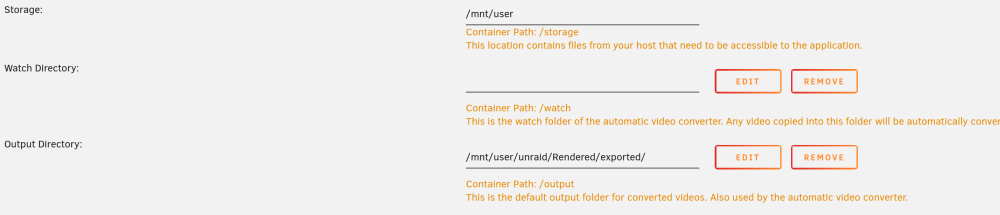
I apologize for my unclear question. I'm not sure what to provide. I have shares smb with log-in and password. I can access it via windows PC. I was hoping to allow handbreak running unraid as a docker container to export its transcoded files to the already "shared" folder smb so I don't have to transfer it over to access it from my PC after handbreak finished. The transcode taking place source is from "input folder" which is shared via SMB. I copy files from my PC and put it there. Then in handbreak I chose the input folder (which unraid can access). However when I sent export destination to and choose my output folder shared via SMB it doesn't have permission. The transcoding happining within Unraid server as handbreak is running as a docker container. However I think even though the allowed destination for me to export the file default is "output" in handbreak. I went to the setting and change the default destination to my SMB shared drives and I think it worked. I am not sure how, but I think it worked. Thank you for all of your help.
-
Hello, I am new to unraid and I hope if someone could help guide me to the right direction. When I tried to output unraid to my SMB share it said that I don't have permission to read or write. May I ask if anyone can guide me on how to add permission to unraid so that it can output converted files to my SMB share drives? If it is not possible, may I ask on how do I share the output files from handbrake transcoded files so that I can access on my PC? Thank you so much for your time.
