





eicar
Members
-
Joined
-
Last visited
Everything posted by eicar
-
Problem is that this is an industrial motherboard, so it's probably going to be hard to find one at a reseller. They usually order these in bulk for corporate clients, and it's not a given that you can always get one as an individual customer. 🤞
-
Currently, this looks like my favorite, but I'll wait for comments and reviews. I probably won't buy my server parts anyway until early 2024.
-
The RTX 4070 is an x16 card, so you would not be able to use the second CPU-direct PCIe 5.0 slot. This means you'd have to run the 10G NIC via the PCH using one of the two PCIe 4.0 x4 slots. On paper, this would leave you with 4 lanes of PCIe 4.0 on the chipset, or 8 lanes of PCIe 3.0, until you've saturated the DMI. However, even if you use a 10G PCIe 4.0 x4 NIC, e.g. the one by OWC, the actual bandwidth used by a 10G connection will be below one lane of PCIe 4.0. So that would leave you with enough expansion options before reaching a DMI bottleneck. (IMHO.)
-
In a home server setting, the NIC will usually be the bottleneck. (Case in point: I plan to have a RAIDz1 storage pool with seven SATA SSDs, but I'll only have a dual SFP+ NIC. I would have to upgrade to a 25G SFP28 network, but that's in the future.) But putting that aside, the Intel W680 chipset is definitely able to handle all of that, namely 12 lanes of PCIe 4.0, and 16 lanes of PCIe 3.0: https://ark.intel.com/content/www/us/en/ark/products/218834/intel-w680-chipset.html (This obviously includes almost everything you see on the board: SATA, USB, networking, the gen3 M.2 slot etc.) But there's always another potential bottleneck, namely the DMI, which in our case can handle data throughput of "only" 126 Gb/s = 15.754 GB/s between chipset and CPU, which corresponds to eight lanes of PCIe 4.0. And that's where you'd have to start calculating. One thing is easy: if you populate both PCIe 4.0 x4 slots on the ASRock with (for example) one gen4 M.2 NVMe SSD each, you will already have saturated the DMI. So it's always better to handle the important stuff via the CPU-direct slots, e.g. a NIC (x8), or a PCX-bifurcated dual or quad gen4 M.2 SSD carrier card, or something like the Broadcom HBA 9500-8i for two additional gen4 M.2 SSDs. As for the DMI, looking at it from the PCIe 4.0 vantage point, eight SATA SSDs would need 2 lanes, the gen3 M.2 SSD would need another two, which would leave you with 4 lanes, or 8 lanes of PCIe 3.0, or 16 lanes of PCIe 2.0, which is still enough for lots of SATA HBAs, the occasional USB connection etc. As for virtualization & IOMMU groups? Sorry, can't say. (Couldn't find anything either.)
-
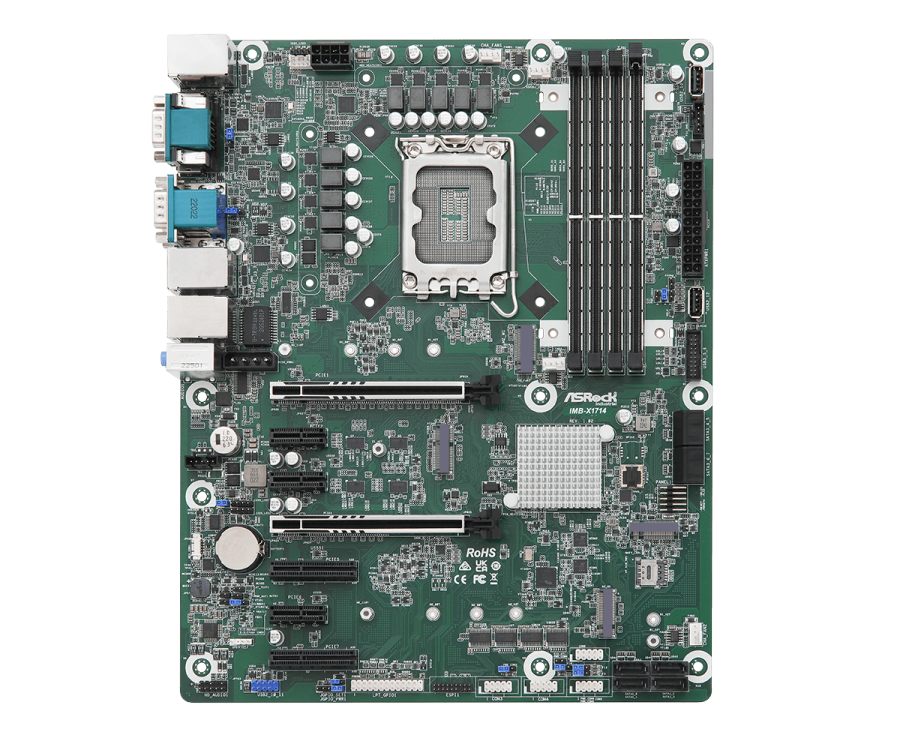
fyi… comparing the Asus Pro WS 680-ACE (IPMI) and the new ASRock Industrial IMB-X1714: https://forums.unraid.net/topic/145312-asrock-industrial-imb-x1714-atx-intel-w680/
-
It's x16/NA or x8/x8 for the two gen5 slots, i.e. if you run 16 lanes in slot 1, the second gen5 slot cannot be used. However, you still have PCIe 4.0 x4 left, which is used by the CPU-direct M.2 slot.
-
One of the mobos on my list for an Unraid server is the Asus Pro WS 680-ACE IPMI for 12th & 13th generation Intel Core CPUs. (We have a topic on that here.) But I just found out about the new IMB-X1714 by ASRock Industrial: https://www.asrockind.com/en-gb/IMB-X1714 …and it kinda looks like it's a little better for building your own server. What do you think? Here's a quick comparison, but also see my question regarding the SIM card at the end of this post. Price: I haven't found a lot on the ASRock yet, but it seems that it would be about 150 to 200 USD|EUR cheaper than the Asus Network: the Asus has 2 x 2.5GbE ports, the ASRock has three, one of them with PoE IPMI: only Asus offers an IPMI model (for a few dozen bucks more), so with the ASRock you'd need to set up your own KVM solution, e.g. with a TinyPilot Voyager 2a Security: both have support for discrete TPM, while the ASRock also has onboard Intel PTT Chipset & RAM: both use the Intel W680, both support DDR5 ECC memory, the Asus up to 192 GB, but the ASRock only up to 128 GB… maybe 192 GB will be possible after a future upgrade PCI Express (general): the Asus has five PCIe slots, while the ASRock has the full seven for an ATX build, i.e. it's a lot more versatile for building or expanding your server PCIe x16: both have 2 x 5.0 x16 (x16/NA or x8/x8), while the ASRock also supports a dual x8 riser for the primary x16 slot PCIe x4: the Asus has 2 x 3.0 x4 (in x16), while the ASRock has 2 x 4.0 x4 (open slots); note: see M.2 storage (PCH) below PCIe x1: the Asus has one 3.0 x1, while the ASRock has three (open slots) M.2 PCIe NVMe storage (CPU-direct): both have one gen4 x4 M.2 slot M.2 PCIe NVMe storage (via PCH): the Asus has two gen4 x4 M.2 slots, while the ASRock has only one gen3 x4, but this allows the ASRock more versatility with regard to PCIe expansion, specifically with the two PCIe 4.0 x4 slots Nota bene: the gen3 M.2 slot on the ASRock with 3.938 GB/s would imho be A-OK for an Unraid application cache, even if you use SATA SSDs instead of HDDs for your storage, or for a dedicated unassigned volume for macOS Time Machine backups SATA storage: the Asus has four plug&play SATA ports and support for four more using the 4i SlimSAS connector (which can also be used in PCIe 4.0 x4 mode), i.e. you'll need a pricey adapter cable, while the ASRock has eight plug&play SATA connectors at no extra cost M.2 Key E: both have one slot for WiFi/Bluetooth (PCIe 3.0 x1), which you can use with an adapter card for two more SATA ports M.2 Key B: only the ASRock has such a slot (PCIe 3.0 x1), with a SIM card adapter built-in; note: see below Video/Audio: both have DP + HDMI + VGA plus audio I/O (5 x audio on the Asus, 3 x audio on the ASRock) External COM ports: the Asus has none, while the ASRock has two (RS-232/422/485); note the ASRock also has a lot of internal RS232 COM headers USB rear I/O: the Asus has one Type C 3.2gen2 and one Type A 3.2gen2 plus four Type A 3.2gen1 and two Type A 2.0, while the ASRock has one Type C 3.2gen2x2 and five Type A 3.2gen2, i.e. no USB 3.2gen1 or USB 2.0 ports, only 3.2gen2 Internal USB Type A ports: the Asus has none, while the ASRock has two internal USB 2.0 Type A connectors, i.e. it can also be used for TrueNAS with two mirrored thumb drives for boot/system, or for Unraid with one boot drive and one dummy array drive, if you only want a ZFS storage pool USB headers (2 ports each): both have one 3.2gen1 header, but the Asus has two 2.0 headers, while the ASRock has only one (pitch header) Internal USB connector: the Asus has one 3.2gen2x2 connector with support for Type C, while the ASRock has none; note: its 3.2gen2x2 is already present as a rear I/O port (Type C) Fan connectors etc.: both have one CPU fan header and three 4-pin chassis fan headers, but the Asus has two additional 4-pin headers (optional CPU fan and water pump) Other internal connectors/headers: both have Thunderbolt etc. Question about SIM cards: I haven't looked into this at all, especially with regard to Unraid, but maybe you could use a SIM card as a fallback WAN, in case your copper/fibre WAN is down, i.e. you will always be able to connect to your server. For normal operation, you could use it to send server notifications using SMS, or maybe use the mobile carrier time to create a local NTP server. (?) However, I don't know if all of that is possible with Unraid.
-
I just watched the Unraid on ZimaBoard video by @SpaceInvaderOne here… and there is also a topic in this forum. Very nice indeed, and maybe it's possible to build a fairly big NAS with several drives using the PCIe slot on the side. At any rate, I immediately remembered the LattePanda Sigma. Since there don't seem to be any topics on this device here, only one for the older LattePanda Delta, I figured I could open one: The LattePanda Sigma does not come with any traditional SATA ports—the ZimaBoard has two built in—, but I think it can be expanded to at least 10 (ten!) SATA ports with adapters converters on the underside of the device: 6 ports via e.g. the 10Gtek M.2 M key to 6xSATA adapter —> PCIe 3.0 x4 M.2 slot (#14) 2 ports via e.g. the IO Crest M.2 B+M key to 2xSATA expansion card —> PCIe 3.0 x1 M.2 B key slot (#13) 2 ports via e.g. the IO Crest M.2 M.2 NGFF A+E key to 2xSATA expansion card —> PCIe 3.0 x1 M.2 E key slot (#16) You would obviously lose WiFi/Bluetooth expandability by occupying the E key slot, but maybe there's also an M.2 M key to 7- or 8-port SATA adapter… then you wouldn't need the E key slot. At any rate, this would still leave one PCIe 4.0 M.2 slot for a fast cache drive. And like so often, the network interface would become the bottleneck (2 x 2.5GbE). 😉 Now, this sounds crazy, and maybe it is. One obvious downside is that the board only has one SATA power header. So you'd not only need a 10-bay SATA enclosure for the drives, but an external power supply to power these 10 drives. So in the end, this would be way more expensive than a solution using the ZimaBoard, and you might probably also save money building a server/NAS on your own instead of expanding a LattePanda Sigma. In any case: would anyone know how to solve the latter two issues? (SATA power supply + enclosure?) PS: it is a bit weird that the Sigma only comes with only 16GB or 32GB of RAM. The processor (Intel Core i5-1340P) supports up to 64GB. Maybe it's because of the form factor? Or the type of RAM used? DDR5 vs DDR4?
-
But when looking at the board view of the Pro WS W680M-ACE SE, the x16 slot isn't at the edge of the board, and a card in the x4 slot might be in the way, i.e. you might need an additional PCIe 4.0 x16 extension cable. And furthermore, I'm not sure if the splitter/riser by C-Payne has the right orientation. The fixing plate with the two x8 slots might end up flipped upside down, so I don't know if this specific splitter would work. Maybe you need two more x16 risers for the right angle. Seems hackier by the minute. 😉
-
Found it… this is the one I was looking at for my potential low-power build using either mATX or Deep Mini-ITX: https://c-payne.com/products/pcie-gen4-gen5-bifurcation-adpater-fpc-cable-x8x8-1w-1u-55mm
-
Addendum: the splitters above are PCIe 3.0, it seems. So it would need to be gen4 compatible too.
-
It's a riser/splitter combo, e.g. this one: http://www.ameri-rack.com/ARC2-PELY423-C7_m.html But there are a couple more on the market. But I would buy one that matches the board's bifurcation (potential) settings. EDIT: and you should check the breakout cable length… should be sufficiently long to go over the board to the side.
-
For the ATX form factor, setting the bifurcation manually is possible in BIOS: x16 —> x8/x8, by default set to auto. Maybe manual bifurcation is possible for the mATX form factor too? Then you could just add a passive x16 to dual x8 PCIe splitter/riser (with a cable, so you can place it next to the board). If the x16 slot on the mATX can't be bifurcated, however, this would only be possible with an active splitter, and those cost a lot of money. 😕
-
I'm still learning, too. Off the top of my head: The L2ARC (level 2 adaptive replacement cache) is kind of an extension of the default ARC, which is the ZFS read cache that resides in memory, in your case the 32GB, I assume. (Basically it's a mirror of the primary data on your storage pool or any other Unraid volume/pool that is accessed most often.) Obviously, for an L2ARC to make any sense, it would need to be significantly faster than your main storage pool (and have better random read IOPS), but a gen4 M.2 SSD vs. even a SATA SSD RAID should definitely suffice… a gen3 M.2 SSD would probably only work for a SATA HDD RAID. (You'd have to calculate if gen3 read speeds would exceed your storage pool read speeds.) The size of the L2ARC should be at least 5 times as big as the maximum that your system will allocate to the standard ARC. Afaik the latter is currently capped at 50% of available RAM on Linux, which is a bummer, so it's not really as "adaptive" as on *BSD, e.g. on TrueNAS Core, but this might change in a future Linux/ZFS update. So if you have 128 GB of RAM, the maximum size of your ARC, assuming a later update to account for (let's say) 90% of RAM or more, would be about 115GB, meaning your L2ARC should be about 500GB. Since it's hard to find a fast gen4 SSD with 500GB, a 1TB M.2 SSD is probably the right choice. If your ARC is full or sized down as part of its "adaptive" scheme, ARC data is written out to the L2ARC. Then, if a client requests a file, the system first looks in RAM (ARC), then on the M.2 cache SSD (L2ARC), then on the slower storage volumes or other cache volumes. Nota bene: internet says that an L2ARC is useless & should be avoided in case you have less than 32 GB of RAM. Whether your system needs an L2ARC is another question: if you're only streaming videos & music in Plex or Emby, you don't need it. The L2ARC is usually meant for random reads of lots of data in the same dataset by many users. Then it can really shine, even if you have loads of RAM. But in home server systems, it can be useful for metadata and auxiliary data used by applications, e.g. in their UI. This is a setting that can be applied to the L2ARC at initialization, if I remember correctly. As for Unraid, the L2ARC is not yet implemented really, let alone the metadata-only feature. (To my knowledge there is a workaround to get the L2ARC to work in its basic form.) But it seems that it will be implemented at some point. I still think it could be a nice companion to an M.2 SSD that's used by Unraid as a cache for application data, e.g. for Docker containers, because the L2ARC would cover the data on those cache volumes too. Regarding the Asus board: it definitely has enough gen4 M.2 slots to use for many cache or scratch drives. Almost like a dream come true. 😉 EDIT: I would put the L2ARC in the Asus board's CPU-direct gen4 M.2 slot, because it's a deep cache for the file system, different from e.g. Unraid's app data cache, which is (to my knowledge) more like a software/library cache. I would rather not want the system to access the L2ARC through the PCH.
-
Thank you. That would answer part of the question. With Paragon's extFS for Mac, I'd be able to erase/format the drive before adding it to the server. The other part of the question is, how the backup task would work with alternating drives. Those drives would have different IDs, I assume, so does that mean that I would need to create two backup tasks? Meaning that Unraid will run only ever one of the two tasks depending on which HDD is currently mounted via the UD plugin?
-
My plan is to use SATA SSDs for my main storage pool (ZFS/RAIDz1), and run a regular auto-backup job (clone, not incremental) to a large enough hotswap HDD used as a standalone unassigned drive, i.e. I don't want to use an attached USB hard drive for my on-site backup. I want to format the destination drive as ext4, so in case there's a hardware failure with the server/NAS, I would still be able to access my data on a Mac using the Paragon Linux FS drivers. (Afaik OpenZFS isn't stable enough on macOS.) The HDD would be in a hotswap bay, so I could use alternating HDDs, with one always stored safely off-site. Is this possible?
-
Yes, the CPU direct lanes are x16 at 5.0 + x4 at 4.0 or x8/x8 + x4, which is perfect for a NIC, a storage AIC/HBA, and a gen4 M.2 SSD cache, e.g. for a metadata-only L2ARC. (I'd put the Unraid application data cache on a gen4 PCH M.2 slot… if you really need both, which I'm still not sure about; see my topic here.) It looks like all of the relevant CPUs in Intel's gen 12 & 13 have those 20 lanes, even the G6900 Celeron and the Pentium G7400. (Those were on my list for a more power-efficient build, but the PCH would be inferior, so I'd lack expansion options… and I would in principle be able to reduce power consumption of a 13th gen Core i5 too, maybe even get it down close to the Pentium.) A side-note/question regarding this: This might be a false memory, but I might have read somewhere that using a cache SSD via the PCH, which also handles the SATA RAID storage pool, can lead to internal bottlenecks, if the PCH isn't powerful enough. This would relate to read or write operations within the PCH, internally routed from the RAID pool to a cache drive or vice versa. I don't know if this true, but if it is, it would probably be wiser for me to use additional cache drives via the second CPU-direct x8 slot with a carrier card or Slim SAS HBA. PS: yes, I'd love to have those diagrams too… SuperMicro does a great job in this respect.
-
Those are really good suggestions/information against the tray models. Thank you. I had planned to tweak the board & CPU in BIOS anyway to bring power down. Lots of stuff that's possible: disable virtualization (don't need VMs), disable hyper-threading & turbo-boost etc. Not sure what I'll do in the end, but on my Intel MacBook Pro I even disable some cores, too, when I'm away from wall power for longer. Good to know that you can also tweak using an Unraid plugin. 👍 As for the board, the main topic of this thread: I have looked at a lot of potential other builds, but in the end it always seems to come down to the board's chipset and the DMI. Putting aside the NIC, that's where the bottlenecks would occur, maybe not immediately in build stage #1, but when (on paper) I started adding (for example) PCIe M.2 SSDs or other components, and started calculating, the W680 (and 12th/13th gen CPUs) always seemed to look best to me in terms of future expansion. (And the ATX form factor was always plug-and-play; with smaller boards that only have one x16 CPU PCIe slot, I'd need a dual x8 riser/splitter for a future upgrade, e.g. with an additional x8 HBA. Here's looking at you, Broadcom HBA 9500-8i. 😉) I just wish that Asus would include a Slim SAS to 4xSATA cable. Ever since the Asustor FlashStor came out this year, I have also looked at a future-proof MB, one that you could (in principle) use for an all-gen3-M.2 server/NAS. With this board, you can. With the right setup, you could run your server/NAS storage pool on seven gen3 or five gen4 M.2 SSDs with (afaict) little to no speed restrictions. (But if I understand this correctly, for a gen3 build, you'd need a PCIe 4.0 x8 card that supplies 16 lanes to attach four gen3 M.2 SSDs.) At any rate, the Pro WS W680-ACE always looked damn great to me. Then all I'd need is a dual 100G fibre network. Ah, 💩. 😆 ❓➡️ But jumping off from the idea of an all-M.2 build, I have a more general question about the PCH and the DMI, since I'm still quite new to all this: the DMI has 8 lanes at PCIe 4.0 speed. Does that mean you can get a theoretical throughput corresponding to 16 lanes at PCIe 3.0 speed, if (for example) you're only using gen3 M.2 SSDs via the PCH? In other words: does the chipset "translate" or "bundle" the data stream for the DMI? Or does 8 lanes on the DMI mean a maximum of 8 lanes that the PCH can use for its components at any give time, whether gen3 or gen4?
-
Thank you. I would in fact have a lot of Docker containers, probably a dozen, maybe more, a maximum of 7 users, but probably not more than 4 simultaneously… no VMs or build server etc. planned, though. So I guess the i5-13600T should be the better choice for me: ECC support, too, slightly higher base clocks than the i9, but a good value.
-
This is one of the MBs that is on my list. Looks like an awesome board. Would any of you recommend the Core i9-13900T (35W TDP) with this board for Unraid? N.B.: my gen4 alternative with older hardware would be the Asus P12R-E with a Xeon E-2324G (65W TDP).
-
I bought the SwissBit SFUI032GJ1AE2TO-I-LT-2AP-STD, which is a 32GB pSLC NAND eUSB drive that goes directly into the 10-pin USB header. Peace of mind. I'll use this 9-pin male to Type A male adapter cable to attach it to my Mac for Unraid installation.
-
Thank you for the quick reply. I do plan on using quite a lot of Docker containers, but no VMs—I'm even thinking about disabling Intel Virtualization via BIOS to save power. 😉 Your answer kinda supports my gut feeling that (at least with enough RAM) ZFS already has a good amount of ARC as read cache, so you can probably do without an L2ARC, while a fast gen4 M.2 SSD would be a good option for Unraid application data.
-
Hello, first post this, and great to be here. I finally settled on Unraid for my home server/NAS system. I don't have hardware yet, because there are still some issues that need to be resolved, some of which I hope to resolve in this forum. This is the first one. I plan on going all-in with a 7 x SATA SSD RAIDZ pool, with one disk worth of parity, so this would already be quite fast… fast enough (on paper) for my stage #1 NIC solution (dual SFP+) to be a bottleneck. Almost all of the motherboards I've looked at offer an option to add at least one gen4 M.2 SSD, either directly, or via OCuLink or SlimSAS or PCIe 4.0 slot (carrier card) etc., which would be even faster than the ZFS RAID, i.e. future-proof for a later NIC upgrade to SFP28, so my question is, whether an Unraid setup that uses ZFS and RAIDZ would need both an L2ARC (metadata-only!) and a dedicated M.2 SSD for the traditional Unraid cache, e.g. for application data/metadata. Would two caches be a reasonable option, or be redundant? Nota bene: I know that ZFS is still fairly new in Unraid (stable), and I faintly remember reading that enabling L2ARC currently isn't possible yet in the UI, so I don't know if enough of you have even tried this.


