





pedro1989
Members
-
Joined
-
Last visited
Everything posted by pedro1989
-
Thanks everyone for your help so far. I have another strange observation. Because Zigbee2MQTT was also one of my suspects (recently upgrade to v2.0.0), I decided to keep it turned off. Now 14 hours later, the server is still online without any issues. I checked the logs of Zigbee2MQTT, but couldn't find any errors which could be related to out of resources, problems with memory or whatever (only rows with 'info:'). It seems to be coincidence, or can anyone relate it to this?
-
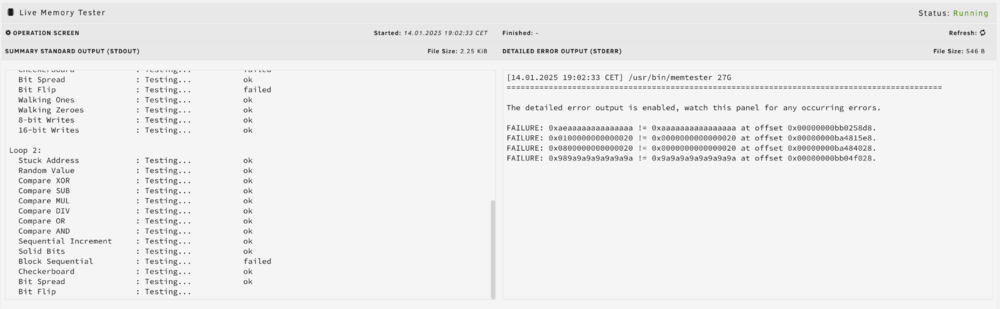
OK I started a new test until now the following errors occur: Does this mean the memory is damaged or can it also be a software issue? Sorry for probably stupid questions, but I don't have any experience with these kind of problems
-
I've started the memtest this afternoon, until now no errors. I will run it longer, but I do not expect it is a memory issue. I didn't have any problems before upgrading to v7.0.0. Can I do something else as well?
-
Hello everyone, This weekend, I did the upgrade to 7.0.0 (from 6.12.14) and it seemed to go well. I got the message 'Wrong pool State. Too many wrong or missing devices', but fixed it as described by using the 'Remove Pool' function (because I do not have a separate drive for a 'cache' pool, only have an 'Array' drive). The server runs smooth without any issues, however after a couple of hours the user interface is no longer available. Also the Docker containers no longer work (e.g. my Home Assistant is no longer available, and the Zigbee2MQTT devices also not). I need to do a hard reset of the server (by holding the Power Button until it is powered off). After I boot again, the server runs smooth, but again after a couple of hours I get the same issue. I don't know how to find the cause, I scrolled through the 'syslog-previous', but cannot find the cause. Can someone help to solve / identify the issue? I didn't have any issues with 6.12.14 so it seemed to be related to the upgrade to 7.0.0. Thank you for your help. See attached the complete Diagnostics zip file. sw-main-diagnostics-20250113-1942.zip
-
I did the upgrade to 7.0.0 (from 6.12.14) and it seemed to go well. I got the message 'Wrong pool State. Too many wrong or missing devices', but fixed it as described by using the 'Remove Pool' function (because I do not have a separate drive for a 'cache' pool, only have an 'Array' drive). The server runs smooth without any issues, however after a couple of hours the user interface is no longer available. Also the Docker containers no longer work (e.g. my Home Assistant is no longer available, and the Zigbee2MQTT devices also not). I need to do a hard reset of the server (by holding the Power Button until it is powered off). After I boot again, the server runs smooth, but again after a couple of hours I get the same issue. I don't know how to find the cause, I scrolled to the 'syslog-previous' (see attached), but cannot find the cause. Can someone help to solve / identify the issue? I didn't have any issues with 6.12.14 so it seemed to be related to the upgrade to 7.0.0. Thank you for your help. syslog-previous.txt
