





Alkalyne
Members
-
Joined
-
Last visited
Everything posted by Alkalyne
-
This way it should work, if it doesn't maybe check force install otherwise it will not work since it will say "plugin: not reinstalling same version" And you can't uninstall buggy version of the plugin either because it will faill Only way is to force install and it should echo : ---Prometheus Node Exporter found, continuing!--- ---Starting Prometheus smartctl Exporter--- @ich777 I edited my file following your recommandations
-
I fixed it, see the pull request : https://github.com/ich777/unraid-prometheus_smartctl_exporter/pull/3
-
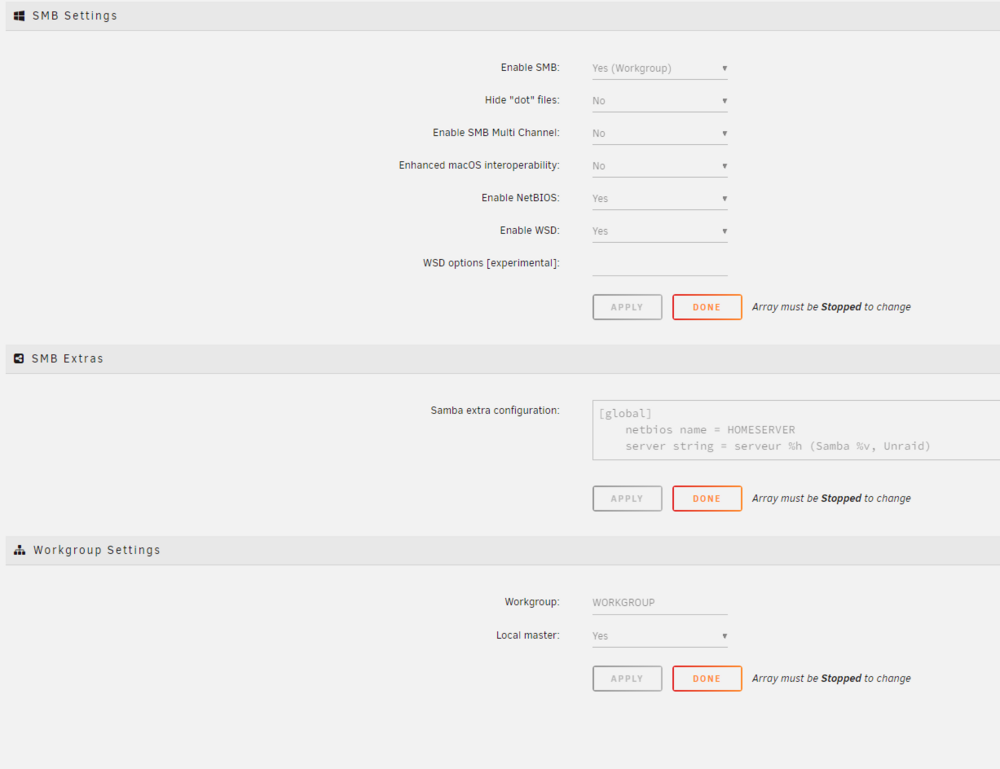
@dwffls I had the problem, I'm not sure the setting browseable = yes in global settings is safe since it should be a per share specific setting ? I checked on my phone and the SMB share was showing with an IP address instead of the netbios name, despite the fact I enabled it (NetBios) and the server had the name "homeserver" in settings. Since other visible SMB shares had Uppercase name I decided to set it manually in SMB settings with Uppercase name also (don't know if that matter) I also disabled Enhanced macOS interoperability, I restarted and it worked, so I don't know if it was because of the macOS interoperability or UPPERCASE netbios name. Here is my extra samba config (you can check the whole config in my screenshot) [global] netbios name = HOMESERVER server string = serveur %h (Samba %v, Unraid)
-
I had this problem, deleting /array/user/appdata/palworld/steamapps/appmanifest_2394010.acf Solve the problem (it was Palworld in my example)

