






XTA
Members
-
Joined
-
Last visited
-
Hi! Same "Recycle Bin Total Size: ?" issue here regardless of what I do, however not errors related to itthat I can see/fin the logs. Mar 8 14:30:42 i9 ool www[552368]: /usr/local/emhttp/plugins/recycle.bin/scripts/rc.recycle.bin 'restart' Mar 8 14:30:42 i9 recycle.bin: Stopping Recycle Bin Mar 8 14:30:44 i9 recycle.bin: Starting Recycle Bin .Recycle.Bin exits (and or is recreated after I delete it when empty) and deleted files via SMB end up inside it as seemengly usual, including emptying it. It just seems to not able to, at least, display the size of it AND it is not showing below (in the Share section) a link to see/access the files in there. i9-diagnostics-20250308-1435.zip

-
Ohhh yes, I completely forgot about this. indeed, the cache drive is nvme, the mobo is an aorus master z390 with an i9 9900k, makes sense now, i completely forgot about that and to put 2 and 2 together, thanks! In any case, the hba sata card works very well so far, nice to know i could still add 2 more drives (would have to move the nvme drive to another m.2 slot)
-
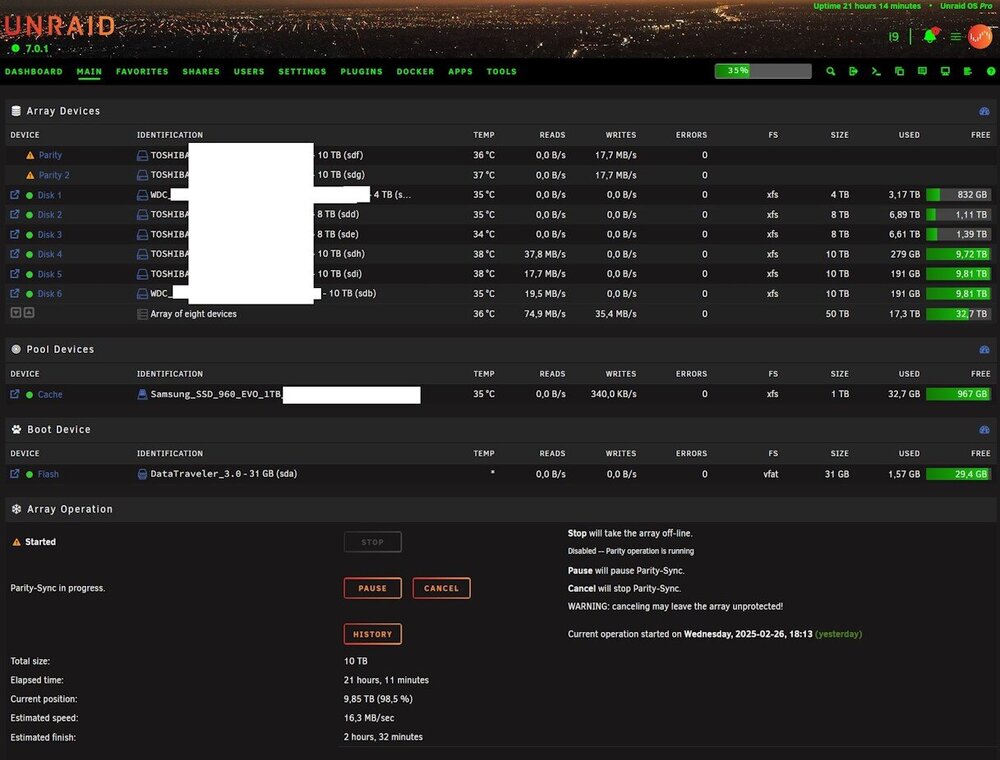
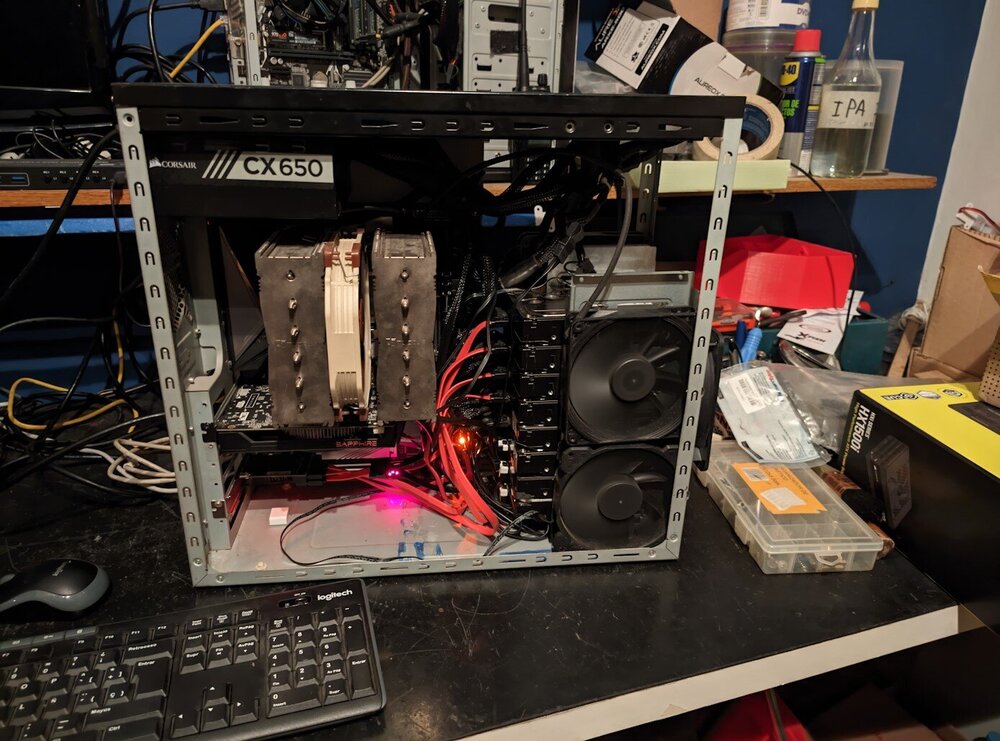
Thanks! It was a long journey (more on that later) but In short, i ended up adding thle hba card (more on this later) and the disks and uses tools > new config, moved the 1 parity drive to storage and put 2 new ones as parity and add the other 2 as storage, formated the 3 new ones on the array and started the array. Parity sync is almost done now 😄. In all, this was the answer/steps I was looking for. In the meantime I analyzed and concluded zfs was not the best for me. About the case, the one on the pic the cage for the drives could not hold more than 4, so after much looking around in the local market, bought one used for cheap, hdd cage had space for 9 hdds. when it arrived and tried to move the mobo i realized that despite fitting (it was atx after all) there were no holes nor reasonable space to route the sata cables from the 90º angled sata connectors of the mobo... so i took out the cages of both and swapped them. of course nothing is as straightforward. Lets say I drilled the rivets and took the cages out. Ok, so i have no screws/bolts to fix the 9 hdd cage on my case, and I realized the time came for me to buy rivets and the tool, another day passed. in all the little monster ended up looking like that of course nothing is as straightforward, for some reason my last 2 (out of 69 sata ports of my aorus master z390 didn't detect the 2 new disks (not in bios, not in unraid) while the 2 connected to the humble ASM1064 based hba card were detected (not in bios) in unraid. So I ended up using all 4 ports of the card and just as a precaution, disabled those 2 sata ports in the bios.
-
Hi bmartino1 Thank you for taking the time and effort to help. > I would recommend making a zfs raid z1 pool The disks in the array currently are in xfs, I'd have to read and learn what this implies (pros and cons of each fs). > as you begin to move data off disks I'm just adding disks, not removing. Unless something fails, I think I'll be replacing (swapping the 4tb one for a bigger one) in 1 or 2 years time in the future, at least that's my current panorama. Iin any case your reply makes me realize this is between a bit and a lot over my head, I'll study in detail the videos you linked before I can make a reply (probably with some questions) that make sense, because I'm not understanding why I should ditch the array nor what a "tank" is in this context. But the point I wanted to make was I'm just adding disks and keep the array more or less the way it currenty is (alas, just swapping the 1 parity drive to storage and replacing it with 2 new ones) so all 3 (the other 2 new ones and the ex-poaraity one, into the array as storage). Kind regards
-
XTA changed their profile photo
-
Hi! I'm a newbie still. I have been running unraid for less than a year. I have a modest set up. Current array in my Unraid v7.0.0 (ignoring the 1tb nvme cache drive) is: 1 x 10 TB parity (WDC) 2 x 8 TB storage (Toshiba N300) 1 x 4TB storage (WDC Black) I bought 4 10TB Toshiba disks, and I'd like to arrange the array so it ends up as follows 2 x 10 TB parity (new Toshiba N300) 3 x 10 TB storage (the old WDC one + 2 new Toshiba N300) 1 x 4TB storage (WDC Black, no change here) What is the best route to do this while ensuring the data I have on the disks is reasonable safe (I can accept the risk of running for a little while without parity if that saves considerable amount of time). I also understand the empty disks have to be pre-cleared (and that takes time like redoing parity more or less) and in the end, the parity will have to be rebuilt, so i'd like that to happen only once, I'd pressume at the very end as the last step. But in any case, I'll heed your advise Thanks!




