





impenetrable-aviator2287
Members
-
Joined
-
Last visited
Everything posted by impenetrable-aviator2287
-
It's not restarting the array. It's saying there is no fs. So was hoping to clear the fault and hopefully rebuild from the two that faulted enough to get by before replacing them as well to rebuild.
-
It looks like another drive faulted while rebuilding. Might be hosed. Is there a way to bring one of the faulted drives back online?
-
No signs of mechanical issue. Bad luck for sure. The errors stopped about 40 min ago and haven't gone up since. The speed has drasitcally increased on the resilvering as well. I'm going to replace those drives as well just incase. I'm thinking about rebuilding that array to have 2 vdevs of 6 and mirror them.
-
New diags fileserver-diagnostics-20250228-0853.zip
-
Thanks @JorgeB. It's doing it's thing now however I'm getting a ton of "Warning [FILESERVER] - offline uncorrectable" from the other disks now that had no signs of issues.
-
So the last time I stopped the array and unassigned the failing disks and assigned new ones the GUI said that there was no file system. And question about offlining the disk. If I do that and I can't get the new disks to rebuild, can I bring it back in to start the array?
-
New diags, should show faulted disks now fileserver-diagnostics-20250228-0655.zip
-
root@Fileserver:~# zpool import no pools available to import root@Fileserver:~# zpool status pool: docker_vms state: ONLINE config: NAME STATE READ WRITE CKSUM docker_vms ONLINE 0 0 0 mirror-0 ONLINE 0 0 0 nvme1n1p1 ONLINE 0 0 0 nvme2n1p1 ONLINE 0 0 0 errors: No known data errors pool: main_array state: ONLINE status: One or more devices are faulted in response to persistent errors. Sufficient replicas exist for the pool to continue functioning in a degraded state. action: Replace the faulted device, or use 'zpool clear' to mark the device repaired. config: NAME STATE READ WRITE CKSUM main_array ONLINE 0 0 0 raidz2-0 ONLINE 0 0 0 sdb1 FAULTED 658 578 0 too many errors sdc1 ONLINE 0 0 0 sdd1 FAULTED 101 141 0 too many errors sde1 ONLINE 0 0 0 sdk1 ONLINE 0 0 0 sdl1 ONLINE 0 0 0 sdm1 ONLINE 0 0 0 sdn1 ONLINE 0 0 0 sdo1 ONLINE 0 0 0 sdp1 ONLINE 0 0 0 sdq1 ONLINE 0 0 0 sdr1 ONLINE 0 0 0 cache nvme0n1 ONLINE 0 0 0 errors: No known data errors Looks like 2 I need to swap now.
-
Hello I have a failing disk and I woud like to replace it with a spare. I stopped the array and selected it in the place of the old disk I'd like to replace and when I started the array it said there was no file system. I used RAIDZ2 for this array. Any help would greatly be appreciated! fileserver-diagnostics-20250227-2047.zip
-
@JorgeBThank you sir! That did the trick. That's what I was confused about when you said to remove the pool, recreate and don't create subpools. So including the subpools into the total number of disks was the answer I was searching for. Thanks again! Now that we know the spares never worked, if a disk were to fail, I'm assuming I'd just assign that spare manually where the failed disk is?
-
Ok, I'll run through this. I was asking if that's what I needed to do initially with the 13 disks vs 12. I'll give you an update shortly.
-
Here is without importing it via CLI after starting the array. However, I can't access my shares until I import and restart the array. fileserver-diagnostics-20241213-1106.zip
-
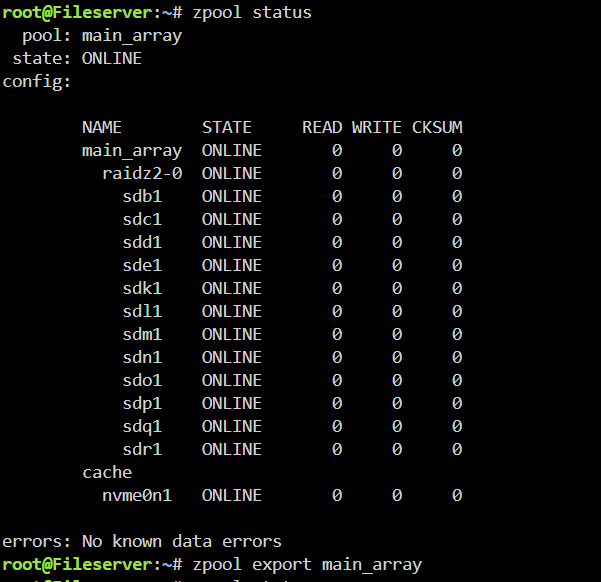
root@Fileserver:~# zpool status pool: main_array state: ONLINE config: NAME STATE READ WRITE CKSUM main_array ONLINE 0 0 0 raidz2-0 ONLINE 0 0 0 sdb1 ONLINE 0 0 0 sdc1 ONLINE 0 0 0 sdd1 ONLINE 0 0 0 sde1 ONLINE 0 0 0 sdk1 ONLINE 0 0 0 sdl1 ONLINE 0 0 0 sdm1 ONLINE 0 0 0 sdn1 ONLINE 0 0 0 sdo1 ONLINE 0 0 0 sdp1 ONLINE 0 0 0 sdq1 ONLINE 0 0 0 sdr1 ONLINE 0 0 0 cache nvme0n1 ONLINE 0 0 0 errors: No known data errors root@Fileserver:~# zpool export main_array root@Fileserver:~# zpool import main_array root@Fileserver:~# fileserver-diagnostics-20241213-1100.zip
-
Correct, I just wanted clarification if you wanted me to import via CLI or attempt from GUI again after removing the array after exporting.
-
Hey Jorge, So export the pool via CLI and import via CLI? Or export via CLI, remove the pool and then add the pool?
-
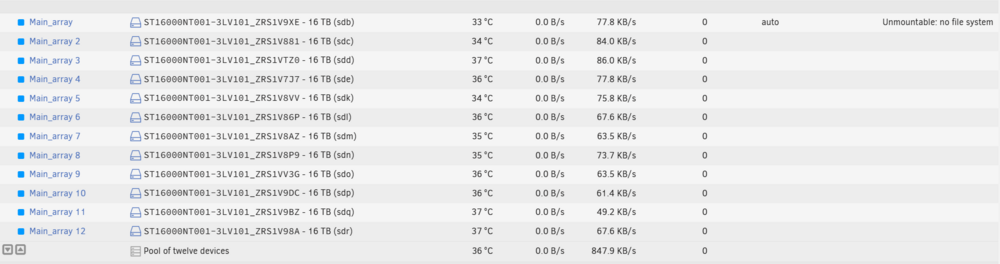
Hello, I attempted to upgrade to 7.0.0rc1 to find out that spares weren't supported. I reverted back and began to follow the steps of: 1. Import the array 2. Remove the spare 3. Export the array 4. Remove the array from the GUI 5. Add the array from the GUI After doing all of this it does not import the array after starting it. If I go to the CLI after starting the array and then importing it via CLI, I can access my data once again. However, what I've noticed is it still says "Unmountable: no file system" and I'm unable to add a subpool to bring back in my cache vdev. When recreating the array, do I count the cache vdev into the total number of slots? For example, I have 12 HDDs and 1 nvme (cache). Would I create the array with 13 slots vs 12? Otherwise, I'm not sure how to bring that cache vdev back into the fold. Any help is greatly appreciated.
-
Has anyone using an Arc a380 for transcoding start experiencing poor performance from it after the last Plex update? If I switch to my igpu (AMD Raphael) transcoding performs just fine.
-
Thanks Jorge! I'll give that a shot when I get some down time. Appreciate the info!
-
Hello, I've recently migrated from a traditional unraid array to another server specifically built with a zfs raidz array. Copied everything over via rsync however, I've hit a roadblock. Is it possible to transfer my VMs over to the new box?
-
root@Fileserver:~# zpool status pool: docker_vms state: ONLINE config: NAME STATE READ WRITE CKSUM docker_vms ONLINE 0 0 0 mirror-0 ONLINE 0 0 0 nvme2n1p1 ONLINE 0 0 0 nvme1n1p1 ONLINE 0 0 0 errors: No known data errors pool: main_array state: ONLINE config: NAME STATE READ WRITE CKSUM main_array ONLINE 0 0 0 raidz2-0 ONLINE 0 0 0 sdb1 ONLINE 0 0 0 sdc1 ONLINE 0 0 0 sdd1 ONLINE 0 0 0 sde1 ONLINE 0 0 0 sdf1 ONLINE 0 0 0 sdg1 ONLINE 0 0 0 sdh1 ONLINE 0 0 0 sdi1 ONLINE 0 0 0 sdj1 ONLINE 0 0 0 sdk1 ONLINE 0 0 0 sdl1 ONLINE 0 0 0 sdm1 ONLINE 0 0 0 cache nvme0n1 ONLINE 0 0 0 errors: No known data errors
-
Hello, How can I remove a subpool from a ZFS pool? I found the L2ARC cache was of no benefit and I'm trying to remove the NVMe so I can repurpose it but I'm unable to remove the subpool. I've set the device to none and I'm able to change the slots to 0. If I set the device to none, I can no longer start the array. So I have to put the NVMe back as the selected device to start the array up. Any help is greatly appreciated.
-
Any chance of adding AMD drivers to the repo? The new 8000 series Ryzen series have crazy capable iGPUs.

