





Kansalis
Members
-
Joined
-
Last visited
Everything posted by Kansalis
-
Yes, I tried all that & posted about it earlier in this thread. I gave up in the end, nothing would make it work. My config is exactly as any documentation I could find. I also found plenty of other posts in various places with the same issue. I'm considering moving away from pfSense, but haven't had the time to look into it yet.
-
I have the same issue with my network as you. Just a headsup before you go changing anything & spending a bunch of time on it; I use pfSense & I couldn't get hairpin NAT working for my Front server, no matter what I tried. The only way I could connect was by using a VPN on my main PC, as The Front doesn't have a direct connect option.
-
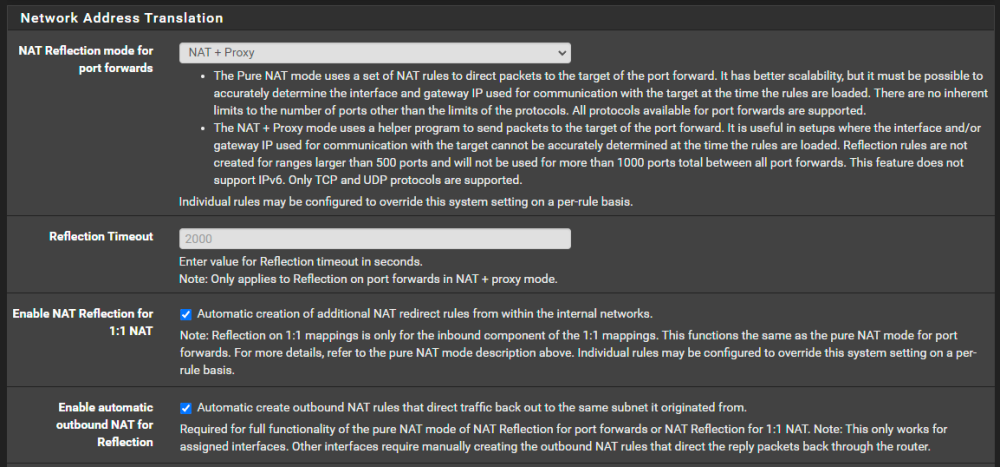
I'm not sure what more I need to try. I'm using pfSense & have tried every combination of options for NAT Reflection. If I set Reflection mode to NAT+Proxy, I get this in the game server log but it still times out: [2023.11.10-19.54.03:359][621]LogNet: NotifyAcceptingConnection accepted from: 192.168.0.123:31355 [2023.11.10-19.54.04:361][656]LogNet: NotifyAcceptingConnection: Server OnlineBeaconHost_2147449736 accept [2023.11.10-19.54.04:361][656]LogNet: NotifyAcceptingConnection accepted from: 192.168.0.123:31355 [2023.11.10-19.54.05:363][691]LogNet: NotifyAcceptingConnection: Server OnlineBeaconHost_2147449736 accept That IP is my firewall, not my actual PC. I assume that's why it's not working, but I don't know how to troubleshoot that. If I change to Pure NAT, I get nothing in the server log at all. I have ports 15636-15640 forwarded to my server. When connecting with an active VPN, I get this (from the public IP on the VPN) and it connects into the game fine: [2023.11.10-20.00.40:971][481]LogNet: NotifyAcceptingConnection: Server OnlineBeaconHost_2147449736 accept [2023.11.10-20.00.40:972][481]LogNet: NotifyAcceptingConnection accepted from: 89.40.212.245:64682 [2023.11.10-20.00.40:997][482]LogNet: NotifyAcceptingConnection: Server OnlineBeaconHost_2147449736 accept [2023.11.10-20.00.40:997][482]LogNet: NotifyAcceptingConnection accepted from: 89.40.212.245:64682 [2023.11.10-20.00.40:997][482]LogNet: Server accepting post-challenge connection from: 89.40.212.245:64682
-
I've installed the container for The Front dedicated server, which is available and working fully from outside my own LAN (after a ton of messing around with ports etc). However, I can't connect to it at all from inside my own network. The only way I have been able to connect so far is to use a VPN on my main PC to give myself a different external IP. When not connected to a VPN I can see my own server in the ingame browser & add it as a favourite etc. It has a 0 ping, which I would expect, being local. After putting in the password, it just times out. If I connect to my VPN, it works fine. After some searching, I've seen other Steam games have similar issues but are able to get around it by using direct connect or various other workarounds. The Front doesn't have any ability to do that though, so far as I can find. Does anyone know of a solution for this particular game?
