JP
Members
-
Joined
-
Last visited
Everything posted by JP
-
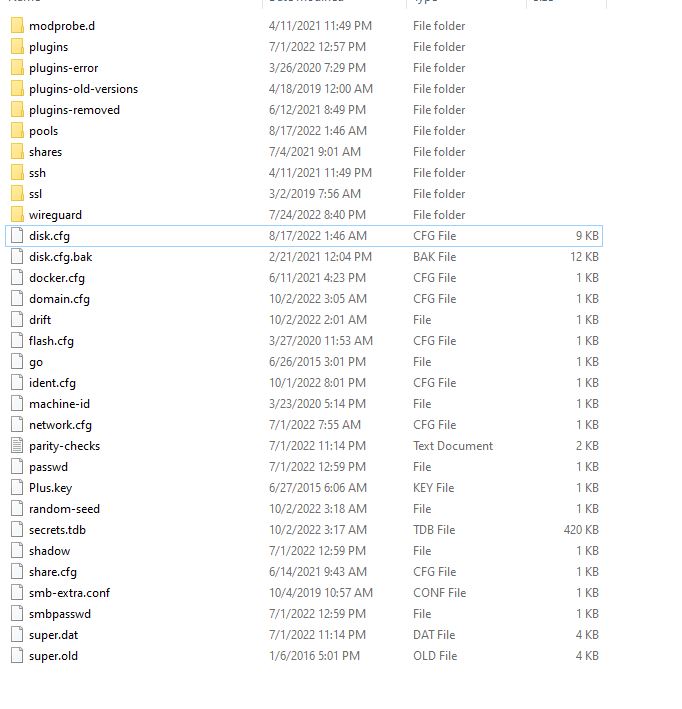
I am very sorry. I don't know what I was looking at, but I do have a CONFIG folder. However, I don't have a file in it called DISK_ASSIGNMENTS.TXT (see attached). I understand the steps you have outlined with the NEW CONFIG, but what about setting up the other disks in the array basically whereever I see fit? I thought those needed to be back in there same spot as before (i.e. Specific Western Digital Drive = Disk 5, etc.). Are you saying that it doesn't matter where the data drives are allocated, as long as they are indeed in the array somewhere. Obviously, you wouldn't want one to be allocated to PARITY. Parity does need to be specific, but it sounds like the other data drives don't matter where they go as long as they are indeed flagged as data drives...correct? I'm half inclined to just start the array as-is. Something tells me UNRAID has it correct. I just don't remember flagging a SEAGATE drive as parity, but it is likely I did.
-
No, I actually do not see a CONFIG folder at all on my backup. No, I stopped the health reports since I only setup notifications to tell me when something was wrong, but the information passed in those emails does not show all the disk assignments (lesson learned). Is there any other place it might be on the flash?
-
Thank you @Hoopster! That did it. One last question if you don't mind. Since I made a backup of my USB UNRAID FLASH is there a place I can go to find what my latest drive assignments were? I haven't started the array since the parity drive it has listed isn't what I thought it would be. It might be accurate, but I would feel better knowing that all the drives are where they should be before starting the array. Thanks again.
-
Oh, I should mention that the BIOS does see the UNRAID USB Flash drive as well. It just won't boot to it. Again, it boots to a Windows USB Flash drive just fine. Confused. Upon boot, it just continues to go to the BIOS screen, rather than booting the UNRAID Flash. It does see it in the boot priority list as being first.
-
My old Unraid motherboard / cpu / ram died on me a few weeks ago. I think it was about 11 years old so I didn't bother to troubleshoot much. I knew I needed to upgrade anyway, so I did. I got the following: CPU: Intel i5 - 12400 Motherboard: Asrock Z690 Steel Legend (has 8 SATA ports) RAM: G.Skill Trident Z RGB Series 32GB (2 x 16GB) 288-Pin SDRAM (PC4-25600) DDR4 3200 CL16-18-18-38 1.35V Dual Channel Desktop Memory Model F4-3200C16D-32GTZR Everything seems to work ok. It posts and I can boot to a USB Windows 10 flash drive (to install Windows if I wanted) just fine. All the parity, data drives, and cache drive are recognized in the BIOS. However, the motherboard won't boot to the UNRAID USB Device that I took from my previous server. I did plug the UNRAID USB Flash Drive into another PC and all the files are there (made a backup of them as well). I've looked through the BIOS and nothing is standing out that I need to switch. It is confusing since it boots to the Windows Flash drive just fine, but not to the Unraid flash drive, which I know was working in my previous server. Any thoughts on what I might be missing here? Thanks for any help.
-
@Hoopster - Can you expand on the mods that you specifically did? Was it exactly what this post reflected or did you possibly do something different? Still can't believe I might spend $225 on a case that has cooling issues, but I guess that's where I'm at.
-
Very good point. Thanks for explaining it so well.
-
I think this might be what you were referring to. I really thought after so many years there would be options available, but it seems that you are either going to play an overpriced amount to fit the criteria here or the option doesn't exist. As I mentioned above, because of that I started looking at Tower cases again and had just about planned on the Silverstone CS380 until I saw all the heat issues and the mods you have to do to get it to cool properly. What a mess by Silverstone. So, as much as I didn't want to, I'm giving a lot of thought of just staying with my old Antec Sonata II case. This thing is something like 18 years old, but keeps all the drives cool and I guess I can save money here. I just hate having to open the case to get to the hard drives. Oh well. Thanks again for all the recommendations and guidance.
-
Yea, either I'm really missing something or there are just some weird idiosyncrasies with this case. So I can see where the module of 4 HDD bays do pull out as one from the front, but that doesn't do you any good when you have to open the case and disconnect power and SATA connections from all four drives to do so. All of a sudden my antiquated Antec case isn't looking so bad.
-
Sorry, I should have been more specific. In my original post, it requested 8 FRONT bays. I think that one has most of them internal. I know it probably doesn't sound like much, but my LAN closet is a little tight so not having to open the case when a hdd fails is a plus.
-
Thanks for that. Yea, I'm not all that familiar with those kinds of connections and I know it might be able to help me if I did, but I'm also willing to bet it will drive my costs up some. Basically, at this point, I feel like a good price/performance option might be: Silverstone CS380 case Intel I5 12400 ASRock Intel Z690 Steel Legend ATX Motherboard (8 SATA connections, all I need) 32 Gigs of some kind of ram My primary goal is to get my unraid server back up and running and there isn't any doubt this will get the job done since it is way more than what I put together 10 years ago. My secondary goal is to eventually add a decent video card and hopefully be able to take advantage of VM and do 4K video editing from it. I know I won't be able to have just about anything running in the background to accomplish this, but this would be nice to have, if possible.
-
Oh, you are probably looking at the RSV-R4000U. I'm referring to the RSV-L4412U. I don't need 12 bays in the front, but I do need at least 8.
-
Yea, I've seen those cases. I don't really need hot swap, but I do want easy access to the drives. I'm sort of surprised a desktop case isn't made where they don't add the expense of making them hot swap and just accessible from the front. I must be in a minority I guess for looking for this kind of equipment. That Rosewill RSV-L4412U would fit the bill for me and I've seen people recommending it a number of time, but Rosewill has really raised their price on it. On Newegg that case used to cost under $200. Now the only place you can find it is directly from Rosewill for $360! Ultimately, to keep cost down some, I think I'm just going to have to settle on a Tower case. I hear mixed reviews with this case, but it does seem to tick most of the boxes for me: Silverstone CS380
-
Thank you for the clear explanation. This makes sense now. My hope is to get a motherboard with 8 SATA connectors and to never go beyond that amount of hard drives so a RAID card would never be needed. I have sort of a JBOD card now that I'm hoping to get rid of. Thanks again for clearing it up.
-
Sorry, this is new to me. Do you simply use a mini sas breakout cable that provides maybe 5 sata data connectors to one mini sas connector?
-
Out of curiosity, if you were going to move a step up from the i5-12400....what might that be? Do 10th and 11th gen Intel CPUs make any sense now given that 12th gen is here?
-
Thanks. I actually have seen those cases. They look like they might work. Those connections on the backplate are new to me I was just expecting to see a bunch of SATA connections. What connections are those? I'm assuming it takes a specific motherboard to leverage them....correct?
-
Yea, that is a huge selling point for me too. If anyone thinks they know of a better MB option with 8 onboard SATA ports, please let us know.
-
Thanks, but that case sort of misses the mark on my first bullet, a desktop style case. I do appreciate the recommendation though because I have read about that case and the reviews haven't been great. Seems there are a lot of complaints about the backplate breaking and poor cooling, but if you are having success then that says something completely different. I certainly give it a closer look should I not be able to find something that checks all my boxes. Thanks again.
-
Admittedly, I haven't looked at cases in ages. I built my unraid server about 10 years ago with pretty much some spare parts and an Antec Tower case. It has worked stunningly well until two days ago where either the CPU or MB has failed on me. So I've been looking to upgrade and I started to try and find a case I would like. I would have really thought there would be plenty to choose from, but I'm not finding anything. I thought my requirements were pretty simple, but maybe not. A desktop style or rack mount case. I don't really like the way I have to access the motherboard from a tower case. 8 front drive bays. It doesn't need to be hot swappable, but I would like an easy way to access the drives. Room for an ATX motherboard. Somewhere around $200 or less. Again, I didn't think this was asking too much, but maybe it is. The only cases I've found that meet this criteria cost way over $200 and in those cases they are hot swappable and are probably made for enterprise environments driving the price up (I'm assuming). I'll keep hunting, but if anyone knows of something, I would really appreciate the guidance. Thanks.
-
Thanks for this. I hit of 5% - 10% is more than reasonable given where I'm coming from. Honestly, some of the terms you used in response to the CPU / MB combo will be some things I'll probably need to learn about. Those terms are new to me, but I'll start doing some research. I was hoping more for some specific product guidance on the less expensive side (<$400 maybe for the CPU and MB). Thanks again.
-
I've used unraid for something like 10 years now, but I never used VMs since I never thought my antiquated Server could probably handle it. Well, two days ago this server died. I've narrowed it down to the CPU or the Motherboard. No use in troubleshooting further and I just need to replace it. So, this is my chance to replace it with something more robust than what I have had. Historically, I haven't need much since this PC has acted as a media server and to archive some data. BUT I had also hoped to buy a new PC to handle my video editing since all my laptops are fairly old as well. Here is the problem. I don't really want to buy a new server AND a new video editing machine. I will likely opt for a good price / performance CPU / MB for the Unraid server and it specs alone would work very well for video editing. So without ever really using a VM before (except for short periods of time at work) and never setting one up, could a VM hosted from an unraid server accomplish video editing really well? Could I take advantage of most of the resources the Server had to offer by going this route or am I possibly better off just spending the money to keep the Server and the video editing machine separate? If having the Server do both, are there any recommendations on what I might want to consider for CPU / MB / VC? Any guidance is really appreciated since I'm sort of in the dark here. Thanks.
-
Thanks for the perspective here. My current unraid server (now toast) had an AMD Athlon in it for about a decade. Never had any issues really. Honestly, I was always pretty shocked how well it worked year after year. However, it doesn't take much to sway me especially with this statement, "If you like tinkering and problem solving..." I don't. I hate it. I much prefer stability over anything so it is Intel for me now. I was willing to take a risk many years ago when I first setup my unraid server, but not any more, even if that risk is really low. Thanks again. Now I just need to determine what a good price / performance option might be for an Intel combo.
-
Timely post here. I too have had an Unraid server for ages and I thought the PSU just died. Turns out is has to be either the MB or CPU. Our needs are pretty much the same (I'm not all the concerned about energy though), but I haven't kept up with the how hardware has changed in the last few years. So you've helped me a lot just by posting a few recommendations. One question though. Why opt for the ASRock Z690 and I3 combo versus the ASRock X570M Pro4 and AMD Ryzen 5 5600G combo? It seems to me that they are closely priced with the AMD outperforming it?
-
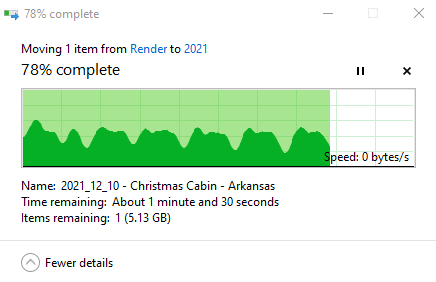
When transferring large files like this family video that was shot in 4K (25 Gigs), I notice that when the file is transferring simply from the cache drive to the array the server seems to intermittently get bogged down. That is, the transfer will proceed pretty fast for about 1 minute and then it seems to get saturated and the speed drops to 0 for about 30 seconds. Overall, the file gets there and playback seems fine, but I'm trying to understand what the culprit might be here and why it just doesn't transfer in a stable fashion. I have 16 Gigs of RAM. I checked and that doesn't seem to be it since there is plenty of free RAM when these transfers takes place. I did notice one of the threads of the processor on the server does go to 100% when the saturation occurs, but all the others still have free space. Not sure what to attribute this to.