gottoesplosivo
Members
-
Joined
-
Last visited
-
like my postgrescontainer is named "postgresql15". Use the same username and password you put in as "DB_USERNAME" and "DB_PASSWORD" Correct Yes no worries
-
Well I'm glad it worked! I updated my guide specifying to use the v0.2.0
-
What I did was actually following the instructions that you linked, and it seems to be working. OPTIONAL: Create a db back up just in case. Change the values in brackets with the one for your database, and remove the brackets: docker exec -t (postgrescontainer) pg_dump -c -U (usernamedatabaseimmich) -d (immichdatabase) | gzip > (/mnt/user/Data/)immich.sql.gz Stop immich and postgres Change the container version on my postgres container. Make sure you choose the right version of pg, in my case it's 15. It's key to use a repo with -v0.2.0 at the end, like in this picture!!!! Restarted postgres Opened a shell in the postgres container: docker exec -it (postgrescontainer) bash enter the database: psql -U (usernamedatabaseimmich) -d (immichdatabase) Run the postgres command (making sure to change the name of the database if needed where it says “ALTER DATABASE immich”) BEGIN; CREATE SCHEMA IF NOT EXISTS vectors; ALTER DATABASE immich SET search_path TO "$user", public, vectors; SET search_path TO "$user", public, vectors; UPDATE pg_catalog.pg_extension SET extversion = '0.1.11' WHERE extname = 'vectors'; UPDATE pg_catalog.pg_extension SET extrelocatable = true WHERE extname = 'vectors'; ALTER EXTENSION vectors SET SCHEMA vectors; UPDATE pg_catalog.pg_extension SET extrelocatable = false WHERE extname = 'vectors'; ALTER EXTENSION vectors UPDATE TO '0.2.0'; SELECT pgvectors_upgrade(); COMMIT; Restarted postgres container Restarted immich container

-
After changing the postgres repo and updating, I'm having a lot of duplicate pictures. Any idea how to solve this?
-
Hi, When trying to add the Crowsec mod I get this error: **** Invalid tarball, could not download crowdsec bouncer **** s6-rc: warning: unable to start service init-mod-swag-crowdsec: command exited 1 ... /run/s6/basedir/scripts/rc.init: warning: s6-rc failed to properly bring all the services up! Check your logs (in/run/uncaught-logs/current if you have in-container logging) for more information. /run/s6/basedir/scripts/rc.init: fatal: stopping the container. I'm quite lost and I don't know what to do...
-
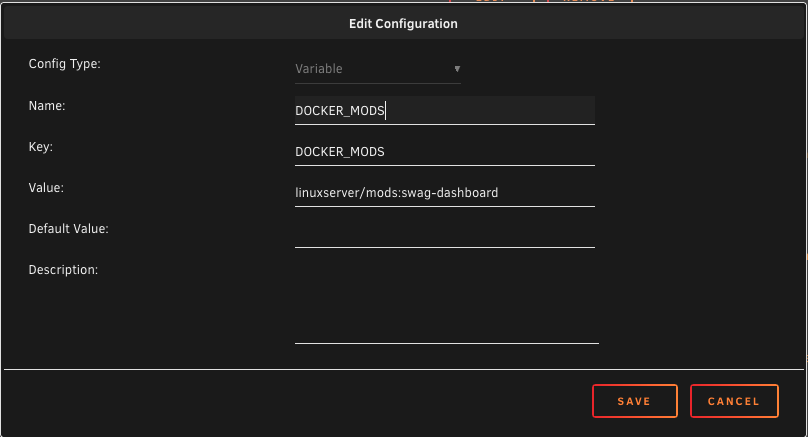
Hello I'm trying to add dashboard to my swag docker on UNRAID, I have attached my configuration for the addons. However when I start the container shows this error: [mod-init] Attempting to run Docker Modification Logic [mod-init] Adding linuxserver/mods:swag-dashboard to container [mod-init] linuxserver/mods:swag-dashboard could not be found on lscr.io [migrations] started [migrations] 01-nginx-site-confs-default: skipped [migrations] done What am I doing wrong?