adaughe2
Members
-
Joined
-
Last visited
Everything posted by adaughe2
-
Hey all! Since upgrading to the newest version of Unraid, I started having random nightly crashes. I enabled syslog but cannot see anything overly obvious and was hoping someone out there might notice something in the logs. I'm fairly tech saavy and this is definitely new behavior. The only other changes made were a few new docker containers added. The last crash happened sometime last night (early am 5/5/24) and I believe this is now the third crash. Any help is greatly appreciated! -Andrew D. syslog-10.0.0.92.log.txt
-
I think I may be missing something here. I have the plugin installed. All works great except I can't talk to my VMs or access the web gui when using the plugin as an exit node. Also, I'm not able to talk to any docker containers in host mode.. bridge mode containers work find. Any suggestions are greatly appreciated! Morty-tailscale-diag-20240101-101809.zip
-
Ahh thanks all! I feared this was the case. The seller has offered a full refund and I have accepted it. I have found quite a few T400 GPUs on Amazon that I will try instead. Looks like they do have a few 4Gb models available too!
-
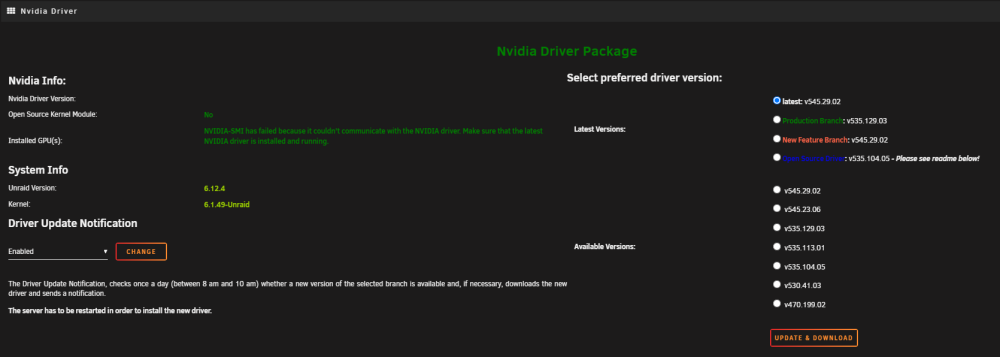
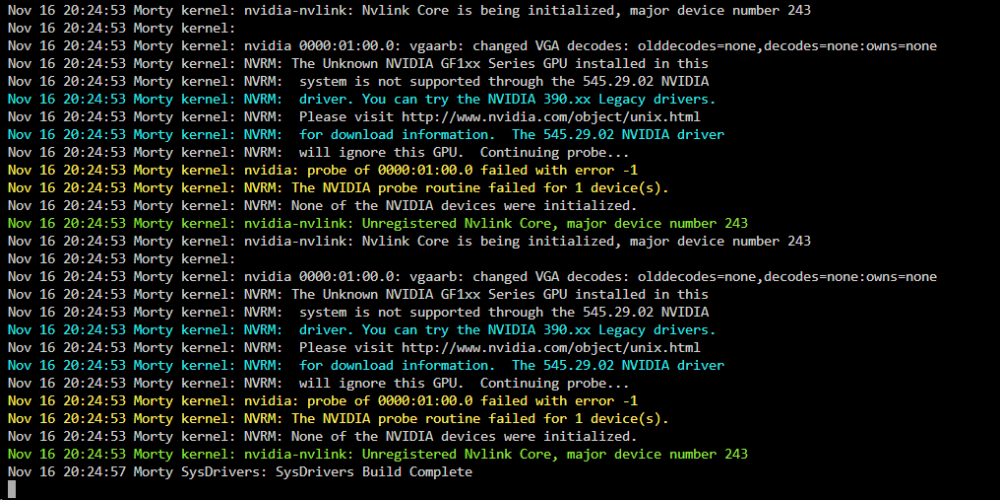
I apologize if this has been covered before but I am experiencing a weird issue with a NVIDIA 1050 ti I bought from eBay. I am running Unraid on a Dell T330 server. I was able to install the card and the driver but got the errors seen below in the screenshots. Any suggestions are greatly appreciated!