





Salty69
Members
-
Joined
-
Last visited
Everything posted by Salty69
-
Strike, Just an update I downloaded the new link from my VPN and installed it and everything work as it should thanks for your help with this hopefully, I will remember how to fix it if or when it happens again. thanks again George
-
Thanks I'll give it a try, if I can remember how to do it.
-
Strike: Here are the 2 logs you asked for. docker run.txt supervisordlog.txt
-
So this happened last night I got up this morning and nothing Deluge was not connected would not load the web ui, same for me I Variable: VPN_ENABLED: no and the web ui loads, set it to yes and I get an error message 2026-08-07 11:31:47 TLS Error: TLS key negotiation failed to occur within 60 seconds (check your network connectivity) 2026-08-07 11:31:47 TLS Error: TLS handshake failed. This all started sometime last night after a system reboot.
-
well after many hours of troubleshooting (actually only 1 hour 😁) I came to the conclusion that my system crashed during the update! looks like the CPU fan failed and my system shut down during the update causing the drive to become corrupt. this is not the worst of it I also lost the M/B and 2 SSD's in the process. so all to gather 1 CPU fan, 2 SSD's and a M/B. WOW🤯. Luckily I had my old media server sitting on the shelf out in my storage, that's what I used to troubleshoot my system, so I dusted it off, put the CPU, memory and drives that are left in it, got the pool rebuilt and it is now finishing up the updates. I'm glad I kept that 7 year old system 😆. All good to go. thanks for the input
-
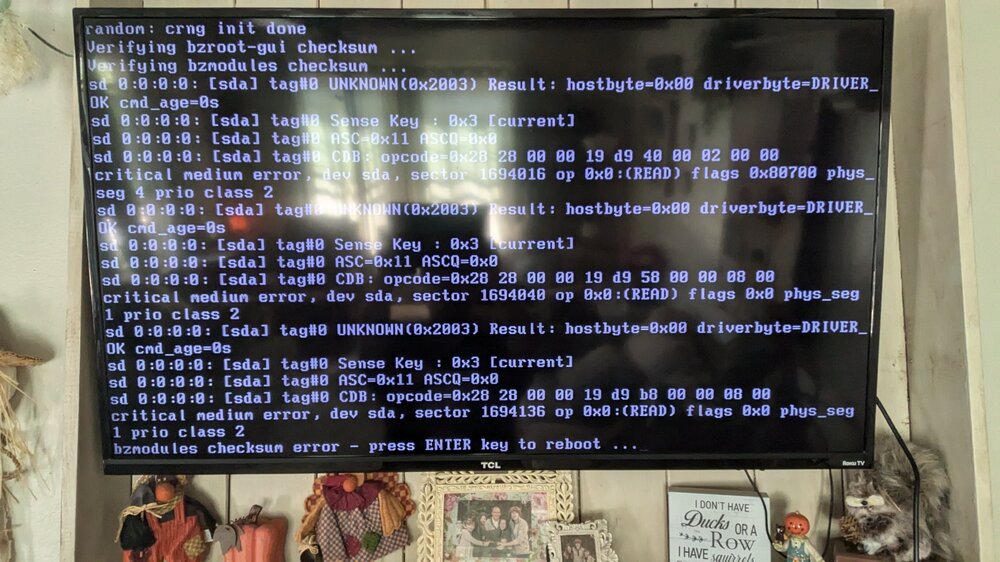
My system did an update yesterday and now will not boot. After about 7 trys got it to boot past the boot screen to this error bzmodules checksum error press any key to reboot. See attached photo Please help, I'm thanking my usb drive is bad. George
-
So here is what fixed my issue, I updated the BIOS to the latest version and then went in and made all the changes that I needed to do saved and exited, booted into UNRAID and all my drives were found, up all listed there, so for some reason UNRAID could not see them with out the latest BIOS version. But all good so far. Thanks 👍 to all who gave it their best to help this newbie out.
-
No all 4 drives were bought from the same vendor, none of them are shucked drives.
-
Attached is a copy of the file littlefoot-syslog-20231206-2056.zip
-
I am new to UNRAID, I just installed the Trial today, I have 7 Drives 4 WD 8TB HDD, 2 1TB SSD's and a 256GB SSD, only 2 of the WD 8TB drives and the 256GB SSD is showing up in UNRAID, even though all 7 drives are showing in the system BIOS, all drives were formatted fat 32 from my laptop running Linux Mint. prior to installing. I was going to attache a copy of the boot log but can not see were to do it at, I do see this issue though Dec 6 12:37:20 LittleFoot kernel: sdb: sdb1 Dec 6 12:37:20 LittleFoot kernel: sd 1:0:0:0: [sdb] Attached SCSI disk Dec 6 12:37:20 LittleFoot kernel: sdc: sdc1 sdc2 sdc3 sdc4 Dec 6 12:37:20 LittleFoot kernel: sd 1:0:1:0: [sdc] Attached SCSI disk Dec 6 12:37:20 LittleFoot kernel: sdd: sdd1 Dec 6 12:37:20 LittleFoot kernel: sd 2:0:0:0: [sdd] Attached SCSI disk Dec 6 12:37:20 LittleFoot kernel: ata4: SATA link down (SStatus 0 SControl 300) Dec 6 12:37:20 LittleFoot kernel: ata5: SATA link down (SStatus 0 SControl 300) Dec 6 12:37:20 LittleFoot kernel: ata3: SATA link down (SStatus 0 SControl 300) Dec 6 12:37:20 LittleFoot kernel: ata6: SATA link down (SStatus 0 SControl 300) Thank you George MOTHERBOARD ASRock FM2A88X-ITX+ PROCESSOR AMD A10 PRO-7850B R7, 12 Compute Cores 4C+8G @ 3700 MHz SYSTEM Memory: 16 GiB DDR3

