





wizwiz
Members
-
Joined
-
Last visited
-
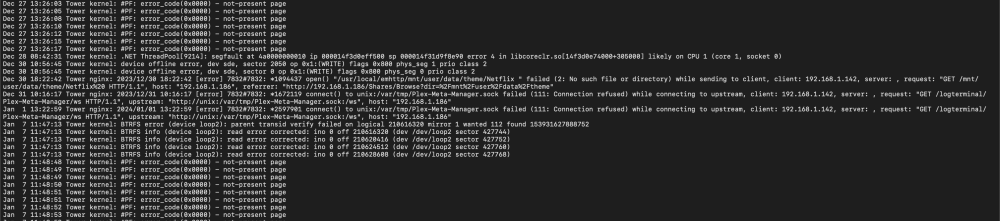
My syslog just went from around 5mb to 28mb (and the server froze), can anyone make sense of it or give a hint? The crash was at "Jan 7 12:49:29 Tower kernel: note: lsof[18384] exited with irqs disabled" I've had tons of issues in the past, but just recently had an uptime of 8 days before this crash. I searched for "error" in the log, and during the uptime there doesnt seem to be much errors until today, took a print screen. Last time I ordered new RAM, but that did not make a difference. However once I released the screw to the CPU cooler a bit, the server stopped having a freeze every 3rd hour or so and had an uptime for over a week before this. EDIT: This seems to be the repeating error message Jan 7 12:20:11 Tower kernel: Modules linked in: veth xt_nat xt_tcpudp xt_conntrack xt_MASQUERADE nf_conntrack_netlink nfnetlink xfrm_user xfrm_algo iptable_nat nf_nat nf_conntrack nf_defrag_ipv6 nf_defrag_ipv4 xt_addrtype br_netfilter xfs md_mod zfs(PO) zunicode(PO) zzstd(O) zlua(O) zavl(PO) icp(PO) zcommon(PO) znvpair(PO) spl(O) tcp_diag inet_diag ip6table_filter ip6_tables iptable_filter ip_tables x_tables efivarfs af_packet 8021q garp mrp bridge stp llc bonding tls i915 intel_rapl_msr intel_rapl_common x86_pkg_temp_thermal intel_powerclamp coretemp kvm_intel iosf_mbi drm_buddy i2c_algo_bit ttm drm_display_helper kvm drm_kms_helper crct10dif_pclmul crc32_pclmul crc32c_intel drm ghash_clmulni_intel sha512_ssse3 sha256_ssse3 sha1_ssse3 aesni_intel crypto_simd cryptd intel_gtt rapl mei_hdcp mei_pxp agpgart nvme intel_cstate syscopyarea video sysfillrect sysimgblt input_leds wmi intel_uncore nvme_core e1000e mei_me fb_sys_fops backlight i2c_i801 joydev i2c_smbus mei intel_pmc_core ahci i2c_core led_class Jan 7 12:20:11 Tower kernel: libahci aacraid acpi_pad button unix Jan 7 12:20:11 Tower kernel: CR2: 0000030000000018 Jan 7 12:20:11 Tower kernel: ---[ end trace 0000000000000000 ]--- Jan 7 12:20:11 Tower kernel: RIP: 0010:__d_lookup+0x34/0x9d Jan 7 12:20:11 Tower kernel: Code: 55 41 54 49 89 f4 55 48 89 fd 53 44 8b 36 44 89 f7 e8 cb d4 ff ff 48 89 c3 e8 81 91 e7 ff 48 8b 1b 48 83 e3 fe 48 85 db 74 52 <44> 39 73 18 75 47 4c 8d 6b 50 4c 89 ef e8 b4 56 62 00 48 39 6b 10 Jan 7 12:20:11 Tower kernel: RSP: 0018:ffffc9000aa1fcb0 EFLAGS: 00010206 Jan 7 12:20:11 Tower kernel: RAX: 0000000000000001 RBX: 0000030000000000 RCX: 000000000000000a Jan 7 12:20:11 Tower kernel: RDX: ffff8882673a6180 RSI: ffffc9000aa1fdc0 RDI: 000000000027b4e3 Jan 7 12:20:11 Tower kernel: RBP: ffff8881cf678300 R08: 5c5f000000000000 R09: 000000444879616c Jan 7 12:20:11 Tower kernel: R10: 27c633e1f2b02418 R11: 0000000000000009 R12: ffffc9000aa1fdc0 Jan 7 12:20:11 Tower kernel: R13: 0000000000000000 R14: 000000009ed38d18 R15: 0000000000000001 Jan 7 12:20:11 Tower kernel: FS: 0000147edc391f00(0000) GS:ffff88884f0c0000(0000) knlGS:0000000000000000 Jan 7 12:20:11 Tower kernel: CS: 0010 DS: 0000 ES: 0000 CR0: 0000000080050033 Jan 7 12:20:11 Tower kernel: CR2: 0000030000000018 CR3: 000000013f64c002 CR4: 00000000003706e0 Jan 7 12:20:11 Tower kernel: DR0: 0000000000000000 DR1: 0000000000000000 DR2: 0000000000000000 Jan 7 12:20:11 Tower kernel: DR3: 0000000000000000 DR6: 00000000fffe0ff0 DR7: 0000000000000400 Jan 7 12:20:11 Tower kernel: note: smbd[22877] exited with irqs disabled Jan 7 12:20:12 Tower kernel: BUG: unable to handle page fault for address: 0000030000000018 Jan 7 12:20:12 Tower kernel: #PF: supervisor read access in kernel mode Jan 7 12:20:12 Tower kernel: #PF: error_code(0x0000) - not-present page Jan 7 12:20:12 Tower kernel: PGD 0 P4D 0 Jan 7 12:20:12 Tower kernel: Oops: 0000 [#2945] PREEMPT SMP PTI Jan 7 12:20:12 Tower kernel: CPU: 1 PID: 22883 Comm: smbd Tainted: P D W O 6.1.64-Unraid #1 Jan 7 12:20:12 Tower kernel: Hardware name: To Be Filled By O.E.M. To Be Filled By O.E.M./Z370M Pro4, BIOS P4.20G 04/01/2021 Jan 7 12:20:12 Tower kernel: RIP: 0010:__d_lookup+0x34/0x9d Jan 7 12:20:12 Tower kernel: Code: 55 41 54 49 89 f4 55 48 89 fd 53 44 8b 36 44 89 f7 e8 cb d4 ff ff 48 89 c3 e8 81 91 e7 ff 48 8b 1b 48 83 e3 fe 48 85 db 74 52 <44> 39 73 18 75 47 4c 8d 6b 50 4c 89 ef e8 b4 56 62 00 48 39 6b 10 Jan 7 12:20:12 Tower kernel: RSP: 0018:ffffc9000b5c7cb0 EFLAGS: 00010206 Jan 7 12:20:12 Tower kernel: RAX: 0000000000000001 RBX: 0000030000000000 RCX: 000000000000000a Jan 7 12:20:12 Tower kernel: RDX: ffff8883693e0000 RSI: ffffc9000b5c7dc0 RDI: 000000000027b4e3 Jan 7 12:20:12 Tower kernel: RBP: ffff8881cf678300 R08: 7da19699d85bb76e R09: 000000ffffffffff Jan 7 12:20:12 Tower kernel: R10: 27c633e1f2b02418 R11: 000000000000000f R12: ffffc9000b5c7dc0 Jan 7 12:20:12 Tower kernel: R13: ffff88815d50a020 R14: 000000009ed38d18 R15: 0000000000000000 Jan 7 12:20:12 Tower kernel: FS: 0000147edc391f00(0000) GS:ffff88884f040000(0000) knlGS:0000000000000000 Jan 7 12:20:12 Tower kernel: CS: 0010 DS: 0000 ES: 0000 CR0: 0000000080050033 Jan 7 12:20:12 Tower kernel: CR2: 0000030000000018 CR3: 000000013f6c4006 CR4: 00000000003706e0 Jan 7 12:20:12 Tower kernel: DR0: 0000000000000000 DR1: 0000000000000000 DR2: 0000000000000000 Jan 7 12:20:12 Tower kernel: DR3: 0000000000000000 DR6: 00000000fffe0ff0 DR7: 0000000000000400 Jan 7 12:20:12 Tower kernel: Call Trace: Jan 7 12:20:12 Tower kernel: <TASK> Jan 7 12:20:12 Tower kernel: ? __die_body+0x1a/0x5c Jan 7 12:20:12 Tower kernel: ? page_fault_oops+0x329/0x376 Jan 7 12:20:12 Tower kernel: ? do_user_addr_fault+0x12e/0x48d Jan 7 12:20:12 Tower kernel: ? exc_page_fault+0xfb/0x11d Jan 7 12:20:12 Tower kernel: ? asm_exc_page_fault+0x22/0x30 Jan 7 12:20:12 Tower kernel: ? __d_lookup+0x34/0x9d Jan 7 12:20:12 Tower kernel: lookup_fast+0x4b/0xc0 Jan 7 12:20:12 Tower kernel: path_openat+0x1a6/0xa4d Jan 7 12:20:12 Tower kernel: ? memcg_slab_free_hook+0x20/0xcf Jan 7 12:20:12 Tower kernel: ? __kmem_cache_free+0x6a/0xf5 Jan 7 12:20:12 Tower kernel: ? getxattr+0x80/0xb3 Jan 7 12:20:12 Tower kernel: do_filp_open+0x55/0xb8 Jan 7 12:20:12 Tower kernel: ? getname_flags+0x29/0x152 Jan 7 12:20:12 Tower kernel: ? kmem_cache_alloc+0x122/0x14d Jan 7 12:20:12 Tower kernel: ? _raw_spin_unlock+0x14/0x29 Jan 7 12:20:12 Tower kernel: do_sys_openat2+0x6c/0xd9 Jan 7 12:20:12 Tower kernel: do_sys_open+0x3a/0x5a Jan 7 12:20:12 Tower kernel: do_syscall_64+0x68/0x81 Jan 7 12:20:12 Tower kernel: entry_SYSCALL_64_after_hwframe+0x64/0xce Jan 7 12:20:12 Tower kernel: RIP: 0033:0x147ee06f69ef Jan 7 12:20:12 Tower kernel: Code: 89 4c 24 58 f6 c2 40 75 32 89 d0 45 31 d2 25 00 00 41 00 3d 00 00 41 00 74 21 80 3d f2 cb 0e 00 00 74 45 b8 01 01 00 00 0f 05 <48> 3d 00 f0 ff ff 0f 87 85 00 00 00 48 83 c4 78 c3 48 8d 84 24 80 Jan 7 12:20:12 Tower kernel: RSP: 002b:00007ffdf6567f80 EFLAGS: 00000202 ORIG_RAX: 0000000000000101 Jan 7 12:20:12 Tower kernel: RAX: ffffffffffffffda RBX: 00007ffdf6568060 RCX: 0000147ee06f69ef Jan 7 12:20:12 Tower kernel: RDX: 0000000000000002 RSI: 0000557feb36fee0 RDI: 00000000ffffff9c Jan 7 12:20:12 Tower kernel: RBP: 0000557feb37da40 R08: 00007ffdf6568060 R09: 0000557feb366fb0 Jan 7 12:20:12 Tower kernel: R10: 0000000000000000 R11: 0000000000000202 R12: 0000000000000002 Jan 7 12:20:12 Tower kernel: R13: 0000557feb365bc0 R14: 0000000000000000 R15: 0000557feb36fee0 syslog.log
-
The RAM was likely the issue. I changed the RAMs but still had freezes. What finally solved it was not having the CPU fan as thigt. I loosened the screwes and the server has now been up for 5 days.
-
I'll update this post if anyone else finds themselves in the same situation. After trying everything, and changing various parts I came to the conclusion that the RAM slots were having issues. Apparently I had screwed the CPU fan too hard, leading to some pin issue. I am hoping this is the final answer, the server has been up for 4 days now.
-
After about 36h uptime my GUI semi-froze. I was not able to access dashboard, or any other tab except "main". I was able to open terminal but could not use any commands (powerdown -r etc). I was not able to stop the array, and after a while everything froze and I had to do a hard reset. I am seeing a few errors in my syslog, but I am not able to make sense of anything. The GUI became unresponsive at around/before "Dec 20 09:45:31" in syslog. syslog.log tower-diagnostics-20231220-1106.zip
-
I have now tried switching to a new flash drive, tried with 1 RAM stick, followed by the other, changing power outlet. I did have the server up for 10 hours yesterday after checking all connections inside, changing the mobo battery and resetting/shorting CMOS and changing macvlan to ipvlan. I was very happy and thought it was fixed. I was wrong The server seems fine until i start an array, is this info irrelevant or could it point towards hardware (except possibly HDDs) being ok? Next up, I think I will try an older version, perhaps 6.11.x and see if I get the same errors.
-
This is syslog was pulled after I shut down the server. I am also seeing a lot of FSCK0001.REC (1-17). syslog
-
Ok, now it froze after 3h uptime.. Hopefully this syslog will be correct. Still not sure when to pull the drive - before shutting down of after. If the log is wrong, where should would I find it? This one is from the 'logs' folder. syslog
-
You were right, I had enabled the remote server instead. Once I switched to mirror to flash the server somehow has been running for 2h+. I'll update this post once (if) starts to crash again. Thanks!
-
This is one after a hard shut down, if that makes any difference. syslog
-
Did it catch it? I removed the flashdrive after the freeze, but before turning the server off syslog
-
Hi, New user trying to set up Unraid for the first time. I've had my ups and downs, a ton of hard restarts. It seems every time I try something new my computer freezes, and sometimes eventually the problems is solved. I've done several memtests (12-24h), recently did SMART test for all my drives, checked all connecitons/updated mobo etc. Right now I am setting up qBittorrent, adding/re-seeding recently moved files. I get maybe 10 minutes before the server freeze. I have barely had 24h running since I forst started. Does my logs give any indications? Thanks! tower-diagnostics-20231211-0414.zip
