





cruzerkk
Members
-
Joined
-
Last visited
Everything posted by cruzerkk
-
I undid the change. I set the IPv4 Address Assignment to 'Automatic'. It still kept the same IP that I had assigned when I set it to static. But now, after I import the tunnel it does not switch back to Inactive. Weird! But I guess this works for me (for now, at least)
-
- I deleted all existing wg*.cfg and wg*.conf files from /etc/wireguard. Also deleted autostart. - I imported the wireguard config file again - Still seeing same issue. - I tried running `wg-quick up wg0` after reading a bit online and the output reads as follows: wg-quick up wg0 [#] ip link add wg0 type wireguard [#] wg setconf wg0 /dev/fd/63 Name or service not known: `ca-tor.prod.surfshark.com:51820' Configuration parsing error [#] ip link delete dev wg0
-
I deleted all the tunnels from VPN manager interface under setting and reimported the tunnel. Still seeing a similar error: wg-quick down wg1 wg-quick: `wg1' is not a WireGuard interface wg-quick up wg1 [#] ip link add wg1 type wireguard [#] wg setconf wg1 /dev/fd/63 Name or service not known: `us-ash.prod.surfshark.com:51820' Configuration parsing error [#] ip link delete dev wg1 wg-quick down wg1 wg-quick: `wg1' is not a WireGuard interface wg-quick up wg1 [#] ip link add wg1 type wireguard [#] wg setconf wg1 /dev/fd/63 Name or service not known: `us-ash.prod.surfshark.com:51820' Configuration parsing error [#] ip link delete dev wg1 wg-quick down wg1 wg-quick: `wg1' is not a WireGuard interface Is there some directory from where I need to delete it on the console ?
-
Okay, will give this a try and update
-
cat /var/log/wg-quick.log wg-quick down wg2 wg-quick: `wg2' is not a WireGuard interface wg-quick up wg2 [#] ip link add wg2 type wireguard [#] wg setconf wg2 /dev/fd/63 Name or service not known: `us-ash.prod.surfshark.com:51820' Configuration parsing error [#] ip link delete dev wg2 wg-quick down wg2 wg-quick: `wg2' is not a WireGuard interface wg-quick down wg2 wg-quick: `wg2' is not a WireGuard interface wg-quick down wg2 wg-quick: `wg2' is not a WireGuard interface wg-quick up wg2 [#] ip link add wg2 type wireguard [#] wg setconf wg2 /dev/fd/63 Name or service not known: `us-ash.prod.surfshark.com:51820' Configuration parsing error [#] ip link delete dev wg2 wg-quick down wg2 wg-quick: `wg2' is not a WireGuard interface wg-quick down wg0 wg-quick: `wg0' is not a WireGuard interface wg-quick down wg1 wg-quick: `wg1' is not a WireGuard interface wg-quick down wg2 wg-quick: `wg2' is not a WireGuard interface wg-quick up wg2 [#] ip link add wg2 type wireguard [#] wg setconf wg2 /dev/fd/63 Name or service not known: `us-ash.prod.surfshark.com:51820' Configuration parsing error [#] ip link delete dev wg2 wg-quick down wg2 wg-quick: `wg2' is not a WireGuard interface wg-quick up wg2 [#] ip link add wg2 type wireguard [#] wg setconf wg2 /dev/fd/63 Name or service not known: `us-ash.prod.surfshark.com:51820' Configuration parsing error [#] ip link delete dev wg2 wg-quick down wg2 wg-quick: `wg2' is not a WireGuard interface wg-quick up wg2 [#] ip link add wg2 type wireguard [#] wg setconf wg2 /dev/fd/63 Name or service not known: `us-ash.prod.surfshark.com:51820' Configuration parsing error [#] ip link delete dev wg2 wg-quick down wg2 wg-quick: `wg2' is not a WireGuard interface wg-quick up wg2 [#] ip link add wg2 type wireguard [#] wg setconf wg2 /dev/fd/63 Name or service not known: `us-ash.prod.surfshark.com:51820' Configuration parsing error [#] ip link delete dev wg2 wg-quick down wg2 wg-quick: `wg2' is not a WireGuard interface wg-quick up wg1 [#] ip link add wg1 type wireguard [#] wg setconf wg1 /dev/fd/63 Name or service not known: `ca-tor.prod.surfshark.com:51820' Configuration parsing error [#] ip link delete dev wg1 wg-quick down wg1 wg-quick: `wg1' is not a WireGuard interface wg-quick up wg2 [#] ip link add wg2 type wireguard [#] wg setconf wg2 /dev/fd/63 Name or service not known: `us-ash.prod.surfshark.com:51820' Configuration parsing error [#] ip link delete dev wg2 wg-quick down wg2 wg-quick: `wg2' is not a WireGuard interface
-
Hi, This setup used to work perfectly for me until couple of days ago. The only change I did was to assign my server a static IP. Since then, my tunnel won't toggle to active. When I toggle to Active, it just automatically sets itself back to inactive. - I have tried to delete the tunnel and reimport the conf - VPN provider is surfshark, if that matters. Is this some sort of a bug ? Is there a fix or workaround for it? Thanks!
-
Hi, I tried adding redis-server --requirepass myPassword to Post Arguments, but the container wouldn't start. Logs shows the following error: Reading the configuration file, at line 2 >>> 'requirepass' wrong number of arguments Can anyone please tell me what I'm doing wrong ?
-
Never mind, found the solution here:
-
I installed the official Redis docker container using the jj9987 template as mentioned above. Don't see an option to set password though. This is my first time working with redis. Can you guide here please ?
-
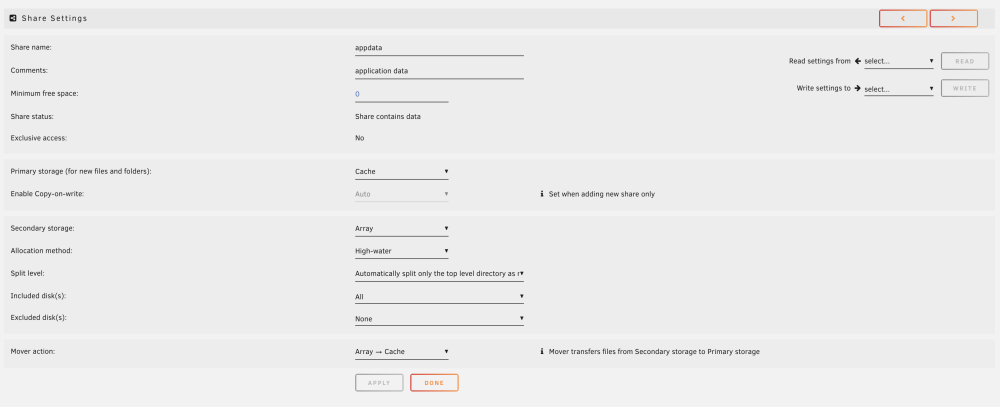
For reference, attaching my appdata share settings.
-
I do have separate folders under 'appdata' share for all those applications, if that's what you mean. If that does survive containr updates, how come I lost all settings. I am confused. Am I missing something ? Is this something I need to do manually ?
-
I used Apps and for some reason all the settings were lost.
-
I am quite new to Unraid. Apologies, if this question has been answered before. I have my Media Stack setup on Unraid (Sonarr - Radarr - Jackett - Plex - QBitTorrent). I noticed that when I updated the containers, I basically lost all the settings and metadata of these apps: - For the *arr : Lost all Indexers, Quality, Download Clients & Profiles settings. Also Movies and Shows library became empty. - Jackett - Lost all the Indexers that were added - Plex - Thanksfully while all the data was still there. The metadata/ Thumbnails were all lost and also I'm pretty sure that some of the app settings got reset to default. I spent close to 2 hours this morning, setting it all back up again. I reckon there must be a way to update the containers without affecting the internal data/settings of it. Can someone guide me on how to do this in future without losing these settings?
-
Yeah. Looks like it is looking for a specific table and it is not finding it. "An exception occurred while executing a query: SQLSTATE[42S02]: Base table or view not found: 1146 Table 'nextcloud.oc_appconfig' doesn't exist" Any idea where nextcloud.oc_appconfig is expected to be present or defined ? Also, I'm not facing this issue when using the linuxserver respository. Weird that I followed the exact same steps and seeing this error only in this repo. Is this something within the mariadb container? I wonder if this has something to do with the /var directory being used. A couple of differences I noted between the linuxserver's container (which works) and this one is that: 1. When I opened the Nextcloud webUI for the first time and set up my admin credentials and mariadb info, the Data Folder provided was different. For the linuxserver repo it was just /data and for Kilrah's it was set to : /var/www/html/data 2. Also , in the container settings I see that there is an extra setting for "App data" present with container path set to "/var/www/html" and Storage has container path "/var/www/html/data". I did not touch the /var directory when working with linuxserver's repo, as far as I remember. Could this be something ? Sharing screenshots for comparison of container settings linuxserver: kilrah: No, I haven't done anything with redis. So looks like that's ruled out obviously, in light of the Database error above.
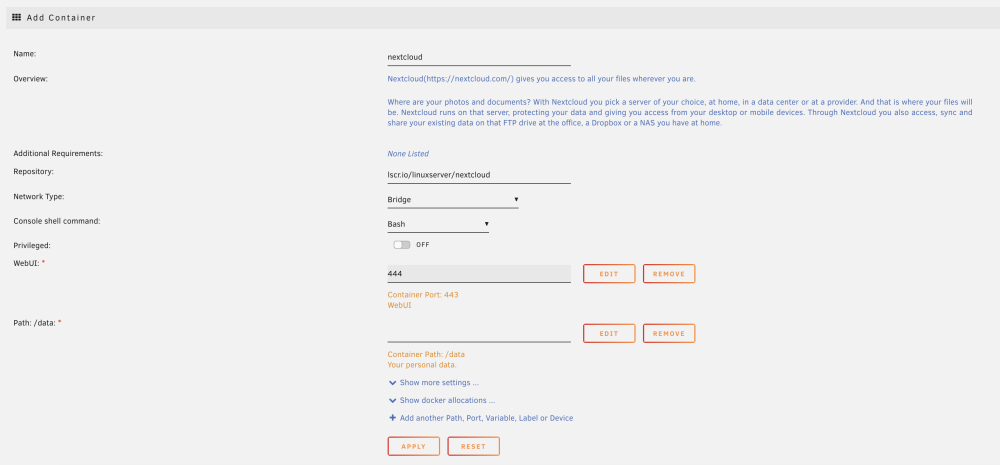
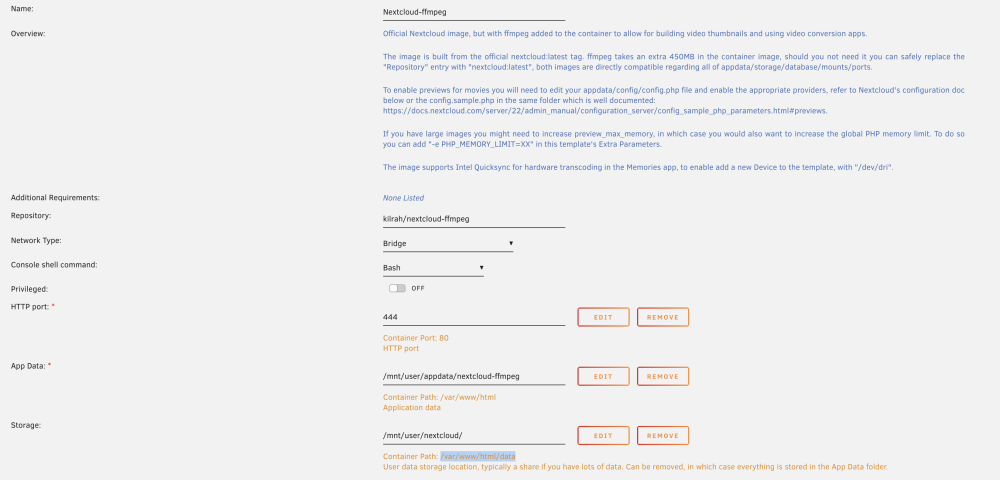
-
I was able to find the attached line of logs in the nextcloud.log file within my share. The lines are generated when I get the "Internal Server Error" message. Can you please help debug ? nextcloud_log.txt
-
'trusted_domains' => array ( 0 => 'x.x.x.167:444', ), I did not, but it looks like it gets set automatically in config.php. I found this discussion, where they say it could be due to "redis server". I have no idea if that could be related. Any thoughts on that ? Also, is there any place else where I could look for logs other than the container logs that I shared above ?
-
Hello, Firstly, thanks for this container. I've been breaking my head since last week to get my videos to show thumbnails. So, hoping I can get this to work and resolve my pain. Originally, I followed Spaceinvader One's tutorial on Youtube to setup Nextcloud with MariaDB and Swag. I got everything to work and synced my iPhone photos and videos with my server. However, my videos wouldn't show thumbnails. After spending close to a week, trying several troubleshooting methods with no success, I stumbled upon your container. So I thought I'd give this a shot. I got rid of everything I had previously done to start from scratch. As in, I removed swag, mariadb and linuxserver's nextcloud containers as well as their respective appdata folders from unraid server. Now, I installed mariadb afresh and setup a DB there. I installed your container and just changed the port number to use 444 instead of the default 80 (since that's what I previously did following the tutorial and it worked for me). I was able to open the WebUI and I created a new admin account and also configured the MySQL/MariaDB within nextcloud. However, after selecting install, it took a little while and now it just shows this error on my browser when I try to access the Web UI: Internal Server Error The server encountered an internal error and was unable to complete your request. Please contact the server administrator if this error reappears multiple times, please include the technical details below in your report. More details can be found in the server log. I looked into the Nextcloud-ffmpeg container logs and couldn't find much info there. At least none that I could understand with my limited knowledge. I am attaching the logs for your reference here. Note that I obscured the ip address to x.x.x.151. Only thing that didn't make sense to me was that IP address, as my Unraid server's IP is x.x.x.167, so not sure where the 151 comes from. Any suggestions to help me move into the next steps of my install would be greatly apprecited! Thanks in advance. Logs.txt
-
Oh okay. I understand. Thanks
-
I believe that you are right. Although, I am not quite sure why unraid made the disk a part of the configuration in the first place. I connected the disk to my NAS server externally and used Unassigned Devices plugin and mounted it. Then used Krusader to move existing data to the array. Didn't know that this would cause unraid to think that the external drive is a part of the configuration, especially, even after I completely formatted it and inserted it into the 4th bay. I never completed parity sync process till that point. Reason being I wanted to move my data over to the array sooner (since I had close to 7TB). Although, I had selected one of the 3 disks as Parity in my config, I had paused the sync. Now I am running the parity sync finally after it accepted my 4th drive. .
-
SOLVED: Here's the solution: Went into Tools -> New Config -> Selected "Preserve current assignments" to "All" -> Checked the box that says "I want to do this" and clicked Apply. When I went back to the Main tab, it now allowed me to add the 4th disk like I was adding it for the first time. Basically looks like what it does is that if the disk has never been used by Unraid before then it will be partitioned to UnRAID standards. If it is previously used by Unraid then its contents are left intact. Parity is also set to be invalid and thus need rebuilding.
-
My NAS has 4 drive bays. I currently have an array of 3 drives (2 data and 1 parity). In addition to the 3 drives, I also have a 4th external drive that had about 4TB of data in it. I connected it to the NAS using a USB cable and mounted the drive using unassigned devices and used Krusader to move the data to my array shares. Now I have formatted this 4th hard drive on my macbook and shucked it and am trying to use it in the 4th bay. I stopped the array, added the drive to the bay, and am trying to add it to my array. But am running into the following error: You may not add new disk(s) and also remove existing disk(s). Does someone know what I might be doing wrong ? Note: All the 4 drives are 14TB Another thing I noted is that this drive is under 'Disk Devices' section as opposed to unassigned devices. I am assuming that when I "Mount" an Unassigned Device, it makes it a "Disk Device" ? Also, when I select it as Parity 2 unraid is fine with it. But when I select it as my 3rd data disk, it won't allow me to proceed.



