





Neo78
Members
-
Joined
-
Last visited
-
I also tested the following SMB settings, which are often recommended to improve performance when backing up a very large number of small files (such as an iOS backup), but unfortunately they did not make any noticeable difference: aio read size = 1 aio write size = 1 As a final test, I enabled NFS on the Unraid share, mounted it in macOS, and then started the iPhone backup again. The result was a night-and-day difference: performance was excellent, and the backup completed in just over one hour. Based on my testing, the bottleneck appears to be related to SMB when handling the huge number of small files generated during an iOS backup. For now, I will probably use a combination of SMB and NFS for accessing Unraid shares from macOS, depending on the workload, until a better SMB-based solution becomes available. Hopefully this information helps others experiencing similar issues. Thanks!
-
Thank you for sharing this information. I have applied the configuration on my Mac mini (macOS 27) and Unraid Server (7.3.3). At the moment, a backup of my iPhone 15 Pro Max (approximately 200 GB) is running to an Unraid share (via symlink), and I noticed that the performance is extremely slow compared to Windows 11. After about 2 hours, the backup has only reached 20% completion. Can anyone confirm whether this behavior is normal? Has anyone experienced similar performance issues when backing up to an Unraid SMB share from macOS? Also, are there any known optimizations or settings that could improve the backup speed? Any feedback or recommendations would be greatly appreciated. Thanks!
-
Hello, no problems on my side upgrading Unraid from 7.2.5 to 7.3.0 (flash drive). The update process completed without any errors, all Docker container up and running, no errors in the Dashboard. I also had no errors during the onboarding after the first login. I was a little skeptical because of the negative experiences some users had regards,
-
Yes, but Urbackup supports only 1 backup destination
-
Hello, I'm trying several backup solutions, at the moment I'm on "UrBackup" and is quite interesting. I'm wondering what could be the best solution for offsite backup of "UrBackup". I have a old QNAP NAS that I like to use for 2nd backup. Maybe 1st backup with "UrBackup" (Unraid-SRV) and 2nd backup with "luckyBackup" to QNAP NAS (entire UrBackup folder) ? How do you manage this? Thanks!
-
Hello, I have excactly the same problem since the upgrade from 7.1.4 to 7.2.0. Only "zfs-cache -> array" shares are affected. I can read but not write to the affected folders The command "zfs mount -a" solves the issue until the next day (when mover is finisished). This must be a bug in Unraid 7.2.0 and hopefully will be resolved soon ...
-
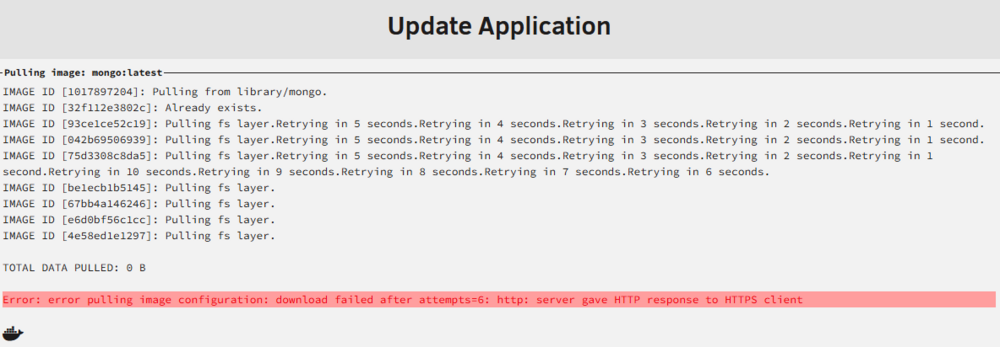
Problem found/solved! My ADGuard DNS filter suddenly started blocking a page that is necessary for the update.
-
Hi, MongoDB update (official container) not working anymore since a few days (all other docker updates works fine). Any ideas?
-
Hello, thanks for the great tutorial! Can you explain how the setup works with Cloudflare (purchased domain)? Thanks!
-
ok, thanks for the Info. I thought there is maybe a difference between this two methods, and Z1 is "more" secure against HDD failure. Of course, a backup of the important data is essential (I'll use my old NAS and/or external HDD for this)
-
Hi, I've been using my first Unraid server for a few months now and I'm pretty excited about it. I build a server with the following configuration - supermicro, 128GB ECC RAM - 2x 2TB NVME ZFS Cache Pool (RAID Z1) - Array with: 2x18TB (1x18TB Parity) - XFS 4x6TB - XFS I wonder where the data that is very important to me (especially family photos) should be stored: on the ZFS Cache Pool ECC protected or on the array. In other words: are the data equally protected against failure? I am a little skeptical because the last parity check had some errors (the second check none). The disadvantage at the moment is that I don't have much space left on the NVME Cache pool .. thanks in advance for your suggestions, regards,
-
ok, thank you, I'll check that!
-
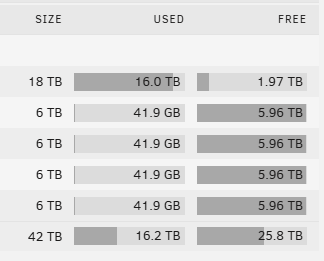
Hello, I have a question about Unraid's High-Water Allocation method. I started with my server originally with 2x18TB HDD (1 array, 1 disk) and copied all data from my old NAS (4x6TB HDDs). I then installed the 4x6TB HDDs in the Unraid server and assigned them to the array. For my "multimedia" share (movies, series) I chosed the "High-Water Allocation" method and "Top-Level Directory" as split level. If I have understood the "High-Water" method correctly, then if there is less than 3TB of free space on the largest HDD (18TB), the system should switch to the next HDD. However, everything is still written to the 18TB. I have of course selected that all disks should be used for the share (even selecting individually does not change anything). kind regards,
-
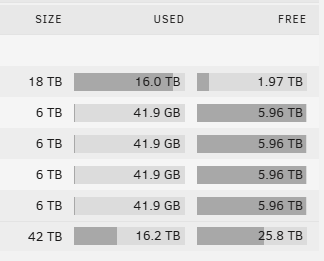
Hallo, hätte eine Frage zu der High-Water Allocation Methode von Unraid. Ich mit mit meinem Server ursprünglich mit 2x18TB HDD gestartet (1 Array, 1 Disk) und habe sämtliche Daten von meiner alten NAS (4x6TB HDDs) kopiert. Danach habe ich die 4x6TB HDDs in den Unraid-Server eingebaut und dem Array zugewiesen. Für mein "Multimedia" Share (Filme, Serien) habe ich die "High-Water Allocation" Methode gewählt sowie als Split-Level "Top-Level Directory". Wenn ich die "High-Water" Methode richtig verstanden habe dann sollte bei weniger als 3TB freiem Seicherplatz der größten HDD (18TB) auf die nächste HDD gewechselt werden. Trotzdem wird jedoch nach wie vor alles auf die 18TB geschrieben. Beim Share hab ich natürlich ausgewählt dass alle Disks verwendet werden sollen (auch einzeln auswählen ändert nichts). mfg,
-
alles klar, danke für die Info!

