






fredskis
Members
-
Joined
-
Last visited
Everything posted by fredskis
-
Thanks for your reply and confirming the findings :) I kept credit detection back on as overall it doesn't happen often enough to be a nuisance and as you point out, it would just be hiding the symptom without knowing what might fix it or helping find a pattern. I have just experienced the issue again overnight and it's been surfaced by the same activity from AppData Backup. I ran the requested command at 2026-10-14 7:37:54 local time, can see the output on syslog and attached diagnostics. I'll go ahead and do the double powerdown now and once it's up and stable I'll upgrade to 7.3.3 define-diagnostics-20261014-0741.zip
-
Unraid [7.3.2], kernel 6.18.38-Unraid. i7-14700K, W680, 128GB ECC. Diagnostics attached. Summary: A userspace process (Plex Media Scanner) got permanently stuck in the kernel inside munmap(), waiting on a per-VMA lock that nothing holds. Every ps/pgrep that touches that process then blocks forever, php-fpm workers pile up behind them, and the WebGUI dies. SSH and the other containers stay up. Only a reboot fixes it. It's happened a few times, at most every couple of weeks; this is the first time I've had the time to catch and troubleshoot it properly. I reboot with "powerdown -r" via SSH. I need to send this twice as the first one never finishes shutting down. On restart, a parity check needs to run. Plex doesn't seem to be the bug, it's the trigger. Userspace shouldn't be able to wedge the kernel like this. Plex container details: plexinc/pms-docker Timeline: - Oct 2 04:20:17: Plex launches credits detection (Plex Media Scanner -C) on one episode. It never finishes. Plex logs it giving up at 04:50. - From then on: ps and pgrep hang. The first hung pgrep's PID is ~2,400 after the scanner's, so it started within minutes. - Oct 3 04:05: AppData Backup stops the Plex container. The scanner gets the signal and every thread enters do_exit, but none can finish. The container stays "Up" with its init gone, and the healthcheck fails with "OCI runtime exec failed: setns process: exit status 1". - WebGUI: login spins forever. nginx logs "upstream timed out" on php-fpm.sock for /Dashboard, and /Main hangs too. - Load average ~28 with ~2 runnable, i.e. ~26 tasks in D state. The stuck thread (the only scanner thread not in do_exit): TID 1629308 Plex Media Scan state=D wchan=__vma_enter_locked __vma_enter_locked+0x85/0xb0 __vma_start_write+0x13/0x40 __split_vma+0x132/0x220 vms_gather_munmap_vmas+0x81/0x1e0 do_vmi_align_munmap+0x11f/0x1a0 do_vmi_munmap+0x109/0x130 __vm_munmap+0xd0/0x110 __x64_sys_munmap+0x17/0x20 All 17 other scanner threads are stuck at do_exit+0x2b9. Every ps/pgrep is stuck here: mmap_read_lock_killable __access_remote_vm environ_read vfs_read Every other thread in the process is in do_exit, so nothing alive holds that VMA lock. It leaked. Same signature as these reports on other 6.18.x kernels: https://github.com/microsoft/WSL/issues/41708 https://github.com/microsoft/WSL/issues/41113 One of the WSL reports shows the same pattern on 6.18.40, so I wouldn't assume a point release fixes it. I haven't found an upstream fix. Questions: 1. Is this known, and is there a kernel with a fix on the roadmap? 2. Can CONFIG_DETECT_HUNG_TASK be enabled? /proc/sys/kernel/hung_task_timeout_secs doesn't exist, so the kernel logged nothing despite threads being stuck for 24+ hours. I had to dig everything out by hand. Workaround in the meantime: turning off Plex credit-marker generation, since that's the workload that tripped it. The bug will presumably find another victim eventually. Attached: diagnostics (taken while wedged), the hang captures, the per-thread stacks, and the Plex logs. 00-commands-used.txt 01-hang-capture.txt 02-dstate-scan.txt 03-scanner-threads.txt define-diagnostics-20261003-1141.zip Plex Media Scanner Credits logs.txt Plex Media Server.log
-
Thank you, I ended up going with this option to ensure I didn't fat-finger the New Config method 😅
-
Last year or so I went through the process of changing my Parity drive to a larger one to allow me to upgrade array disks to larger sizes. This process resulted in having an empty Parity 1 slot and instead using only the Parity 2 slot. I'm now wishing to move this parity drive from Parity 2 slot to Parity 1 slot. What is the cleanest process? To clarify I only have one parity disk. Alternatively, is that required? I read about Parity Q computation on P2 slot being more computationally expensive than Parity P on P1 slot, and disk order mattering when using P2. This whole potential issue was only brought to my attention when I started monitoring Unraid with Pulse.
-
Great - thank you @itimpi for confirming that 🙂 I think this is back to working now then! Thanks again @JorgeB
-
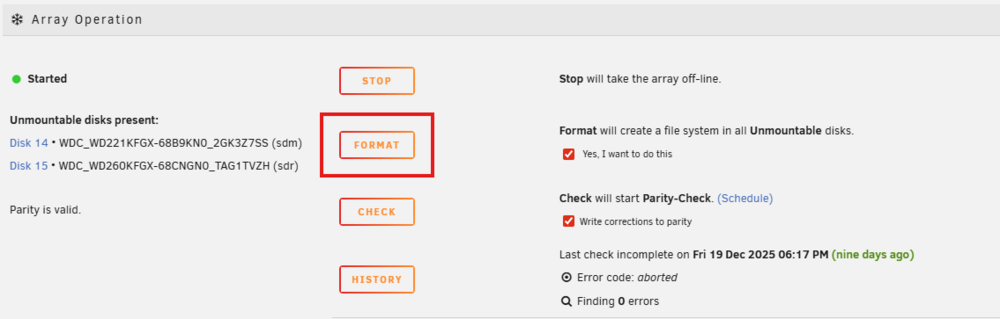
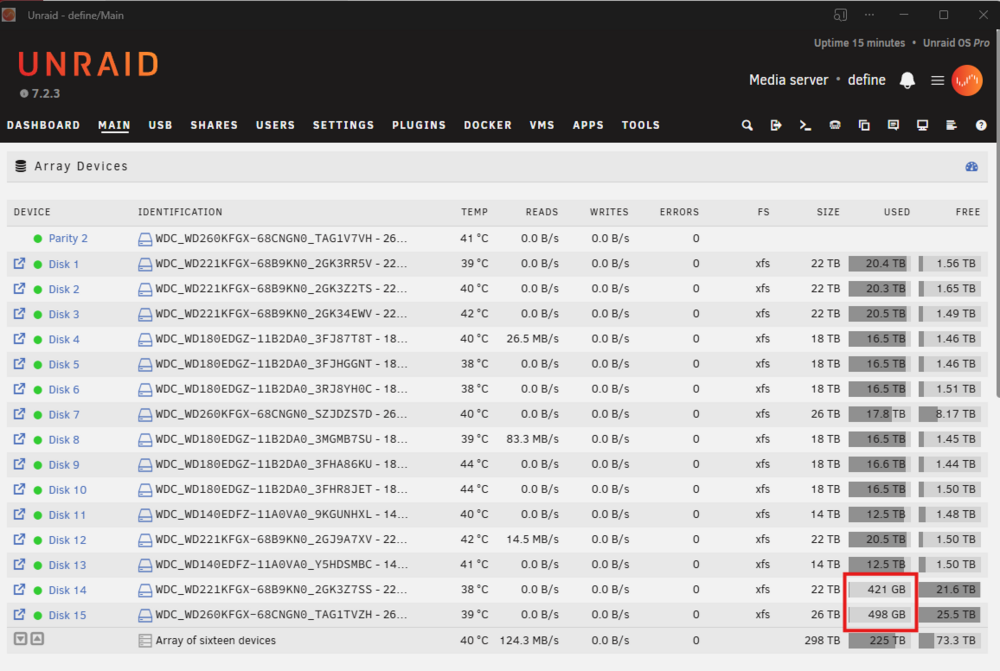
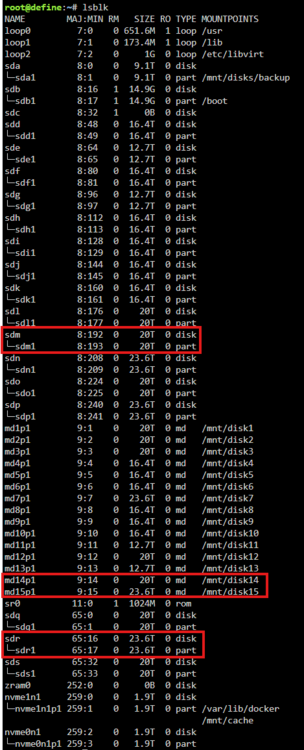
4 hours later, still no output from those commands. Oh well, here goes a format 😁 🤞🏽 Edit: Interestingly, format completed very quickly - I thought it would constitute a lengthy clean process as well - I guess it successfully cleaned during the original format operation? Any reason to be concerned that the disks list ~1.9% of data already "Used"? 421 GB for the 22 TB disk and 498 GB for the 26 TB disk I had a quick look with lsblk and didn't notice any bonus partitions nor do I see files when trying to browse the mount points
-
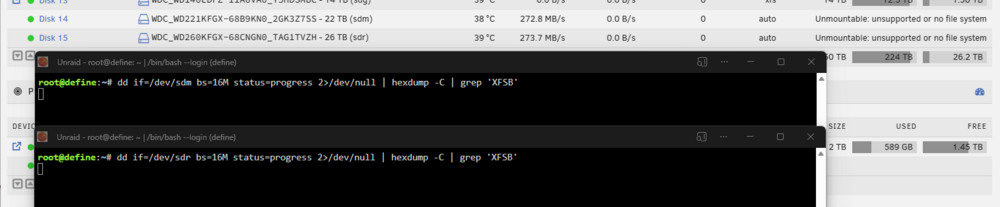
Thanks for that. Been about 10 minutes now and no output from either. Guessing they weren't formatted then.
-
That's the question I'm asking - if it's possible to determine. Between the clear supposedly finishing and the first power event that triggered the parity check (a day or so) I didn't get a chance to manually validate. As I understand it, if the format never completed then the behaviour explains itself and there is no useful data on those disks anyway and my solution would be to format again. However, I don't know if there's a chance for the format to have happened and then the power event caused something strange to happen or to revert to a previous config while there having been some data written to those disks that I now can't identify...
-
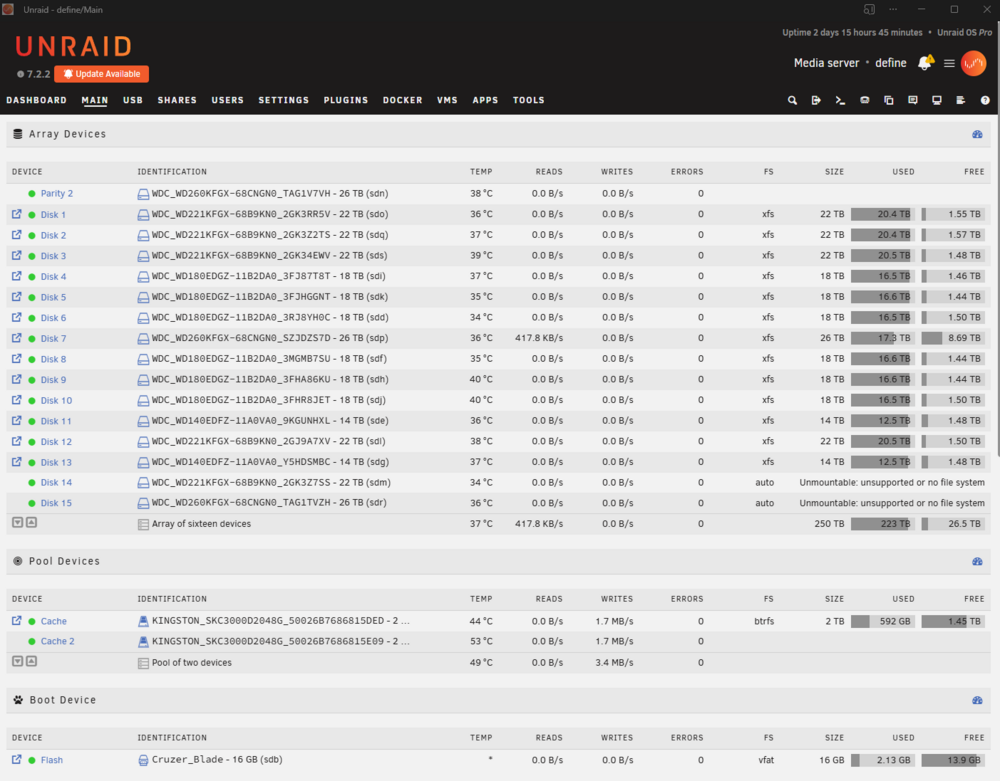
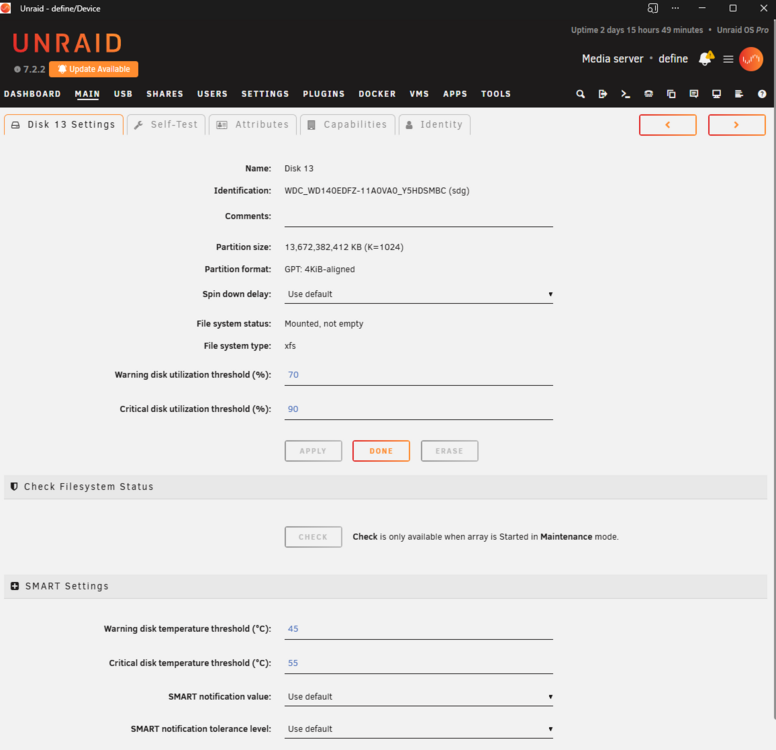
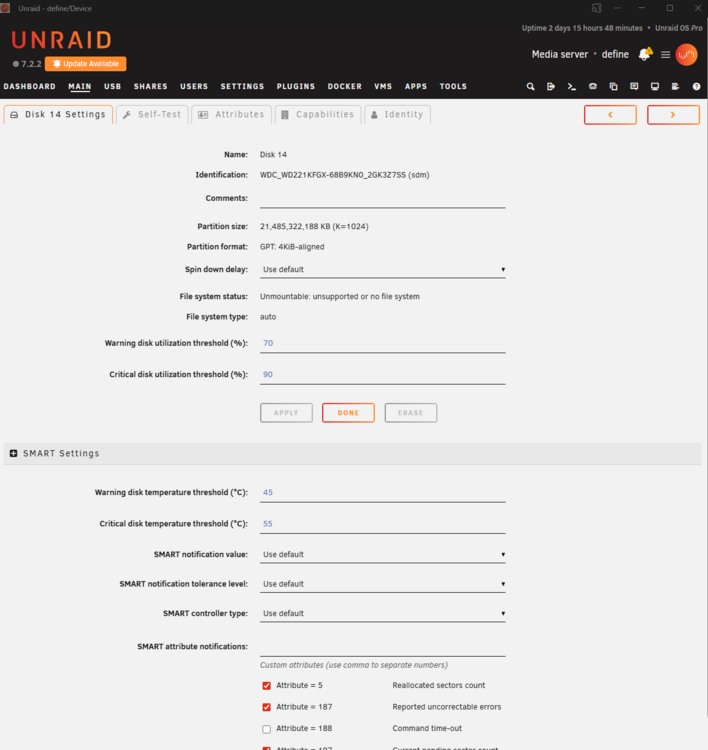
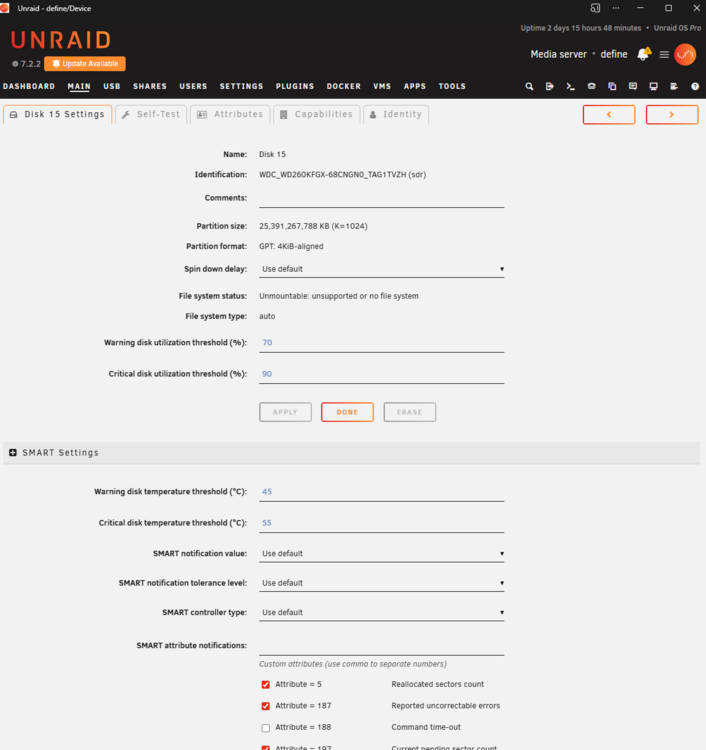
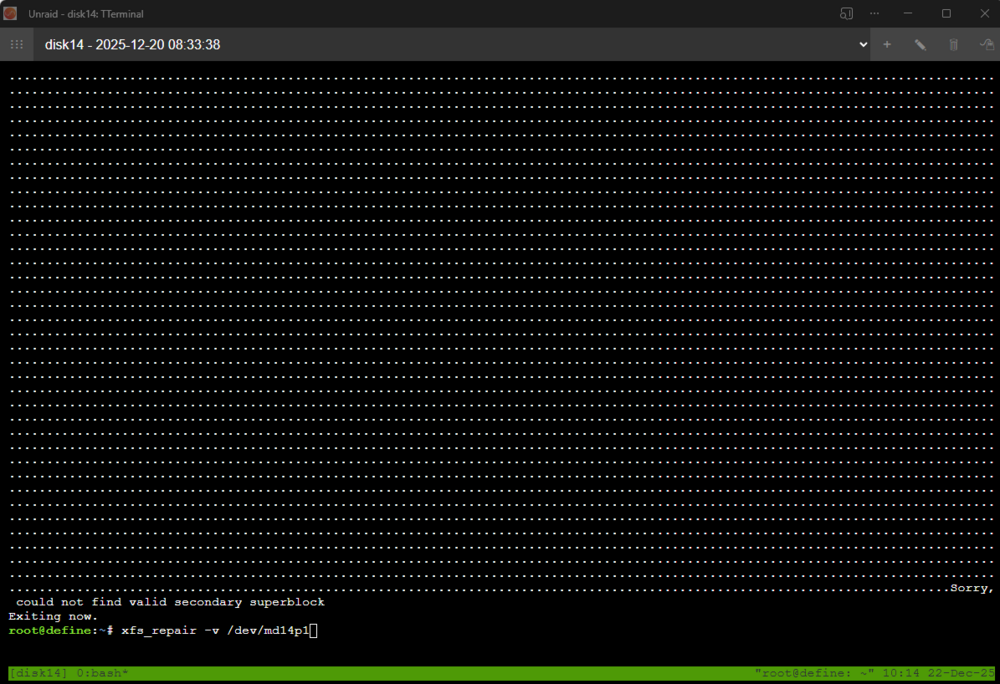
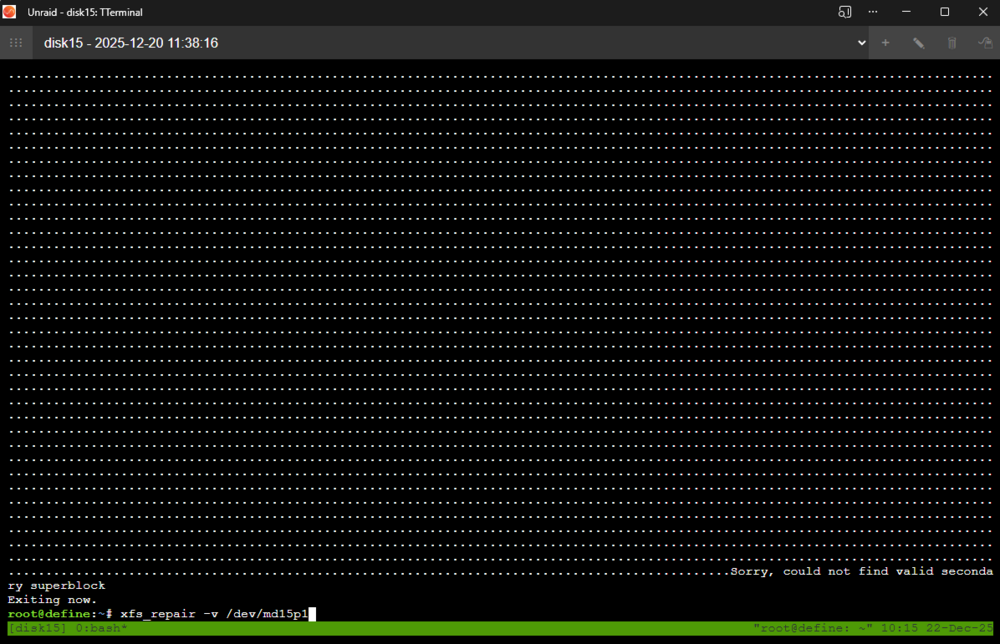
Hi all, Back with another weird issue. Long story short, I have the error in the title on two drives following a power outage during parity check, wondering how to pull data off them before reformatting and re-adding to array. Details below: I recently added 3x new 26 TB HDDs to my array. One replaced a failed 14 TB drive (removed failed drive, added new (Disk 7) rebuilt disk) One replaced the existing 22 TB Parity (added 26 TB Parity 2, recalculated, removed Parity 1) The final 26 TB one, along with the 22TB previously-Parity 1 drive were added as new disks, Disk 15 and Disk 14 respectively. After the final two disks were added parity, they were cleared as normal, this took a couple of days. I didn't monitor the state after this but there was a power outage that resulted in an unsafe shutdown. On restart, the array was recalculating parity, as expected. During the next couple of days, there was another power outage. When the array came back up, it mounted, but the two new disks now show up with the FS attribute showing as "auto" and the error: Unmountable: unsupported or no file system I have looked through other threads and performed the following steps. Firstly, there is no Check Filesystem Status section in these disks settings, probably because they're not even identified as xfs, so I can't "click the Check button" as is referenced in other threads. See below Disk 14 and Disk 15 Settings. I've also added a Disk 13 Settings screenshot of a good disk that does show the section and button. I instead manually ran xfs_repair -v /dev/md14p1 and xfs_repair -v /dev/md15p1 on the disks. This immediately detects a bad primary superblock and then takes over a day on each drive (I guess it's scanning the whole disk?) and fails to find a secondary superblock. Phase 1 - find and verify superblock... bad primary superblock - bad magic number !!! attempting to find secondary superblock... ................................................ Sorry, could not find valid secondary superblock Exiting now. Is there a next step to try and repair the filesystem on these disks and attempt to view what files may have been placed there in the day or two they were live before this problem? Ideally I'd just want to access and pull those files off, then I assume reformat these two again? I have since solved my power issue - I have a UPS that is now 3-4 years old and Unraid is configured to shut down when it reaches 10 minutes of battery run-time left. The UPS used to last about 2 hours, however, due to battery degradation, now after an hour on no power, it quickly drops from reporting ~45 mins runtime left to 2 mins, then loses power within the minute. I have now recalibrated it and set Unraid to shut down after 20 minutes of a continued power outage event to avoid this same problem. I've also attached diagnostics. define-diagnostics-20251222-1021.zip
-
Can you confirm that in that time it did at least one full pass of all memory? I recently did a memtest of 2x 32GB DDR4 SODIMMs and it took longer than overnight to complete the first pass.
-
So you say they passed Memtest, but also that they locked up on Memtest? Which is it? If they're locking up, that's pointing to the problem... If you're running them at their rated speed or less then clearly points to faulty RAM. Can you figure out which stick(s) are bad? It's a time consuming process but the best way is to hammer them with Memtest for a while
-
Disable Fast Boot otherwise Unraid can't automatically boot as Fast Boot disables USB boot. Set iGPU to Multi Monitor to allow IPMI video output and iGPU access to Unraid. Set SlimSAS configuration to SATA if you plan on using the SAS plug on the board to split to 4x SATA drives.
-
I'll check when I get home but I was using most of the PCIe slots plus both M.2 slots. I have two 2TB NVMe drives as mirrored cache, the IPMI card in the top PCIe slots closest to the CPU, then two HBA cards (one slot gap between them for cooling), and one ASUS 10GbE card in the bottom slot. I can double check the actual slots when I get home, although since then I've changed to a HBA with more slots so one more slots available .
-
I didn't know about the ASRock board when I was choosing to be honest. I thought the ASUS was the only LGA 1700 board that supported ECC RAM. The 14 onboard SATA slots look great on the ASRock and largely negates the requirement for more PCIe slots for more HBAs. However, for me, IPMI was the killer feature.
-
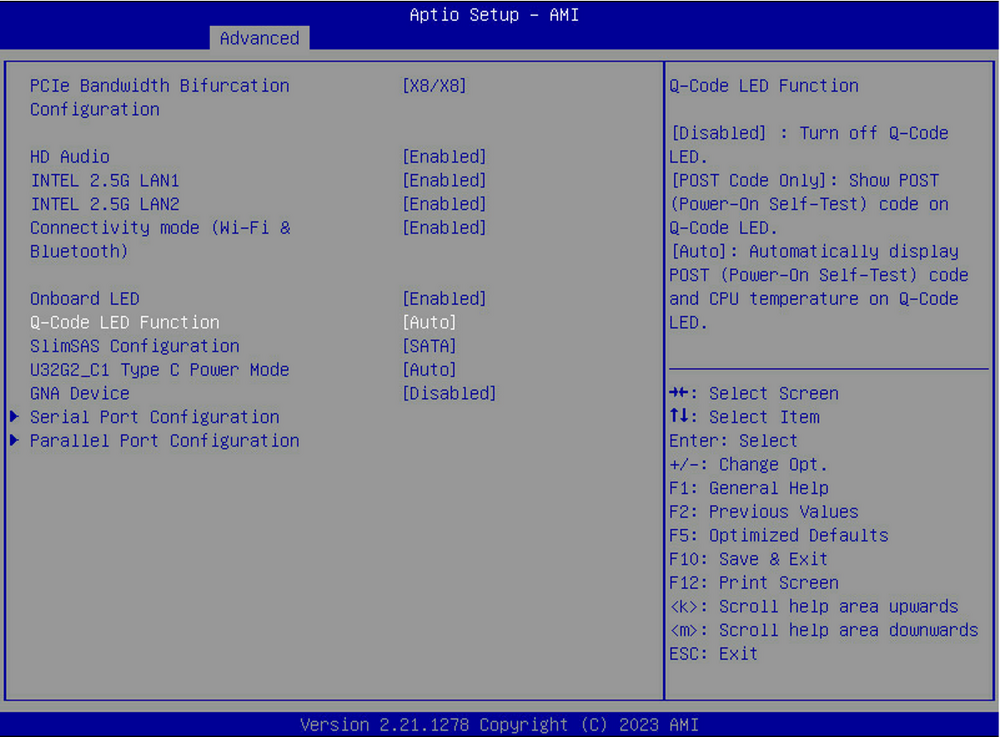
Go to Advanced > Onboard Devices Configuration You'll find a setting for SlimSAS Configuration. You want to change that to SATA.
-
How did you manage this by the way? Was a Windows installer ISO sufficient? Or did you have to bodge together something custom? As I understand it, the Intel ME driver etc (Windows-only) installer also includes firmware updates for the chipset or some subcomponents of it? Unless I've misunderstood it... but I always see on motherboard manufacturer manuals/guides, to ALWAYS upgrade Intel ME.
-
Interesting, 1.1.34 is the latest version for the full sized board/card. (I've got 1.1.33 installed) https://www.asus.com/motherboards-components/motherboards/workstation/pro-ws-w680-ace-ipmi/helpdesk_bios?model2Name=Pro-WS-W680-ACE-IPMI
-
My screenshot was from the ATX sized WS W680-ACE IPMI where the IPMI card is a separate add-in card that occupies a PCI-e slot and needs to be wired in to front panel headers, power, etc (ugly). Seems they're not so comparable to the built-in mATX version though if these differences exist? Have you got the latest BIOS? Edit: actually, going by your screenshot, seems you've got the same version as me. Hmm.
-
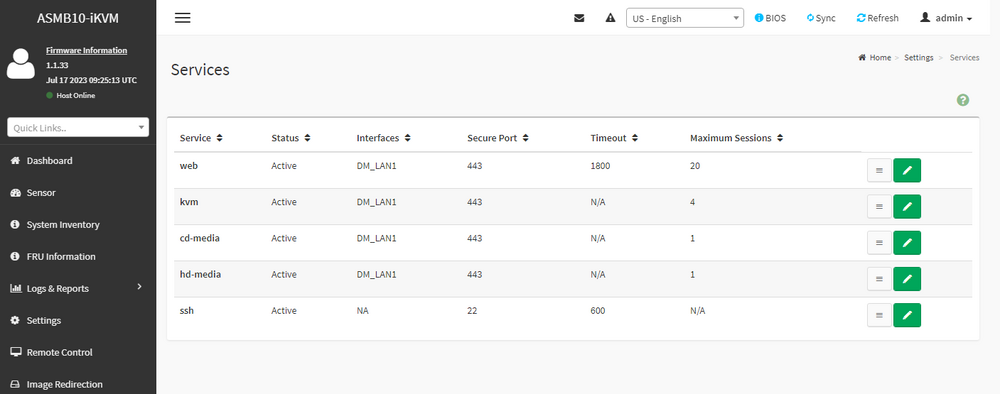
Anyone? This has happened multiple times now and is incredibly frustrating. I can't figure out what's triggering it, seems to be network related. As a paid product, what type of support are we entitled to? I'm happy to do some digging of my own if I can at least be pointed in the right direction.Make sure you've turned off Fast Boot as that will disable booting from USB (which Unraid requires)Just checked this on mine too. It looks like it is in Settings > Services
 The IPMI card has pins for both plugging into the motherboard header pins, as well as passing through to the case buttons. You don't lose functionality, depending on the size of your case you might need extensions though. I ended up making some longer cables so I could cable manage them.The reason, btw, is because fast boot achieves its speediness by only enabling core hardware and features for POST and leaving everything else to the OS. Some of this "unnecessary" functionality that doesn't get loaded includes USB booting.Couple more updates... on 6.12.10... just happened again. As far as I can tell there's some networking problem as everything on my Unraid boxes main IP is failing when this occurs. IPv4 address is 10.10.10.250 and nothing responds on it. Not Unraid Web GUI, not containers exposing ports on it through a custom bridge network. Other containers bridged to separate networks continue working fine throughout the outage.








