






fredskis
Members
-
Joined
-
Last visited
Everything posted by fredskis
-
You've very much echoed my sentiments. For me, a frustrating security aspect, which I thought granular AD permissions could solve, is that with Unraid local user access, access is granted at a share level, and there is no way to share a subfolder separately so I need to grant users full read or read/write access to the whole share when I only want to provide access to part of it. I guess that thinking leans to creating lots of individual Unraid shares, but then you're at a loss when moving files between shares, being forced to "copy+delete" rather than being able to "move" as well as the overhead of managing multiple shares and not being able to logically group them. Coming from a mentality of least-privilege access makes me internally scream trying to figure out a way to securely store and separate my family's photo libraries with individual user accounts, while avoiding granting too much access - understanding these are running on "regular users'" computers where they may be exposed to malware or ransomware from less-educated users feels like I'm opening up security holes I shouldn't have to
-
I recently hopped on the Unraid wagon and in passing, seeing the Active Directory support in the SMB settings thought it was more mature than it is... I'm not very hopeful that AD permissions currently work on Unraid from my configuration and the various threads in this subforum. I tried following this guide, How To: Active Directory on unRAID 6, but it just resulted in removing access entirely. I come from an enterprise IT background with much experience on the Windows Server side and am probably only at a hobbyist level of expertise with Linux and Samba. I don't want to have to dig into config files and potentially cause issues with updates and overriding GUI, currently stumped and considering just reverting back to regular non-AD SMB.
-
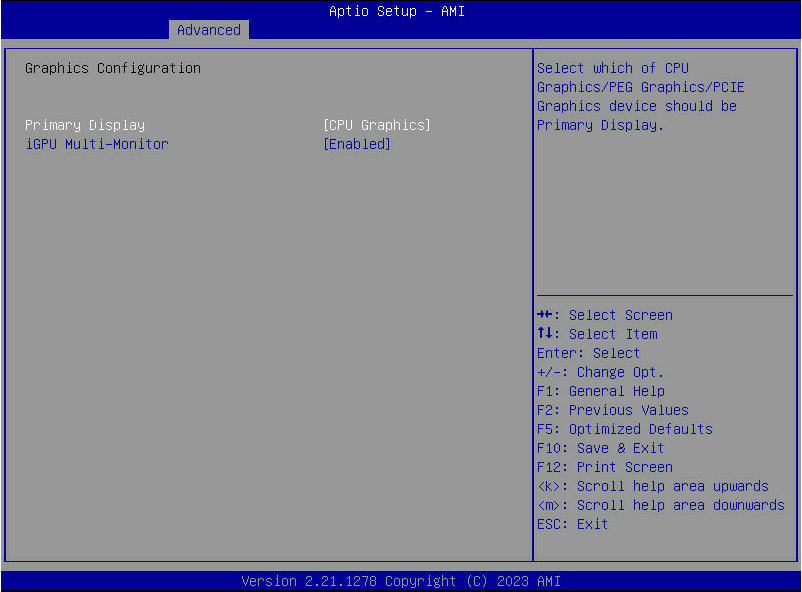
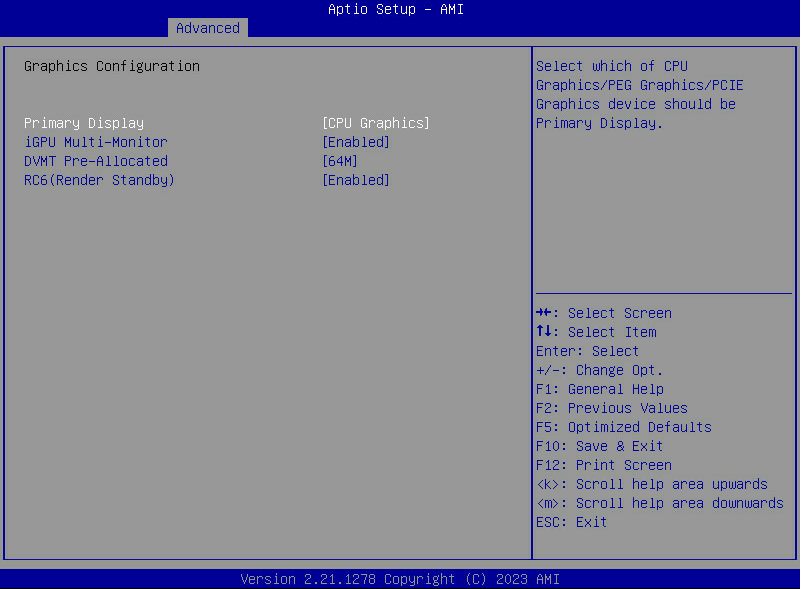
That's really strange. If you disable CSM mode do the normal options come back? I have 2x LSI 9207-8i I bought from eBay which I'm maybe 40% sure they're clones due to the price, but they do the job. They didn't need changing to CSM mode to work. Maybe you might have to try a different HBA model I took some screenshots earlier today as I was documenting the settings I changed before upgrading BIOS and troubleshooting an issue where my Unraid box doesn't restart but requires a second power off/on. Screenshotted what I first see when switching to CPU Graphics: and then two extra settings show up after booting with CPU Graphics selected: I noticed these got reset when I removed my HDMI dongle/terminator thing.
-
This is the second time I've had a device be disabled on system boot/restart. I'm rebuilding on top of itself, this will take a few days annoyingly. Can you please point me to which logs or what to look for to determine if there is a root cause I should be aware of? This is on different cables and on a different HDD than previously. define-diagnostics-20240115-1152.zip
-
No issues on the SlimSAS connector. I have, however, had another couple of read errors on other drives using these provided cables. I went and bought 4x sets of these StarTech cables and they seem to be working wonderfully. StarTech Mini-SAS to SATA Cable, 1x SFF-8087 Plug, 4x SATA Female - 50 cm - Umart.com.au Only the third parity rebuild in as many weeks 😅 - at least it's about to complete.
-
Haha wow I just spent the last half hour wondering why this wasn't working - I had started off in bridge mode as I prefer that over host. Noticed the log and scratched my head why the template was using port 2343 instead of 2342. My separate manual Docker Compose PhotoPrism yml was using 2342 so confused me even more. Manually adding a new port mapping is all you need to do. time="2024-01-08T15:48:33+10:00" level=info msg="webdav: shared /originals/" time="2024-01-08T15:48:33+10:00" level=info msg="webdav: shared /import/" time="2024-01-08T15:48:33+10:00" level=info msg="server: disabled auto tls" time="2024-01-08T15:48:33+10:00" level=info msg="server: listening on 0.0.0.0:2342 [1.322683ms]" Attached what the new port config should look like. You could also just point to 2343 on the host if you're using that already.

-
I'm home now after 2 days away for Christmas with family. The two errors happened to the same disk with different cables on different controllers. I will try connect it directly to the motherboard via the onboard SlimSAS connector, got one of those cables just in case too. Should have it set up that way in a couple of hours then will monitor it. Another 10TB left to transfer from the original 160TB array then I can add parity drive and see what happens 😬
-
Hello, I'm a relatively new Unraid user but generally pretty knowledgeable with computing and servers. I have been migrating my data from my existing working array to Unraid. I bought 4* new 22TB WD Red NAS Pro drives and installed them into my new Unraid server. I left one out as it will be parity once all the transfers are complete and added 3* of them to a new unRAID array. I started copying data over, emptying out drives on original array running on old server, then shutting it down along with the Unraid server, moving HDDs across, adding to array and resuming copying process. My new Unraid server is using 2* "9207-8i" HBAs from eBay, which came with 2* SFF-8087 to 4*SATA cables each. After about 20-30TB copied across, one of the drives was recording 199 UDMA CRC errors in SMART. I ended up moving this to the other HBA and different cable as I moved the HDDs to their "final" positions. Things were fine for a few days and now the same disk, on a different HBA and cable, is reporting Read errors and it seems to go half-offline and the array in a weird state where the user shares are no longer visible and I can't view any disk data to verify SMART reports without stopping and restarting the array. This has happened twice now in the last 24 hours. I downloaded diagnostic logs before restarting the array the last time, and after restarting the array, I downloaded SMART reports for the affected disk. Does this point to a bad (new) drive? define-diagnostics-20231226-1207.zip define-smart-20231226-1228.zip



