





keithbrakebill
Members
-
Joined
-
Last visited
-
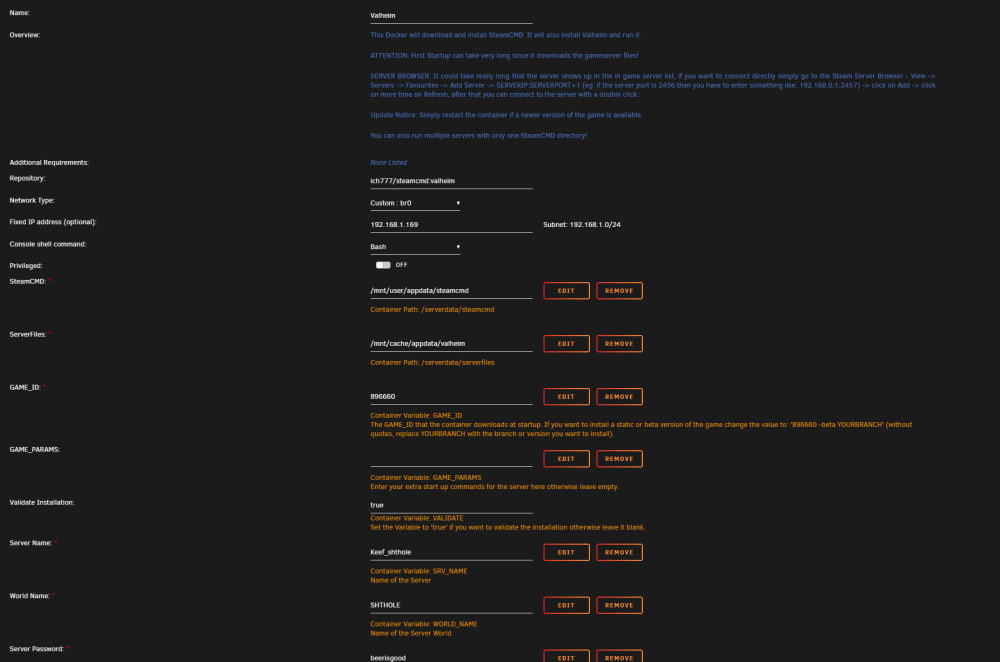
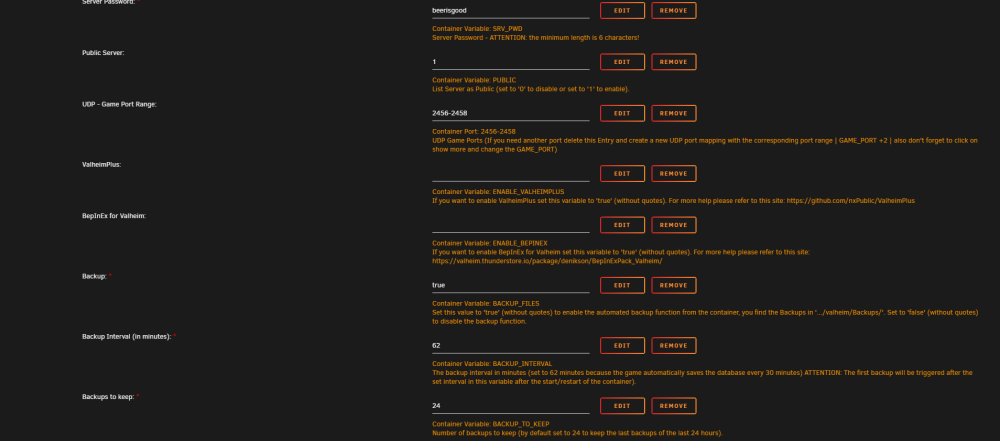
Thanks for the response, I am just trying to setup plain vanilla Valheim. I have restarted the container also deleted and reinstalled multiple times. I did turn off verification after taking these screenshots. I have forwarded ports 2456-2458 on my router still not seeing the server for whatever reason.
-
keithbrakebill joined the community
-
text error warn system array login [S_API] SteamAPI_Init(): Loaded local 'steamclient.so' OK. CAppInfoCacheReadFromDiskThread took 1 milliseconds to initialize Setting breakpad minidump AppID = 892970 SteamInternal_SetMinidumpSteamID: Caching Steam ID: 76561197960265728 [API loaded no] [S_API FAIL] Tried to access Steam interface SteamNetworkingUtils004 before SteamAPI_Init succeeded. ---Ensuring UID: 99 matches user--- ---Ensuring GID: 100 matches user--- ---Setting umask to 000--- ---Checking for optional scripts--- ---No optional script found, continuing--- ---Taking ownership of data...--- ---Starting...--- ---Update SteamCMD--- Redirecting stderr to '/serverdata/serverfiles/Steam/logs/stderr.txt' Logging directory: '/serverdata/serverfiles/Steam/logs' [ 0%] Checking for available updates... [----] Verifying installation... Steam Console Client (c) Valve Corporation - version 1702079268 -- type 'quit' to exit -- Loading Steam API...dlmopen steamservice.so failed: steamservice.so: cannot open shared object file: No such file or directory OK Connecting anonymously to Steam Public...OK Waiting for client config...OK Waiting for user info...OK ---Update Server--- ---Validating installation--- Redirecting stderr to '/serverdata/serverfiles/Steam/logs/stderr.txt' Logging directory: '/serverdata/serverfiles/Steam/logs' [ 0%] Checking for available updates... [----] Verifying installation... Steam Console Client (c) Valve Corporation - version 1702079268 -- type 'quit' to exit -- Loading Steam API...dlmopen steamservice.so failed: steamservice.so: cannot open shared object file: No such file or directory OK Connecting anonymously to Steam Public...OK Waiting for client config...OK Waiting for user info...OK Update state (0x5) verifying install, progress: 2.89 (40310576 / 1396527811) Update state (0x5) verifying install, progress: 85.24 (1190374358 / 1396527811) Success! App '896660' fully installed. CWorkThreadPool::~CWorkThreadPool: work complete queue not empty, 1 items discarded. CWorkThreadPool::~CWorkThreadPool: work processing queue not empty: 1 items discarded. ---Prepare Server--- ---Server ready--- ---Starting Backup daemon--- ---Update check deprecated!--- ---Start Server--- I have had no luck having my server populate in Valheim, anything in these logs that can be an issue?

