bithoarder
Members
-
Joined
-
Last visited
Everything posted by bithoarder
-
Didn't we do that when we created a new install automatically? That one came up correctly on the same hardware. I've done a little bit of experimenting, copying parts of config over, and seeing if it boots, but I haven't gotten very far - I'm being forced to do actual work today.
-
I'm more than willing to try this, but could you help me understand what it'll do that creating the image automatically didn't (?) I'm pretty sure that I'll have no trouble with the manual method, either. BTW, I've noticed that the images which won't log on, don't shut down, either... they freeze on the "up to 90 seconds..." message, and never move on.
-
I just tried this... the new drive now gives the same behavior, and I can't get it to accept the logon input.
-
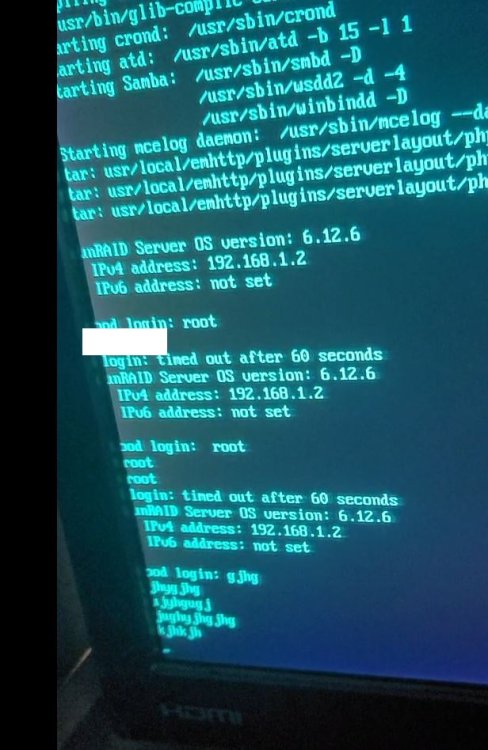
No... it still didn't seem to recognize the "Enter" and process my input... it just translated to a line-feed still. i set up another card, and with it, the machine boots up (and logs in) without trouble.
-
I think we cross-posted a moment ago. I'll try this, but I'm pretty sure it'll work.
-
It was a long shot, but I deleted config/shadow and config/smbpasswd. It's not the first time I've done that - I swear I got locked out of the root account incorrectly during the weekend. I'm lucky, I guess, the array itself doesn't matter much at the moment, but I had a lot of effort into container setup. If I need to start again, it seems like reason for very deep concern. I'm hoping there's a solution that can at least save some of my work, if not recover the current install.
-
I don't. So much of the setup happened in the last 24 hours that a backup wouldn't have caught most of my changes anyway. That question made me concerned.
-
I just tried... I get the same behavior. It appears to start up, but it's not connectable over the network, and the same thing happens where hitting "Enter" just starts a new line.
-
I moved to new hardware, and it seems like it went okay, but I the console won't let me log on. Hitting "enter" doesn't accept input - it just seems to place a carriage return, and I can keep typing. I'm not able to connect remotely, or get a ping response from the machine. Thanks in advance for your suggestions!