bithoarder
Members
-
Joined
-
Last visited
-
Thanks again! I confirm for anyone who's planning to do the same: it worked flawlessly. I've removed and restored several pools now. When I recreated the pool, I manually chose "BTRFS/RAID 5"... I did not test "auto". My confidence is higher now, though. I'm very much open to suggestions for better ways to make backup sets, though. My IDEAL would be creating another "UnRAID array", because of the flexibility, and because you can have parity while keeping the drives readable as standalones. I don't know why I thought that feature was slated for 7.0.
-
raid5 btrfs pool. I'm hoping to remove and put six-drive pools into storage and restore them at some future date. As far as I know, I'd just stop the array and pull them out?
-
I've created a couple of BTRFS pools (6 drives each, 1 parity) to store some data offline. What's the best way to remove the array and be sure that I can restore it again later? It doesn't seem like it would be an unusual thing to do, but I can't find any writeups. Thanks in advance!
-
It looks like everything is there... thanks again!
-
Thank you again for your help... I'm not really sure where to go from here, and I want to tread lightly - especially since I don't fully understand what the repairs actually did. My guess is that I'm ready to try to bring Drive 4 back online? Another 14TB drive arrived today, but I'm thinking the first one may be okay, after the recabling(?)
-
Started. Disc 4 is currently emulated - I really don't know at the moment if I'm missing any data. ood-diagnostics-20240826-1231.zip
-
I do... I haven't checked them yet. I've been kind of afraid to know, and wanted to get everything else protected, first. Thank you for mentioning it. I'm not really sure I've lost anything at the moment. At least some missing files reappeared after the restart.
-
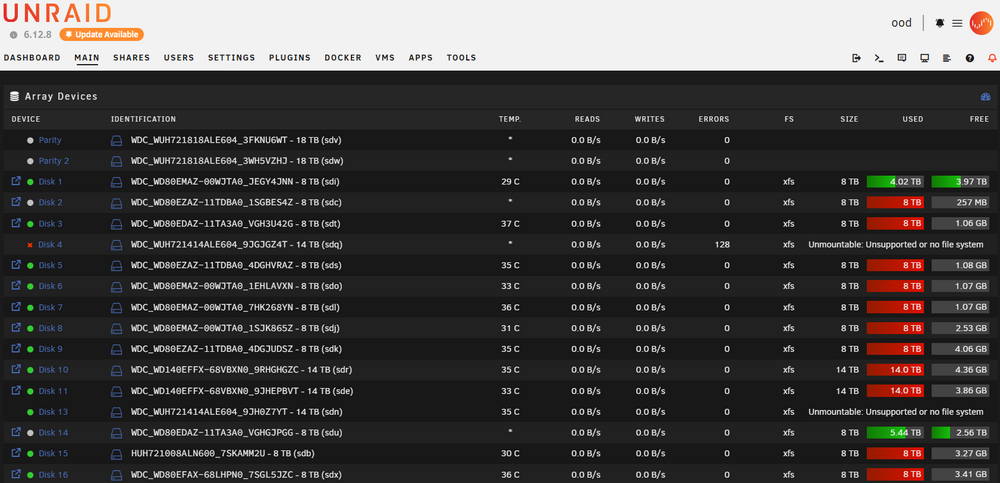
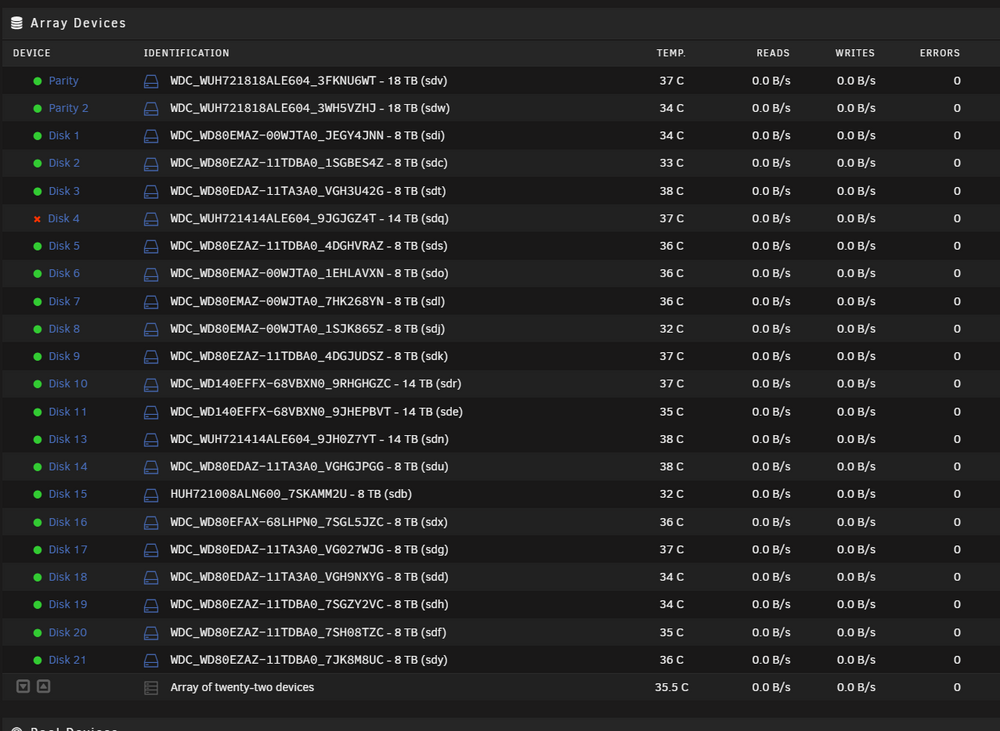
I'd like to be sure that I'm following this. The disk hasn't been reporting as "unmountable or unformatted" for a while. Disk 13 appears to be active in the array, and Disk 4 is emulated. The array is still in maintenance mode. What should I do next?
-
Attached... disc 13 looks pretty scary. Discs_4_13.txt
-
It took me a little while to figure out how to do this... I almost did it from a prompt, but when I saw the UI element in the Device Settings, I understood. Disk 4: Phase 1 - find and verify superblock... writing modified primary superblock Phase 2 - using internal log - zero log... ERROR: The filesystem has valuable metadata changes in a log which needs to be replayed. Mount the filesystem to replay the log, and unmount it before re-running xfs_repair. If you are unable to mount the filesystem, then use the -L option to destroy the log and attempt a repair. Note that destroying the log may cause corruption -- please attempt a mount of the filesystem before doing this. Disk 13: Phase 1 - find and verify superblock... writing modified primary superblock Phase 2 - using internal log - zero log... ERROR: The filesystem has valuable metadata changes in a log which needs to be replayed. Mount the filesystem to replay the log, and unmount it before re-running xfs_repair. If you are unable to mount the filesystem, then use the -L option to destroy the log and attempt a repair. Note that destroying the log may cause corruption -- please attempt a mount of the filesystem before doing this.
-
Thanks Again! I see that it needs to be started in "maintenance mode" to do that. Do you have any idea how long I can expect that to take with a 14tb drive?
-
The cable was delayed. New diagnostics are attached. I'm pretty sure I did this wrong, and rebuilt the parity instead of the drives. Thanks for looking! EDIT: I might actually be okay, data wise. It's showing that Drive 4 is emulated, but it's no longer showing the two drives as unformatted. Unfortunately, I need to head out for a couple of hours, but I'm more optimistic now. ood-diagnostics-20240825-1619.zip
-
Will do. I opened the machine up and realized that I don't have a spare. Hopefully I'll have a replacement "SFF-8643 to (4) SATA" tomorrow. Thank you!
-
Of course... thanks! I've got a really bad feeling that I did this the wrong way, but I swear the disc activity showed writing to the new drive(s). ood-diagnostics-20240822-1418.zip
-
UnRAID removed two drives from my array because of performance problems. I replaced both with "refurbs". I restarted the array, and one of the drives dropped out again during the rebuild. I let the rebuild finish, expecting to restore one of the drives. Now, I'm seeing both of those drives listed as "Unmountable", even though all but one of the drives appears to be back in operation. Did I just rebuild my parity and lose the data on my drives? One of the drives was dumping so many "power on reset" errors that my log doesn't go back to start of the array rebuild.