GradwellZA
Members
-
Joined
-
Last visited
-
GradwellZA changed their profile photo
-
This is also something that comes up during the loop cycle: ** INVOKEAI INSTALLATION SUCCESSFUL ** If you installed manually from source or with 'pip install': activate the virtual environment then run one of the following commands to start InvokeAI. Web UI: invokeai-web Command-line client: invokeai If you installed using an installation script, run: /config/03-invokeai/invokeai/invoke.sh Add the '--help' argument to see all of the command-line switches available for use. [2024-01-28 01:08:16,911]::[InvokeAI]::INFO --> Patchmatch initialized /home/abc/miniconda3/lib/python3.11/site-packages/torchvision/transforms/functional_tensor.py:5: UserWarning: The torchvision.transforms.functional_tensor module is deprecated in 0.15 and will be **removed in 0.17**. Please don't rely on it. You probably just need to use APIs in torchvision.transforms.functional or in torchvision.transforms.v2.functional. warnings.warn( [2024-01-28 01:08:21,568]::[uvicorn.error]::INFO --> Started server process [1055] [2024-01-28 01:08:21,568]::[uvicorn.error]::INFO --> Waiting for application startup. [2024-01-28 01:08:21,569]::[InvokeAI]::INFO --> InvokeAI version 3.6.2 [2024-01-28 01:08:21,569]::[InvokeAI]::INFO --> Root directory = /config/03-invokeai/invokeai [2024-01-28 01:08:21,573]::[InvokeAI]::INFO --> Initializing database at /config/03-invokeai/invokeai/databases/invokeai.db [2024-01-28 01:08:26,606]::[InvokeAI]::ERROR --> Problem creating migrations table: database is locked [2024-01-28 01:08:26,609]::[uvicorn.error]::ERROR --> Traceback (most recent call last): File "/home/abc/miniconda3/lib/python3.11/site-packages/invokeai/app/services/shared/sqlite_migrator/sqlite_migrator_impl.py", line 101, in _create_migrations_table cursor.execute( sqlite3.OperationalError: database is locked The above exception was the direct cause of the following exception: Traceback (most recent call last): File "/home/abc/miniconda3/lib/python3.11/site-packages/starlette/routing.py", line 705, in lifespan async with self.lifespan_context(app) as maybe_state: File "/home/abc/miniconda3/lib/python3.11/site-packages/starlette/routing.py", line 584, in __aenter__ await self._router.startup() File "/home/abc/miniconda3/lib/python3.11/site-packages/starlette/routing.py", line 682, in startup await handler() File "/home/abc/miniconda3/lib/python3.11/site-packages/invokeai/app/api_app.py", line 105, in startup_event ApiDependencies.initialize(config=app_config, event_handler_id=event_handler_id, logger=logger) File "/home/abc/miniconda3/lib/python3.11/site-packages/invokeai/app/api/dependencies.py", line 73, in initialize db = init_db(config=config, logger=logger, image_files=image_files) ^^^^^^^^^^^^^^^^^^^^^^^^^^^^^^^^^^^^^^^^^^^^^^^^^^^^^^^^^^^^^^ File "/home/abc/miniconda3/lib/python3.11/site-packages/invokeai/app/services/shared/sqlite/sqlite_util.py", line 34, in init_db migrator.run_migrations() File "/home/abc/miniconda3/lib/python3.11/site-packages/invokeai/app/services/shared/sqlite_migrator/sqlite_migrator_impl.py", line 47, in run_migrations self._create_migrations_table(cursor=cursor) File "/home/abc/miniconda3/lib/python3.11/site-packages/invokeai/app/services/shared/sqlite_migrator/sqlite_migrator_impl.py", line 116, in _create_migrations_table raise MigrationError(msg) from e invokeai.app.services.shared.sqlite_migrator.sqlite_migrator_common.MigrationError: Problem creating migrations table: database is locked [2024-01-28 01:08:26,609]::[uvicorn.error]::ERROR --> Application startup failed. Exiting. Unknown args: ['--web'] Unknown args: ['--web'] Unknown args: ['--web'] Unknown args: ['--web'] App is starting! Channels: - defaults Platform: linux-64 Collecting package metadata (repodata.json): ...working... done Solving environment: ...working... done # All requested packages already installed. Channels: - conda-forge - defaults Platform: linux-64 Collecting package metadata (repodata.json): ...working... done Solving environment: ...working... done ## Package Plan ## environment location: /config/03-invokeai/env added / updated specs: - git - python=3.10 The following NEW packages will be INSTALLED: _libgcc_mutex conda-forge/linux-64::_libgcc_mutex-0.1-conda_forge _openmp_mutex conda-forge/linux-64::_openmp_mutex-4.5-2_gnu bzip2 conda-forge/linux-64::bzip2-1.0.8-hd590300_5 c-ares conda-forge/linux-64::c-ares-1.26.0-hd590300_0 ca-certificates conda-forge/linux-64::ca-certificates-2023.11.17-hbcca054_0 curl conda-forge/linux-64::curl-8.5.0-hca28451_0 gettext conda-forge/linux-64::gettext-0.21.1-h27087fc_0 git conda-forge/linux-64::git-2.43.0-pl5321h7bc287a_0 keyutils conda-forge/linux-64::keyutils-1.6.1-h166bdaf_0 krb5 conda-forge/linux-64::krb5-1.21.2-h659d440_0 ld_impl_linux-64 conda-forge/linux-64::ld_impl_linux-64-2.40-h41732ed_0 libcurl conda-forge/linux-64::libcurl-8.5.0-hca28451_0 libedit conda-forge/linux-64::libedit-3.1.20191231-he28a2e2_2 libev conda-forge/linux-64::libev-4.33-hd590300_2 libexpat conda-forge/linux-64::libexpat-2.5.0-hcb278e6_1 libffi conda-forge/linux-64::libffi-3.4.2-h7f98852_5 libgcc-ng conda-forge/linux-64::libgcc-ng-13.2.0-h807b86a_4 libgomp conda-forge/linux-64::libgomp-13.2.0-h807b86a_4 libiconv conda-forge/linux-64::libiconv-1.17-hd590300_2 libnghttp2 conda-forge/linux-64::libnghttp2-1.58.0-h47da74e_1 libnsl conda-forge/linux-64::libnsl-2.0.1-hd590300_0 libsqlite conda-forge/linux-64::libsqlite-3.44.2-h2797004_0 libssh2 conda-forge/linux-64::libssh2-1.11.0-h0841786_0 libstdcxx-ng conda-forge/linux-64::libstdcxx-ng-13.2.0-h7e041cc_4 libuuid conda-forge/linux-64::libuuid-2.38.1-h0b41bf4_0 libxcrypt conda-forge/linux-64::libxcrypt-4.4.36-hd590300_1 libzlib conda-forge/linux-64::libzlib-1.2.13-hd590300_5 ncurses conda-forge/linux-64::ncurses-6.4-h59595ed_2 openssl conda-forge/linux-64::openssl-3.2.0-hd590300_1 pcre2 conda-forge/linux-64::pcre2-10.42-hcad00b1_0 perl conda-forge/linux-64::perl-5.32.1-7_hd590300_perl5 pip conda-forge/noarch::pip-23.3.2-pyhd8ed1ab_0 python conda-forge/linux-64::python-3.10.13-hd12c33a_1_cpython readline conda-forge/linux-64::readline-8.2-h8228510_1 setuptools conda-forge/noarch::setuptools-69.0.3-pyhd8ed1ab_0 tk conda-forge/linux-64::tk-8.6.13-noxft_h4845f30_101 tzdata conda-forge/noarch::tzdata-2023d-h0c530f3_0 wheel conda-forge/noarch::wheel-0.42.0-pyhd8ed1ab_0 xz conda-forge/linux-64::xz-5.2.6-h166bdaf_0 zstd conda-forge/linux-64::zstd-1.5.5-hfc55251_0 Downloading and Extracting Packages: ...working... done Preparing transaction: ...working... done Verifying transaction: ...working... done ERROR conda.core.link:_execute(945): An error occurred while installing package 'conda-forge::ca-certificates-2023.11.17-hbcca054_0'. Executing transaction: ...working... done Rolling back transaction: ...working... done [Errno 95] Operation not supported: 'cacert.pem' -> '/config/03-invokeai/env/ssl/cert.pem' ()
-
Perfect thanks so much, that would be amazing. I tried redoing the installer last night and this time I selected 02 - Automatic1111 instead of the 03 - InvokeAI WebUI. That worked perfectly. So looks like it's just 03 - InvokeAI WebUI install that is causing an issue. If you could figure it out and point me in the right direction, that would be absolutely amazing!
-
Hi everyone, Im having an issue installing stable diffusio. Hopefully someone can point me in the right direction? I install it easy enough, but it gets stuck during the post install script where it is trying to download condo-forge. Here is an excerpt from the log: The following NEW packages will be INSTALLED: _libgcc_mutex conda-forge/linux-64::_libgcc_mutex-0.1-conda_forge _openmp_mutex conda-forge/linux-64::_openmp_mutex-4.5-2_gnu bzip2 conda-forge/linux-64::bzip2-1.0.8-hd590300_5 c-ares conda-forge/linux-64::c-ares-1.26.0-hd590300_0 ca-certificates conda-forge/linux-64::ca-certificates-2023.11.17-hbcca054_0 curl conda-forge/linux-64::curl-8.5.0-hca28451_0 gettext conda-forge/linux-64::gettext-0.21.1-h27087fc_0 git conda-forge/linux-64::git-2.43.0-pl5321h7bc287a_0 keyutils conda-forge/linux-64::keyutils-1.6.1-h166bdaf_0 krb5 conda-forge/linux-64::krb5-1.21.2-h659d440_0 ld_impl_linux-64 conda-forge/linux-64::ld_impl_linux-64-2.40-h41732ed_0 libcurl conda-forge/linux-64::libcurl-8.5.0-hca28451_0 libedit conda-forge/linux-64::libedit-3.1.20191231-he28a2e2_2 libev conda-forge/linux-64::libev-4.33-hd590300_2 libexpat conda-forge/linux-64::libexpat-2.5.0-hcb278e6_1 libffi conda-forge/linux-64::libffi-3.4.2-h7f98852_5 libgcc-ng conda-forge/linux-64::libgcc-ng-13.2.0-h807b86a_4 libgomp conda-forge/linux-64::libgomp-13.2.0-h807b86a_4 libiconv conda-forge/linux-64::libiconv-1.17-hd590300_2 libnghttp2 conda-forge/linux-64::libnghttp2-1.58.0-h47da74e_1 libnsl conda-forge/linux-64::libnsl-2.0.1-hd590300_0 libsqlite conda-forge/linux-64::libsqlite-3.44.2-h2797004_0 libssh2 conda-forge/linux-64::libssh2-1.11.0-h0841786_0 libstdcxx-ng conda-forge/linux-64::libstdcxx-ng-13.2.0-h7e041cc_4 libuuid conda-forge/linux-64::libuuid-2.38.1-h0b41bf4_0 libxcrypt conda-forge/linux-64::libxcrypt-4.4.36-hd590300_1 libzlib conda-forge/linux-64::libzlib-1.2.13-hd590300_5 ncurses conda-forge/linux-64::ncurses-6.4-h59595ed_2 openssl conda-forge/linux-64::openssl-3.2.0-hd590300_1 pcre2 conda-forge/linux-64::pcre2-10.42-hcad00b1_0 perl conda-forge/linux-64::perl-5.32.1-7_hd590300_perl5 pip conda-forge/noarch::pip-23.3.2-pyhd8ed1ab_0 python conda-forge/linux-64::python-3.10.13-hd12c33a_1_cpython readline conda-forge/linux-64::readline-8.2-h8228510_1 setuptools conda-forge/noarch::setuptools-69.0.3-pyhd8ed1ab_0 tk conda-forge/linux-64::tk-8.6.13-noxft_h4845f30_101 tzdata conda-forge/noarch::tzdata-2023d-h0c530f3_0 wheel conda-forge/noarch::wheel-0.42.0-pyhd8ed1ab_0 xz conda-forge/linux-64::xz-5.2.6-h166bdaf_0 zstd conda-forge/linux-64::zstd-1.5.5-hfc55251_0 Downloading and Extracting Packages: ...working... done Preparing transaction: ...working... done Verifying transaction: ...working... done ERROR conda.core.link:_execute(945): An error occurred while installing package 'conda-forge::ca-certificates-2023.11.17-hbcca054_0'. Executing transaction: ...working... done Rolling back transaction: ...working... done [Errno 95] Operation not supported: 'cacert.pem' -> '/config/03-invokeai/env/ssl/cert.pem' () Then it just keeps retrying and it loops over and over again.
-
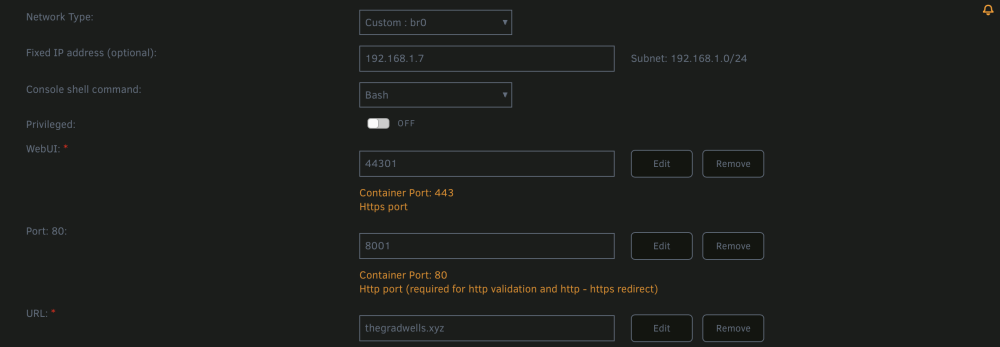
Hi guys, Hopefully you can help me. I had unRAID running on a HP MicroServer for a few years with no issues. However I've recently upgraded to a Dell R720 so I could increase my storage and install a Nvidia Tesla P4 for Hardware transcoding in Plex. However Im running into an issue that I did not experience on the HP. For some reason UnRAID refuses to use ports that I assign to docker containers. It uses its own and ignores the ports I enter in the container configs. Any ideas where I might me going wrong? My main issue at the moment is that I am running Audiobookshelf UnRAID App for my audiobooks and I have assigned its port as 13378 but it ignores that and uses port 80, I am also using SWAG App from the unRAID App Store and that too is ignoring my assigned ports I entered during its installation from port 80 to port 8001.