





Nedevski
Members
-
Joined
-
Last visited
-
I am trying to create a custom HomeAssistant integration using the current version of the GraphQL API just for fun. I'm aware the API is still pretty beta so I hope my findings help with the development. In the meantime I opened issues on GitHub but I figured I can create a post here so someone can help me with the API setup if I'm doing something wrong or have this documented in case I found actual issues. So here are my findings: 1. I'm unable to access the Apollo sandbox => Github Issue While I'm able to fetch data from the API, no matter what I do - I cannot enable the sandbox. I tried changing the environment to staging, enabling developer multiple times but nothing works and I get the default page. 2. I get an error when trying to fetch the docker containers => Github issue When I try to get docker container info, I get an error - "Cannot return null for non-nullable field Query.dockerContainers" I suspect that the issue is that I have a container stack using the Docker Compose Manager plugin, but still I think it should at least not crash like this. Any advice/help would be appreciated.
-
I just created a Firefox container, both with the default `bridge` network and with a custom one (simply `docker network create firefox`). Works with both, websites load, so it has internet. Should be a Nextcloud container specific issue then I guess.
-
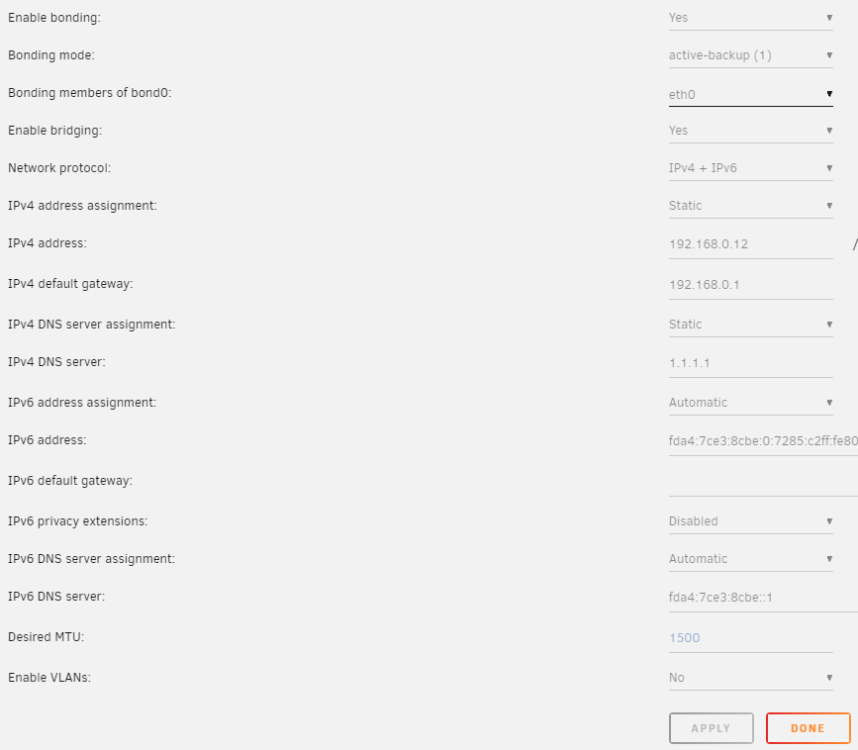
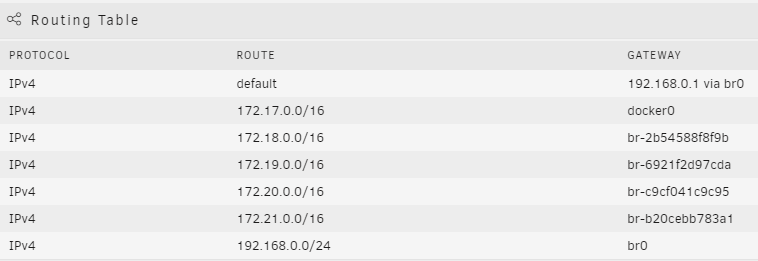
Updated DNS Server from 192.168.0.1 to 1.1.1.1, no change. Here are my settings, diagnostics also attached below. unraid-diagnostics-20240302-1052.zip
-
Nedevski changed their profile photo
-
I think my containers are unable to connect to the public internet. I have installed Nextcloud and Pterodactyl. For each of those I've created a custom network (docker network create customname). When I go to nextcloud.domain.com/settings/admin/overview I get this message: This server has no working internet connection: Multiple endpoints could not be reached. I never figured how to fix it, so I just use my instance like that for the time being. This has prevented me from installing community apps, I guess when there is "no working internet connection", the community apps tab is hidden. Now I'm trying to install Pterodactyl panel & node and I follow a blog post tutorial by the T. I've created the panel, it's reachable by HTTPS (I'm using Nginx Proxy Manager on another PC in the network, it loads succesfully and I'm able to create the node setup there). I've created the correct node config, but when I start the node/wing container it fails and the logs say this: Error response from Panel: _MissingResponseCode: No error response returned from API endpoint. (HTTP/403) This leads me to think that I've botched some configuration and my docker networks don't have access to the outside internet. My Unraid instance is not exposed to the internet, I haven't changed anything Docker network related. Any tips on how I can further debug this?
-
Hi, new user here. I've been using Unraid trial for a week, I've setup everything I need as in disks and docker containers, paths, everything. Everything was working good. Yesterday I bought a Basic license and updated from 6.12.6 to 6.12.8. I noticed that all of my containers are "gone" and the docker settings are reset. Re-enabling docker and setting the correct paths for the vDisk and appdata restored everything, but I was still nervous for a bit, because I spent a couple of days setting everything up. Is it normal for that to break on update? Also "Flash backup" was enabled and now it's not. Also an unscheduled parity check started by itself. Not related but thought I'd share.


