




-
Hey there folks, I'm having an issue that maybe one of you can resolve, I run this as my main vpn coverage, which means that in order for the arr* suite to see it, I need to put them on the same custom br0 network the qbit is on. This has lead to two issues that I perceive as related: i) my plex app cannot be reached by overseerr/ tautulli as it takes a lot of effort to add it to the br0 network that I don't totally understand because my knowledge of networking is VERY limited, I've built all this from scratch, but my understanding of the core principals is weak. My workaround was to connect to plex remotely (this server on the list of plex servers was the only one that overseer / tautulli connect to of the many listed) which is a different ip than the rest of my unraid server obviously. 2) yesterday I set up slskd, lidarr and soularr. Lidarr and soularr are on the br0 network for qbitorrent, slskd is set to bridge mode, because if I put it on the br0 network it will not start, with no option to edit the ips and ports in the unraid docker template at least to my knowledges (it lets me map ports from what I can tell, but not ips). Soulseeker is set up correctly as far as I can see, I can reach the ip its on from my local browser, but i suspect it is unable to be reached by the soulseeker app, which has its own ips. The error it throws is as follows: ConnectionError(e, request=request) requests.exceptions.ConnectionError: HTTPConnectionPool(host='192.168.2.10', port=5030): Max retries exceeded with url: /api/v0/searches (Caused by NewConnectionError('<urllib3.connection.HTTPConnection object at 0x1508b4efbf90>: Failed to establish a new connection: [Errno 113] No route to host')) anyone have any suggestions on how to get the br0 network in this repository to see slskd? Thanks in advance for any suggestions!!
-
ok! so really I can't do this until parity is built and I restart? That's all I wanted to make sure of Thanks again!
-
how can I go about that? There is no SSH set up via unraid yet, I am not all that familiar with telnet from my mac. Considering that I don't know the ip for sure is that possible? I don't have a monitor / keyboard attached and would need to shut down to do so, leading back to the previous issue. Is it possible to telnet in without knowing ip?
-
this absolutely worked, I can see the unraid system on the router now, and some of my dockers work, but as soon as I started the array, and things came back to life, I could no longer access webgui. I'm thinking that maybe a docker container is set to port 80 but I am unsure. The array is running and building parity, so I don't want to shut down or reboot. Another issue is that I forgot to give it a static ip when I started the array, trying all addresses associated with the unraid server (found through ifconfig | grep broadcast | arp -a in my imacs terminal) yield nothing. While the disks are spinning I'm afraid to proceed. Does this seem like a dynamic ip issue or has one of the docker containers on array start up messed up my webgui on port 80? Is there danger in shutting down and restarting to find the servers ip? or does the issue with not being able to connect to the webgui from any of the active ip addresses from the machine lean more towards needing to disable docker on start up? I have a couple of how tos on that from previous forums, just don't want to risk the data!
-
Hey folks. I've had an unraid server installed on a QNAP t646 NAS for about 8 months. Recently, it's been dropping connection or saying connection failed to my mac. The web guis and all dockers become unresponsive. Previously, a hard reset fixed the issue and I was able to log back in to the webgui. Yesterday, it disconnected again, so I went through my normal process of doing a hard reset. Unfortunately this yields no results, and as I mentioned, I rebooted, so there are no logs to speak of. After hours of wading through forums, I reset my modem ( bell home hub 3000) and did a factory reset, still the ethernet connection is showing nothing for the Unraid server (static ip). I deleted network.cfg files on the unraid boot usb, still not showing. I have swapped for cables that I know are working to no avail. How do I go about troubleshooting next? I'm worried it has to do with the NIC card on QNAP machine, but the box stays in a ventilated closet untouched, so I don't know what could be damaged or what might have happened. The disks are all running, I'm very confused! Thank you in advance for any help you might be able to give! EDIT: so I tried booting in GUI and Safe Mode GUI to receive the following ( took pictures). It won't allow me to boot in safe mode, I tried moving the usb to another usb port, same error. I tried to remove some drives and play around with it but I am really at a loss for what I am doing, as I can't remember which drive this belongs to. Could this be why it isn't connecting to the internet? I presume because it wont boot. Any help would be greatly appreciated. Maybe the usb bit the dust? I can go grab another, all the data is visible and accesible when plugged into my iMac.
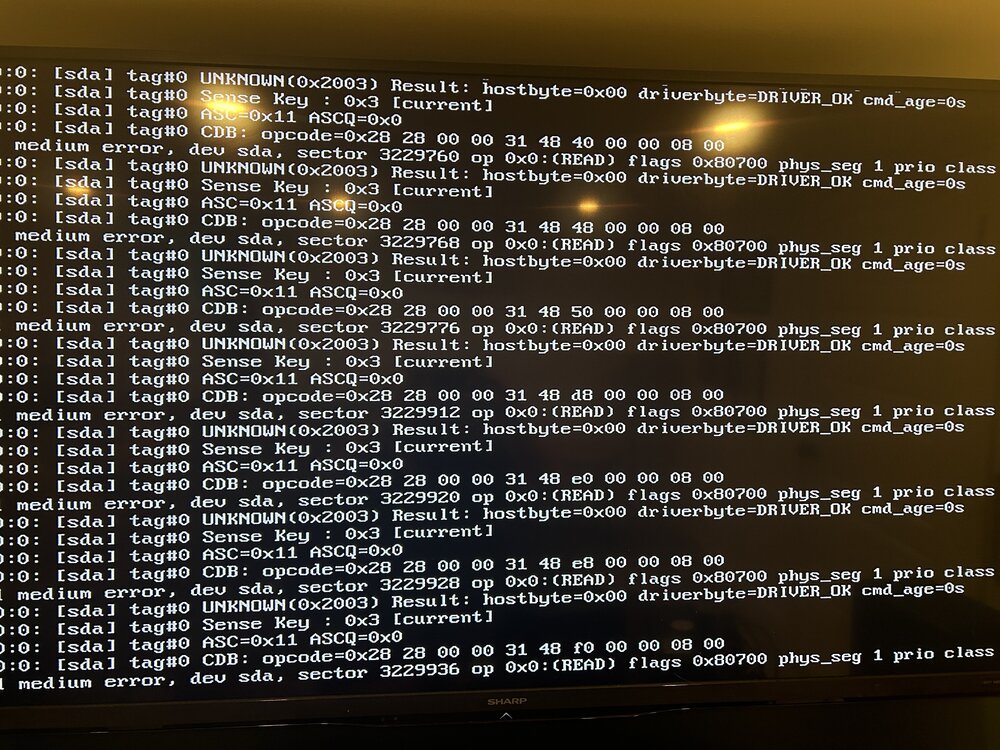
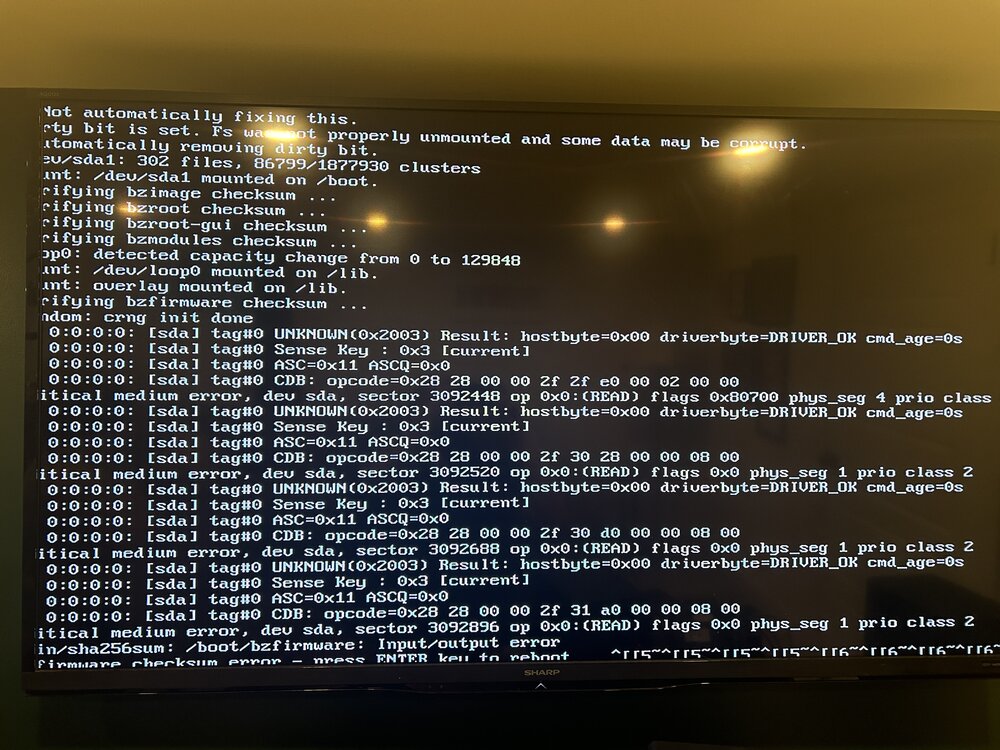
-
Hey Folks! Across multiple Plex instances, my movies library is loading very slowly. To be clear, my TV library loads just fine, as does a library for audio books, music and other movie libraries I have set up for stand up and documentaries. It started happening out of the blue. The logs don't look like they are saying much. The media loads after 30 sec - 1 minute usually. Before it was instantaneous. My hdds in my NAS are almost full. I wondered if that was the issue. Running unraid on a QNAP TS-464, and the plex instance is installed on an nvme0N1 that's only 250gb of it's 1TB full. I can't seem to find any other posts with this issue after a couple of days of searching, but I could have missed something! Any help greatly appreciated! I also could be oblivious to something here, but here's a snippet of the log when I tried to play a few files through the plex docker in unraid as opposed to my xbox series X in the living room, is the audio on these files maybe causing an issue?: Apr 17, 2024 04:03:37.762 [22878059154232] DEBUG - [Req#95] HubCache: Computed '1/tv.recentlyadded.8/1/hubs/promoted/enexternal-media,indirect-media,hub-style-list/contentDirectoryID=8&count=12&excludeContinueWatching=1&excludeFields=summary&includeLibraryPlaylists=1&includeMeta=1&includeRecentChannels=1&includeStations=1&pinnedContentDirectoryID=1%2C2%2C5%2C9%2C7%2C8%2C6%2C3%2C4' in 124 ms. Apr 17, 2024 04:03:37.764 [22878059154232] DEBUG - We're going to try to auto-select an audio stream for account 1. Apr 17, 2024 04:03:37.765 [22878059154232] DEBUG - Selecting best audio stream for part ID 231654 (language: en) Apr 17, 2024 04:03:37.765 [22878059154232] DEBUG - We're going to try to auto-select a subtitle for account 1. Apr 17, 2024 04:03:37.765 [22878059154232] DEBUG - Audio Stream: 610318, Subtitle Stream: -1 Apr 17, 2024 04:03:37.772 [22878059154232] DEBUG - We're going to try to auto-select an audio stream for account 1. Apr 17, 2024 04:03:37.772 [22878059154232] DEBUG - Selecting best audio stream for part ID 195282 (language: en) Apr 17, 2024 04:03:37.772 [22878059154232] DEBUG - We're going to try to auto-select a subtitle for account 1. Apr 17, 2024 04:03:37.772 [22878059154232] DEBUG - Subtitles: Found a candidate subtitle language [en] for a foreign film Apr 17, 2024 04:03:37.772 [22878059154232] DEBUG - Audio Stream: 433827, Subtitle Stream: 433828 Apr 17, 2024 04:03:37.795 [22878059154232] DEBUG - We're going to try to auto-select an audio stream for account 1. Apr 17, 2024 04:03:37.796 [22878059154232] DEBUG - Selecting best audio stream for part ID 195279 (language: en) Apr 17, 2024 04:03:37.796 [22878059154232] DEBUG - We're going to try to auto-select a subtitle for account 1. Apr 17, 2024 04:03:37.796 [22878059154232] DEBUG - Subtitles: Found a candidate subtitle language [en] for a foreign film Apr 17, 2024 04:03:37.796 [22878059154232] DEBUG - Audio Stream: 433708, Subtitle Stream: 433710 Apr 17, 2024 04:03:37.819 [22878181329720] DEBUG - Completed: [IP address] 200 GET /hubs/promoted?contentDirectoryID=8&pinnedContentDirectoryID=1%2C2%2C5%2C9%2C7%2C8%2C6%2C3%2C4&includeMeta=1&excludeFields=summary&count=12&includeStations=1&includeLibraryPlaylists=1&includeRecentChannels=1&excludeContinueWatching=1 (11 live) #95 GZIP 182ms 6879 bytes (pipelined: 2) Apr 17, 2024 04:03:37.822 [22878068095800] DEBUG - [Req#8c] It took 140.000000 ms to retrieve 45 items. Apr 17, 2024 04:03:37.853 [22878068095800] DEBUG - [Req#8c] It took 10.000000 ms to retrieve 125 items. Apr 17, 2024 04:03:37.884 [22878068095800] DEBUG - [Req#8c] HubCache: Computed '1/tv.recentlyadded.9/1/hubs/promoted/enexternal-media,indirect-media,hub-style-list/contentDirectoryID=9&count=12&excludeContinueWatching=1&excludeFields=summary&includeLibraryPlaylists=1&includeMeta=1&includeRecentChannels=1&includeStations=1&pinnedContentDirectoryID=1%2C2%2C5%2C9%2C7%2C8%2C6%2C3%2C4' in 273 ms. Apr 17, 2024 04:03:37.886 [22878068095800] DEBUG - We're going to try to auto-select an audio stream for account 1. Apr 17, 2024 04:03:37.886 [22878068095800] DEBUG - Selecting best audio stream for part ID 240855 (language: en) Apr 17, 2024 04:03:37.887 [22878068095800] DEBUG - We're going to try to auto-select a subtitle for account 1. Apr 17, 2024 04:03:37.887 [22878068095800] DEBUG - Audio Stream: 658045, Subtitle Stream: -1 Apr 17, 2024 04:03:37.890 [22878068095800] DEBUG - We're going to try to auto-select an audio stream for account 1. Apr 17, 2024 04:03:37.890 [22878068095800] DEBUG - Selecting best audio stream for part ID 240078 (language: en) Apr 17, 2024 04:03:37.890 [22878068095800] DEBUG - We're going to try to auto-select a subtitle for account 1. Apr 17, 2024 04:03:37.890 [22878068095800] DEBUG - Audio Stream: 653571, Subtitle Stream: -1 Apr 17, 2024 04:03:37.891 [22878068095800] DEBUG - We're going to try to auto-select an audio stream for account 1. Apr 17, 2024 04:03:37.892 [22878068095800] DEBUG - Selecting best audio stream for part ID 239278 (language: en) Apr 17, 2024 04:03:37.892 [22878068095800] DEBUG - We're going to try to auto-select a subtitle for account 1. Apr 17, 2024 04:03:37.892 [22878068095800] DEBUG - Subtitles: Found a candidate subtitle language [en] for a foreign film Apr 17, 2024 04:03:37.892 [22878068095800] DEBUG - Audio Stream: 649369, Subtitle Stream: 649370 Apr 17, 2024 04:03:37.900 [22878068095800] DEBUG - We're going to try to auto-select an audio stream for account 1. Apr 17, 2024 04:03:37.900 [22878068095800] DEBUG - Selecting best audio stream for part ID 239092 (language: en) Apr 17, 2024 04:03:37.900 [22878068095800] DEBUG - We're going to try to auto-select a subtitle for account 1. Apr 17, 2024 04:03:37.900 [22878068095800] DEBUG - Audio Stream: 648555, Subtitle Stream: -1 Apr 17, 2024 04:03:37.903 [22878068095800] DEBUG - We're going to try to auto-select an audio stream for account 1. Apr 17, 2024 04:03:37.903 [22878068095800] DEBUG - Selecting best audio stream for part ID 231925 (language: en) Apr 17, 2024 04:03:37.903 [22878068095800] DEBUG - We're going to try to auto-select a subtitle for account 1. Apr 17, 2024 04:03:37.903 [22878068095800] DEBUG - Subtitles: Found a candidate subtitle language [en] for a foreign film I should also add that a speed test confims upload and download speeds for the unraid server at 1000 mbps! Plex Media Server (1).log
-
Thanks so much for the prompt reply!! I should have noted that I already have the containers up and running on my iMac, I'm just looking to ship their data to UNRAID so I can relaunch via dockey compose, I just want them to be all set up and have the settings that they currently do on my mac. Appreciate any and all guidance again!
-
Hey folks, very new here and very green! I did multiple reddit / github searches and perhaps I’m not refining my search right. But, I am trying to move my docker desktop containers to my unraid server, and I’ve started by locating docker.raw and copying it to the appdata on my UNRAID server. Am I missing something here? will this file contain all the appdata (settings, etc?) for my docker containers that were on my iMac? I’m starting to think it may be easier to start from scratch at this point. Any and all advice welcome!
-
adamhefferman joined the community
-
Hey folks, very new here and very green! I did multiple reddit / github searches and perhaps I’m not refining my search right. But, I am trying to move my docker desktop containers to my unraid server, and I’ve started by locating docker.raw and copying it to the appdata on my UNRAID server. Am I missing something here? will this file contain all the appdata (settings, etc?) for my docker containers that were on my iMac? I’m starting to think it may be easier to start from scratch at this point. Any and all advice welcome!

View in the app
A better way to browse. Learn more.

