





cablesky
Members
-
Joined
-
Last visited
-
@Kilrah was ist jetzt hier die Lösung? Habe das Problem auch - aber ohne WT.
-
Perhaps something is wrong in the settings. Could you please post your settings to me? Thanks in advance!
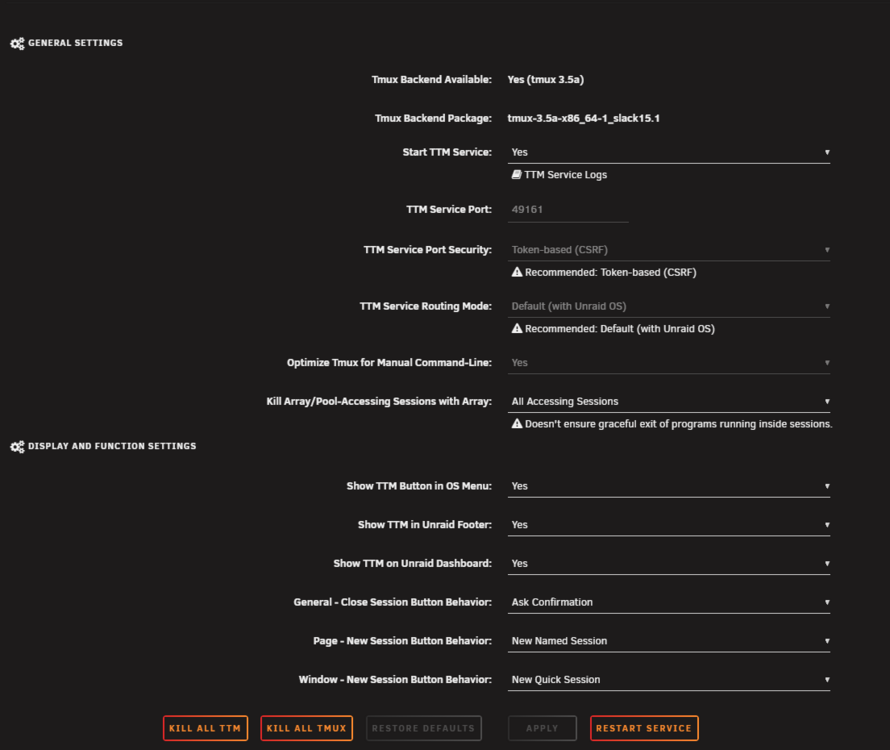
-
Okay, thank you! That's very strange. The color of the marker is different for me than it is for you. It doesn't work the same way for me as it does for you. Aufzeichnung 2025-12-15 065837.mp4
-
No, unfortunately that doesn't work. I'm using Windows/Chrome, and when I go into the Tmux terminal in the Unraid dashboard and select something in the Nano editor, for example, it's not available in the clipboard. However, it works perfectly fine in the regular terminal.
-
One question: Would it be possible to add a cut-and-paste feature? When I select text in the terminal with the mouse, it would be great if it could be copied automatically to the clipboard.
-
Oh, wait. You have to scroll down using the small red arrow in the bottom right corner!
-
That's simply not working. I can no longer access the settings.
-
How do I get back to the settings menu after starting tmux for the first time?
-
Ja leider. Das ist halt so. Hauptsache, ich kann dann bei größeren Datentransfers auf's Webportal noch zugreifen 🙂
-
Also zu meinem System: Es ist ein Fujitsu Futro S740 (J4105 Intel Prozessor). Brauche eigentlich nicht mehr Speicherim Moment. Hab mir bei Ebay-Kleinanzeigen jetzt ein 500GB NVME gekauft, die ich statt der 250GB NVME rein setze. Braucht man dann wirklich noch einen Cache, wenn das Array nur aus NVME's besteht? Ich dachte, die Cache wird nur benötigt, wenn das Array HDD's sind.. Ich krieg' nicht mehr NVME's oder andere Platten in das Gehäuse rein - und ich habe nur 1x Wifi und 1x NVME zur Verfügung. Am Wifie Port hängt eine NVME mit Adapter dran. Deswegen ist die Geschwindigkeit eh' etwas gebremst...
-
Hi nochmal! Ich danke euch für den Denkanstoß (und die weiteren Tips und Erklärungen)! Werde jetzt die Parity-USB-Platte rausschmeißen und nur mit zwei NVME's Unraid betreiben. Hatte bis jetzt nur 1x 500GB und 1x 250GB Platten hier. Werde mir jetzt 2x 500GB besorgen.
-
Danke für eure Tips! Es ist wirklich so, dass ich als Parity Platte eine USB-SSD verwende, wogegen die Datenplatten aus 2 NVME Platten bestehen. Heißt das, dass wenn die Parity Platte auch eine NVME wäre, ich diese Problem nicht mehr hätte?
-
Hallo zusammen! Ich habe das Problem, dass bei einem Datentransfer, z.B. ein großes Video über WebDAV, oder Bilder-Transfer bei Immich, etc., die restlichen Container lahmgelegt werden. Selbst das Unraid WebPortal geht dann fast nicht mehr auf, weil Unraid mit dem Datentransfer "beschäftigt" ist. Gibt es denn eine Möglichkeit, den Datentransfer pro Container zu drosseln? So dass z.B. der WebDAV-Container nur 4MB/s "bekommt"? Wie macht Ihr das denn - z.B. große Dateien kopieren, ohne dass die anderen Container beeinträchtigt werden?
-
It doesn't work for me. Does it still work for anyone?
-
Ok, das funktioniert aber nur dann, wenn man sich mit einem SSH-Client auf den Unraid-Server verbindet. Wenn ich die Shell im Unraid-Webinterface aufrufe, funktioniert das nicht. Trotzdem danke!
