dharmil7
Members
-
Joined
-
Last visited
-
Hi @trurl - Thanks for your help. But i was able to figure out a solution without need to restart the server. For some reason, the ssh and nginx service had stopped when there was a networking reset (The router had to be rebooted) ## SSH: /etc/rc.d/rc.sshd restart #did not work, as there as nothing to start/restart /etc/rc.d/rc.sshd start #This worked ## WebGui (nginx) /etc/rc.d/rc.nginx restart #Did not work, as there was nothing to start. /etc/rc.d/rc.nginx start #This workedI used the above commands to start the sshd and nginx service which for some reason had stopped. After the services were started, everything was working. But what i fail to understand is, why did this happen? Just because of a router reboot, these services shoudn't stop, Right? Am i missing something here?
-
Thanks! I am able to get access to the console. I created this diagnostic file by running the command. diagnosticPlease let me know If you need something else,? d7-nas-diagnostics-20260214-1406.zip
-
But i cannot get the logs at this point. Since cannot access the system. Is there a way to get the logs when ui and ssh Is not accesible? I have turned on the "Mirror to USB" logs feature. Can i remove the drive, connect to windows and get the logs, will that help? IF yes, what would be the location?
-
Hello Community, I need help. My unraid webui and ssh are currently not accessible. But all the docker/apps work. Even the SMB works. When i either do an ssh or try to go to WebUI, it says connection refused (SSH) or Unable to connect on webui. It was working till yesterday night and nothing changed after that. But all the apps are currently accessible. And this has happened a lot of times In the past as well. Mainly after upgrading to v7. Also - When i do an unclean shutdown (either by removing power or holding power button for couple mins), After that the server does not start. It says cannot detect the USB. I have to remove the USB, plug it into a windows machine, do a diskscan (no errors,) then plug back into unraid and start the server after that. What could be the reason? Any help would be greatly appreciated. I dont remember the exact Version, hence "X" at the end.
-
Found a solution. Add a flag to the postgres docker configuration, would solve the Issue. I added it to be a 4G, you can change it to whatever you like. --shm-size=4g
-
I followed this and recreated the Docker File in Brtfs, but still the same error.
-
Do you know what Is the Issue?
-
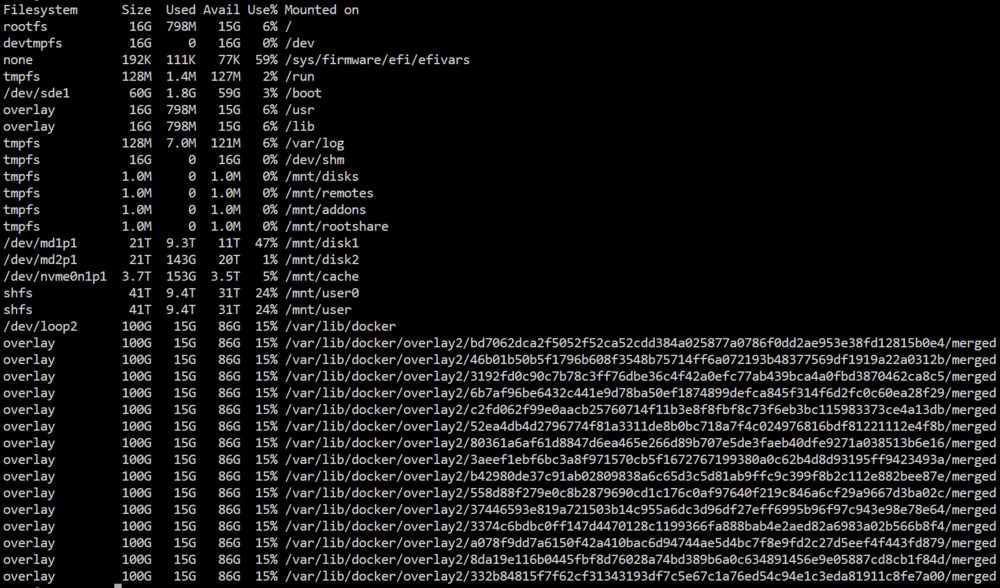
Hello, Unraid Version : 7.2.0 My docker vDisk is 100Gb and out of which only 15GB is being used. But my (and the only one with Issue) docker container : "Immich_PostgreSQL" errors out with : Can someone please help me out to resolve this? All other containers work fine. 2025-11-24 13:05:19.334 EST [270] ERROR: could not resize shared memory segment "/PostgreSQL.4252011740" to 16777216 bytes: No space left on device === Edit (Few more Screenshots) ==== unraid-diagnostics-20251124-1321.zip

-
Hello, I have around 400GB worth of data on my Android phone which I need to transfer It to unRaid. Is there a way I can connect my phone to unraid via usb-c cable and transfer data that way? I tried connecting it and In file transfer mode, but the device does not show up on unRaid. Other options are : 1. Connect usb drive to phone and transfer data to it (getting 30-35mbps), then connect the same to unRaid and transfer from usb to unraid. 2. Transfer to an SMB Share on unRaid directly via phone. (Getting 25-30mbps) 3. Connect phone to PC and transfer the data to unRaid. I tried the above 3, but they are slow and unreliable. sometimes it loses connection and cannot copy. My question Is: Is there a way to connect samsung phone to unraid server and copy files using that?
-
Hello Everyone, I have unRaid server with 64GB of RAM. However It uses only 31.1GB, It does not use the rest. Cam anyone pl. help me In resolving this? I am using unRaid 6.12.6 See screenshots for reference.

-
Damn it!! I have been on this for past 2 hours, with no luck. Thank you soo much And this solution was not mentioned In any post atleast in first 20 google search. I actually did not know what that meant, so i just left It as is. Can you explain the usecase of that option?
-
Hello, This is a new setup, started just over a day. I have created 2 shares and both of them are public. Also created a Share user. When i am trying to access those shares using my windows 11 pro (not domain joined) machine and android device, it fails. I tried the following combinations: \\<ip address> - Shows empty folder \\<ip address>\<share-name> - Shows error, unable to access It. I have followed couple different articles on how to resolve the Issue, but none of them are successful. Screenshot of : ls -hal /mnt/User/ Attaching the diagnostic file. == Edit == Removed the diagnostic file as the Issue is resolved.