





Kermit68
Members
-
Joined
-
Last visited
-
Why it's marked as deprecated?
-
I finally resolved my issue so I leave here some info that could be helpful for others in the future. Short version: replace the SFP+ transciever Longer version: after updating all possible drivers and firmware of the Dell x710 NIC I started to wonder if the problem could have been originated by the transciever. First easy check has been swapping the transciever on the Unraid server with the one in the Win11 PC but no difference. Then I looked on Amazon for a cheap SFP+ Intel compatible so I bought this QSFPTEK transcier https://amzn.eu/d/hxutLY7 and replaced on the Unraid NIC the 10Gtek transciever I was currently using https://amzn.eu/d/icu9FF3. Bingo, it works. Or actually I'm not sure it's working properly as the Unraid server now never detects that the link is down when the Win11 PC is off, but on the other hand the connection works when I switch on he PC which, after all, is what I wanted. Mind the transciever....not only the NIC 😁
-
I'm not even sure this is a bug but I'm having a problem in resuming a direct fiber connection between unRaid (both 7.0.1 and 7.1.0-rc1) and a Win11 PC. I'm using 2 Dell x710-DA2 NIC with SFP+ adapter, one in the unRaid setup and the other one in my local Win11 PC. NIC are both using latest firmware available on Dell support website. On unRaid the NIC is set as eht0 (DAC connected to a 2.5Gb switch) and eht1 (SFP+ direct fiber connected to the PC on a different subnet). After a few hours that the PC has been shut off unRaid drops eth1: syslog: Apr 19 00:44:24 XXXX kernel: i40e 0000:01:00.1 eth1: NIC Link is Down Apr 19 00:44:26 XXXX ntpd[1754]: Deleting 1 eth1, [xxx.xxx.xxx.xxx]:123, stats: received=0, sent=0, dropped=0, active_time=22051 secs but is does not resume it when I switch back on the Win11 PC. I tried many network commands (see the entire discussion): but the only 2 actions that work to wake up eth1 is either a reboot or unplugging/plugging back the SFP+ on the unRaid side. Could it be a driver issue? thor-diagnostics-20250424-1141.zip
-
Unfortunately I'm already using 7.1 rc-1, I upgraded the server a few days ago to see if a newer version could fix the problem.
-
Thanks, I did not tried to unplug the SFP+ modules and as a matter of fact, unplugging the module from unRaid NIC did the job and resumed the connection. Much better than a reboot but still I would prefer either the probem not to happen or to be able to resume the connection with some command. I checked the NIC firmare version that I thought I already upgraded to the lates version but it turned ou there was a newer version on Dell website that I was able to patch on both cards (unRaid and Win11 PC). Unfortunately I still have the same problem .... Could it be that the x710 drivers in unRaid are "too old" and should be ugraded? Not very sure on how to make such modification persistent though ...
-
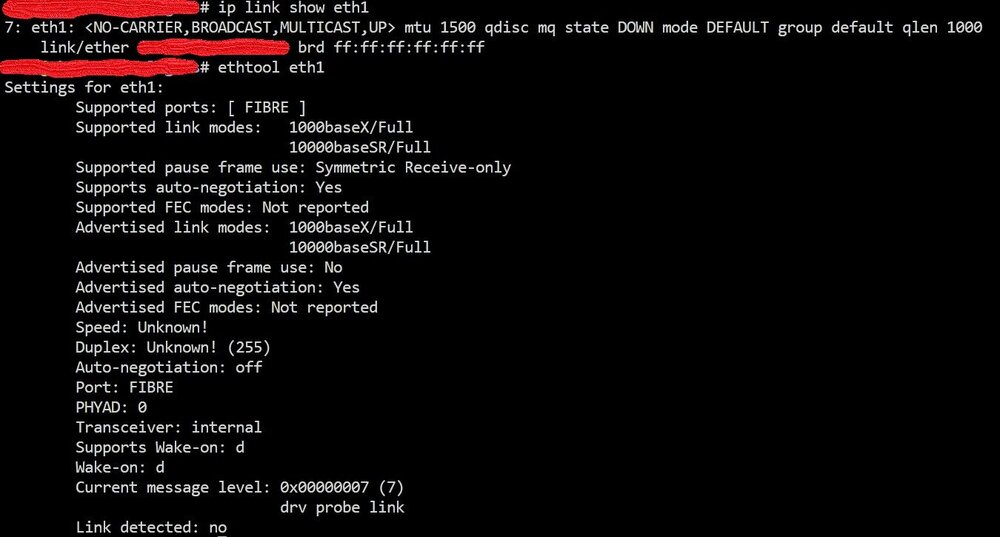
I dug a little bit more on this and as expected it looks that after some time (a little bit more than 6h) the system shuts down eth1 as the link is down. This is from unRaid syslog: Apr 19 00:44:24 XXXX kernel: i40e 0000:01:00.1 eth1: NIC Link is Down Apr 19 00:44:26 XXXX ntpd[1754]: Deleting 1 eth1, [xxx.xxx.xxx.xxx]:123, stats: received=0, sent=0, dropped=0, active_time=22051 secs The link was down as the Win11 PC was off, so I don't see this as a problem. This is the current status: After booting up the Win11 PC I tried several "ip link set eth1 up" or down and then up, or /etc/init.d/eth1_restart or stop and then start but non of such commands were able to make the NIC restarting or detecting that carrier is now present. I'm ruling out the fiber connection and the windows machine as, since rebooting unRaid fix the problem, I'm supposing that the problem is entirely on the server side. At this point I'm looking to a way to prevent timing out of the link presence in order to avoid the NIC to be shutted down or a working command to resume the connection that I can type or run as a script when needed. As I said, I would like not to reboot every day the server in order to have the direct link working.
-
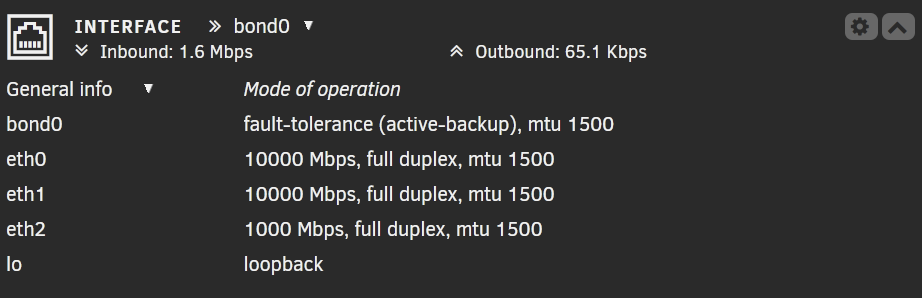
Additional info: eth2 (bonded to eth0) is reported as down in the dashboard which I thought it was normal as active backup bonded to eth0. I rebooted the server and I got as usual the 10Gbe link on eth1 working, but I noticed that eth2 is now also up and running .... I don't know if this is related to my problem, but for sure it cannot be related to the fact that my local Win11 PC is being switched off overnight.
-
Recently I added a x710-da2 card to both my Unraid server and to my local Win11 PC. On Unraid the NIC has been configured as eth0 and eht1 with eth0 connected to a 2.5Gbe switch (DAC) and eht1 direct connected to my PC (different subnet). The Unraid server has also a 1Gbe motherborad NIC (eth2) bonded ad active backup with eth0. On my PC I have a 2.5Gbe motherboard NIC conntected to the same 2.5Gbe switch and the other x710-da2 card with one port direct connected to the Unraid server and the other port left unused. The direct connection is using SFP+ and fiber and it works as expected: iperf is reporting 9.4Gbit/s so I was very happy. The problem is that if I switch off my PC (while of course let running Unraid h24) when I switch back on the PC on the next day, Unraid cannot detect the link unless I reboot the server which is not very convenient. I already tried to port down and then up eth1 (after stoppin docker service which is not very convenienet as well .....) but it does not fix the problem. Any ideas / suggestions? Edit: forgot to say I'm on Unraid 7.0.1


