



Skip to content
View in the app

A better way to browse. Learn more.

Unraid

A full-screen app on your home screen with push notifications, badges and more.

To install this app on iOS and iPadOS
  1. Tap the Share icon in Safari
  2. Scroll the menu and tap Add to Home Screen.
  3. Tap Add in the top-right corner.
To install this app on Android
  1. Tap the 3-dot menu (⋮) in the top-right corner of the browser.
  2. Tap Add to Home screen or Install app.
  3. Confirm by tapping Install.

Magix Networks

Members
  • Joined

  • Last visited

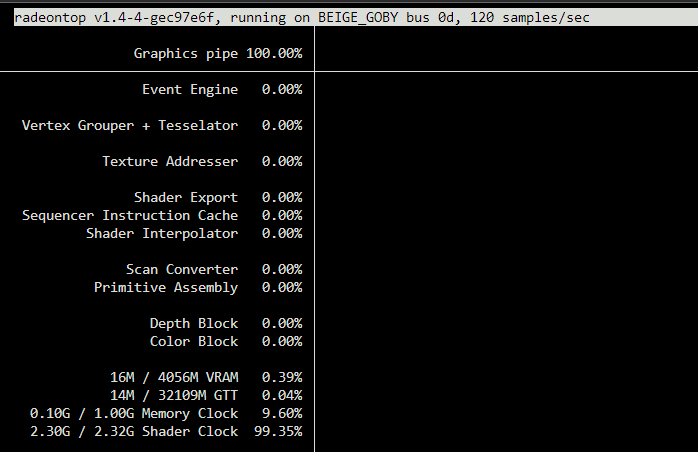
  1. Yes, my radeontop is the latest version. This morning it was showing 0% load on idle until I did something that required the GPU which also displayed correctly and when it came back to idle it jumped back up to 100%. I'm expecting it'll correct itself throughout the day again if the GPU if left idle long enough. It doesn't seem to be causing any issues it just seems to be cosmetic.

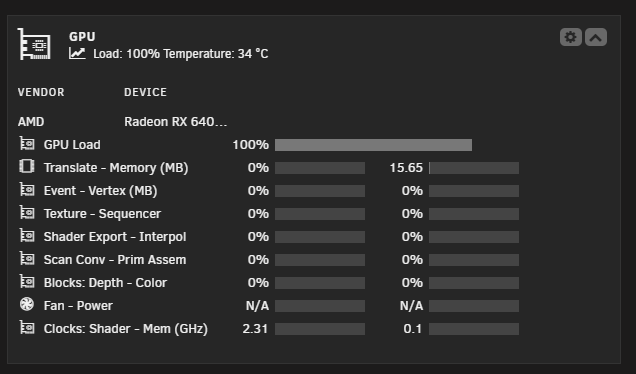
  2. Running unRAID 7.0-beta3 (Beta3 is when the issue started as it was fine with Beta2) with an AMD RX6400 GPU Dashboard shows 100% load on the GPU when idle If a docker (Such as Plex) starts using the GPU it will display accurately until it becomes idle again and it will jump back to 100% radeontop also shows 100% usage
Account

Navigation

Search

Search

Configure browser push notifications

Chrome (Android)
  1. Tap the lock icon next to the address bar.
  2. Tap Permissions → Notifications.
  3. Adjust your preference.
Chrome (Desktop)
  1. Click the padlock icon in the address bar.
  2. Select Site settings.
  3. Find Notifications and adjust your preference.