





teufelhunden
Members
-
Joined
-
Last visited
-
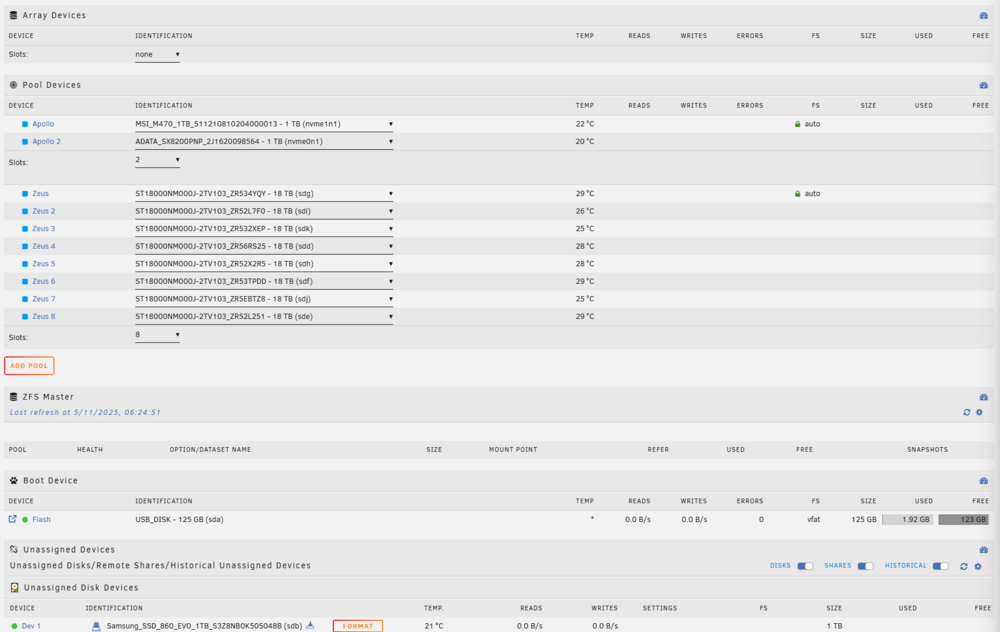
So I recently created a new encrypted zfs pool with 2x nvme drives mirrored. This is where all my appdata and stuff is going to be. I was working with it fine until I rebooted to install the new 7.1.2 update. When I went to put my encryption password back in It gave me a "Wrong Pool State" Apollo - Invalid Config I was reading around the forums and people have said that using "New Config" could fix this. So I did that and now all my devices are showing as blue, the file system is all changed and everything and I really don't want to do anything that would lose me data. Especially on the Zeus Pool that you will see in the attached screenshot. I can rebuild everything on Apollo very easily but Zeus has like 50TB of data on it. Zeus was a ZFS-Encrypted Raidz2 with 2 vdevs of 4 devices before I screwed it up. All the drives are still in the right order but I just don't want to lose anything and I'm scared to proceed further. hermes-diagnostics-20250511-0625.zip
-
I don't believe so but I can't be certain. I just remember deleting the one unused pool. Didn't know if this might have triggered something because there was nothing on that pool which might have been seen as an empty disk.
-
Just curious but I just saw there is a new update stating that they are fixing a potential data-loss issue that was in 7.1.0 and 7.1.1. Do you think this might have been what caused my data being deleted?
-
thanks for your assistance. I'm just going to rebuild. Thank you
-
I tried that but no luck. I'm not sure what happened if that diagnostic doesn't show it.
-
I'm not sure why this happened but I noticed today that all my app data folder has all the data deleted from it except the folders. The dockers are still installed and will start but they are all broken in one way or another. The appdata folder still exists with all the underlying docker container folders but they are all now empty. Only thing I can think of that I changed the last couple days is that I removed an unused pool but the appdata is on a separate array so I don't think that would have done anything and I also did the new updates. hermes-diagnostics-20250510-0349.zip
-
I'm not sure if those diagnostics are messed up because I downgraded to 6.12.14 and it didn't work even after doing that. I did recently update the BIOS but would have sworn it was working fine with GPU statistics after that. I would have noticed it I think but regardless it's resolved now. Thanks for taking a look.
-
Good Afternoon, After upgrading to 7.0 stable my Intel Quicksync no longer works on my i5-12600k. I have tried plugging a monitor in and multiple reboots but no luck. It was working fine before the update. Edit. I was able to resolve this by going into the bios and changing the chipset settings from auto to integrated graphics. Not sure why it worked fine for over a year on auto prior to 7.0 but it's working now. hermes-diagnostics-20250113_1712.zip
-
It was showing when using sudo nut-scanner -U. I got it to work though. I don't know how.
-
I have a American Power Conversion Smart-UPS C 1500. This device is recoginzed when connecting it to my unraid server via USB. When trying to set up the plugin though I keep getting these errors in the logs. Feb 24 22:34:16 Hermes root: Using subdriver: APC HID 0.100 Feb 24 22:34:16 Hermes root: Network UPS Tools - Generic HID driver 0.52 (2.8.1.1) Feb 24 22:34:16 Hermes root: USB communication driver (libusb 1.0) 0.46 Feb 24 22:34:16 Hermes root: nut_libusb_get_report: Input/Output Error Feb 24 22:34:16 Hermes root: Can't initialize data from HID UPS Feb 24 22:34:16 Hermes root: Driver failed to start (exit status=1) I'm trying to use this as a network server so I can also shut down my pfsense box with it. I tried looking around and this is a brand new USB cable and connected to a USB 2.0 port on this X13SAE-F motherboard. Any ideas.
-
If you care to know the solution with the Broadcom card not booting I had to put tape over the B5-B6 pins for it to boot.
-
wouldn't even boot past the blue os screen where you can select if you want to go into memtest etc. with the broadcom card lol.
-
hmm that stinks that those links don't have a solution. I have one working perfectly fine in my truenas machine right now. I found an article from 2016 that said Chelsio cards were supported. Only other model I have is a broadcom one. I'll see if that works.
-
hermes-diagnostics-20240209-2051.zip
-
Forgive me since I'm new to Unraid and testing it out. I'm trying to set up a Chelsio T420-CR nic to make the transfers from my old nas to this one quick. Never had any issues with this nic in Windows or Truenas. The nic does show on the system devices page. I did notice on bootup that this error shows up next to the nic device. unable to change power state from d3cold to d0, device inaccessible The two interfaces don't show up on the network settings page. Not sure if this is a bios issue or what.

