scottlilly
Members
-
Joined
-
Last visited
-
Thanks Jorge. I'll return the drive and try with a replacement.
-
Here is the diagnostics zip file alexandria-diagnostics-20240216-0638.zip
-
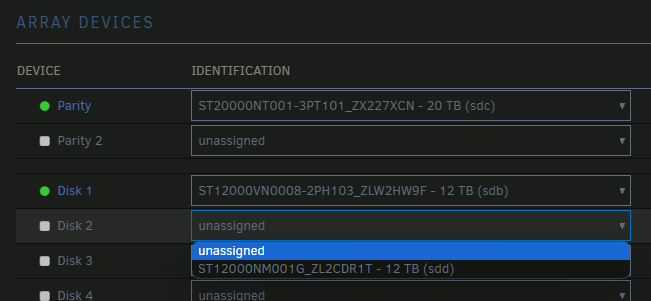
I'm having trouble adding a new drive to my NAS. After installing the drive and restarting the server, I see the drive available in the array devices dropdown. However, when I select it, the "Disk 2" show "unassigned" and if I click on the dropdown again, the drive is no longer there. The system logs show this, rapidly repeating: Feb 15 17:48:12 Alexandria kernel: res 53/04:08:00:00:00/00:00:00:00:00/e0 Emask 0x1 (device error) Feb 15 17:48:12 Alexandria kernel: ata7.00: status: { DRDY SENSE ERR } Feb 15 17:48:12 Alexandria kernel: ata7.00: error: { ABRT } Feb 15 17:48:12 Alexandria kernel: ata7.00: configured for UDMA/133 (device error ignored) Feb 15 17:48:12 Alexandria kernel: ata7: EH complete Feb 15 17:48:12 Alexandria kernel: ata7.00: exception Emask 0x0 SAct 0x0 SErr 0x0 action 0x0 Feb 15 17:48:12 Alexandria kernel: ata7.00: irq_stat 0x40000001 Feb 15 17:48:12 Alexandria kernel: ata7.00: failed command: READ DMA Feb 15 17:48:12 Alexandria kernel: ata7.00: cmd c8/00:08:00:00:00/00:00:00:00:00/e0 tag 21 dma 4096 in Feb 15 17:48:12 Alexandria kernel: res 53/04:08:00:00:00/00:00:00:00:00/e0 Emask 0x1 (device error) Feb 15 17:48:12 Alexandria kernel: ata7.00: status: { DRDY SENSE ERR } I tried swapping the SATA cables and ports, but had the same results. I tried installing the old preclear plugins, but got this from its logs: Feb 15 18:02:56 preclear_disk_ZL2CDR1T_9878: Pre-Read: dd output: dd: error reading '/dev/sdd': Input/output error Feb 15 18:02:56 preclear_disk_ZL2CDR1T_9878: Pre-Read: dd output: 0+0 records in Feb 15 18:02:56 preclear_disk_ZL2CDR1T_9878: Pre-Read: dd output: 0+0 records out Feb 15 18:02:56 preclear_disk_ZL2CDR1T_9878: Pre-Read: dd output: 0 bytes copied, 252.211 s, 0.0 kB/s Feb 15 18:02:56 preclear_disk_ZL2CDR1T_9878: Pre-Read: dd output: dd: error reading '/dev/sdd': Input/output error Feb 15 18:02:56 preclear_disk_ZL2CDR1T_9878: Pre-Read: dd output: 0+0 records in Feb 15 18:02:56 preclear_disk_ZL2CDR1T_9878: Pre-Read: dd output: 0+0 records out Feb 15 18:02:56 preclear_disk_ZL2CDR1T_9878: Pre-Read: dd output: 0 bytes copied, 252.343 s, 0.0 kB/s Feb 15 18:02:56 preclear_disk_ZL2CDR1T_9878: Pre-Read: dd output: dd: error reading '/dev/sdd': Input/output error Feb 15 18:02:56 preclear_disk_ZL2CDR1T_9878: Pre-Read: dd output: 0+0 records in Feb 15 18:02:56 preclear_disk_ZL2CDR1T_9878: Pre-Read: dd output: 0+0 records out My motherboard is a Gigabyte H610M S2H V2 and I have an 850W PSU. Can anyone point me in the right direction to get this drive added?