





sensia255
Members
-
Joined
-
Last visited
Everything posted by sensia255
-
No one is interested in this problem?
-
This is still not solved- for future reference. I have changed DNS provider app. Reboot everything.
-
I am using over two days access my dvd-writer to be recognized so I can use it to burn audio CDs. It is infuriating how we do not have a proper write up to address this issue. lsscsi returns the following for my dvd drive; [2:0:0:0] cd/dvd HL-DT-ST DVDRAM GH24LS70 GL01 /dev/sr0 And here is the relevant section of my xml file- <devices> <emulator>/usr/local/sbin/qemu</emulator> <disk type='file' device='cdrom'> <driver name='qemu' type='raw'/> <source file='/mnt/user/isos/iso/xubuntu-24.10-desktop-amd64.iso'/> <target dev='hda' bus='sata'/> <readonly/> <address type='drive' controller='0' bus='0' target='0' unit='0'/> </disk> <disk type='file' device='disk'> <driver name='qemu' type='raw' cache='writeback' discard='ignore'/> <source file='/mnt/cache/vms/vm-discks/vdisk1.img'/> <target dev='hdc' bus='sata' rotation_rate='1'/> <serial>vdisk1</serial> <address type='drive' controller='0' bus='0' target='0' unit='2'/> </disk> <controller type='scsi' index='0' model='virtio-scsi'> <!-- Host Device Passthrough (Physical SATA DVD-ROM) --> <hostdev mode='subsystem' type='scsi' bus='0x02' target='0x00' lun='0x00'> <address type='pci' bus='0x00' domain='0x0000' slot='0x04' function='0x0'/> </hostdev> <address type='pci' domain='0x0000' bus='0x00' slot='0x06' function='0x0'/> </controller> <controller type='pci' index='0' model='pci-root'/> <controller type='sata' index='0'> <address type='pci' domain='0x0000' bus='0x00' slot='0x03' function='0x0'/> </controller> Adding this edit, I can not save the xml file using virsh; error code is - error: XML document failed to validate against schema: Unable to validate doc against /usr/share/libvirt/schemas/domain.rng Extra element devices in interleave Element domain failed to validate content If I add the extra entry into XML ahead of the <device> section, i receive a different validation error. What am I doing wrong?
-
Reviving my own thread. This is still not solved. When I type my Unraid server's hostname in address bar of Edge, it takes me to the right URL but it ends there. What is blocking the GUI to show up, at this point? Here is link to the error message on Edge. https://imgur.com/a/rkppytE
-
I am literally scratching my head troubleshooting this phenomenon. I just purchased a new PC, installed Win11. I can access my home Unraid server when I am connected to my home network through wifi. But, I can not, when I am connected through ethernet. Main router is using a pi-hole server for DNS. From this new PC, I can ping to router and pi-hole servers. When I am using the ethernet, I can traceroute to the unraid server and the dns server. I am using DHCP for both wifi and ethernet connections. What I am missing here? tower2-diagnostics-20250201-1939.zip
-
So, adding further productive update. I disabled collecting syslog and the array is going strong for a day. Will see if some shenanigans come back after installing a VM.
-
Ok; I will try changing the MTU to 9000. The search results are very few related to this specific problem. Worst case, I need to disable the onboard LAN controller and use a different NIC. However, I am still very very upset that nothing happened in my first month of the trial period.
-
There is nothing new to add; the logfile (problematic_old_6.12.6.....) in my OP still represents the current problem. I can reproduce this problem with 6.12.8, mounted on a fresh USB startup disk.
-
It seems there were some bug back in 2016. I am not sure if that was worked out into latest Unraid. Anyway, I reinstalled the 6.12.8 in a new usb drive to start afresh and the problem came back quickly. https://bugzilla.kernel.org/show_bug.cgi?id=70761 Old error thread with Atheros alx driver And entry from my ballooning syslog; Feb 23 11:37:18 Tower kernel: alx 0000:02:00.0 eth0: fatal interrupt 0x4001607, resetting
-
Well, I guess there is no way to know other than building a new array. No, I don't have access to a new NIC. I mean a new NIC is half the cost of this old PC. Is there any option to flashback my system to an older date? I am certain all was good not too long ago.
-
As of now, I have enabled the syslog server. I think this set option will be sufficient; townfall2 is in my shared array. Remote syslog server is additionally set to my unraid server's IP. Unfortunately, this solution does not work when I have to manually restart the server.
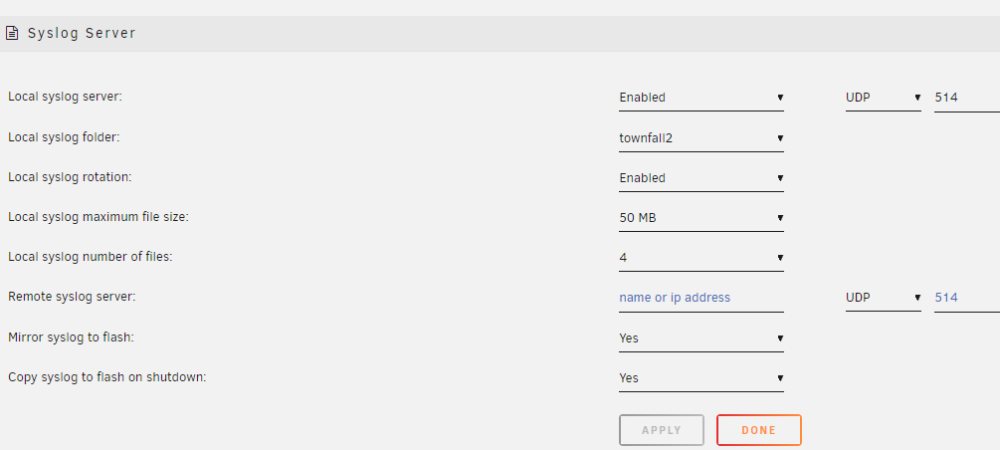
-
Diagnostics is attached. The NIC is integrated into Z97M motherboard. Is there a way to move the syslog to a different location before the system dies? I just rebooted and lost the old syslog predictably. tower-diagnostics-20240224-1145.zip
-
Thanks! uploaded the files in OP.
-
Hello everyone, My first post here; I was really hoping I don't need it as I have tested Unraid for about a month. Very recently, as in last three days, I am noticing my syslog becoming huge to the point the system becomes inaccessible. Doing a df -h, I am seeing /var/log is completely full and syslog is taking up that entire 128MB. It seems, hell is breaking loose with my network. Here is an excerpt; "Feb 23 11:37:05 Tower kernel: alx 0000:02:00.0 eth0: fatal interrupt 0x4001607, resetting" Tower is my hostname. I am not sure what is going on here or how to troubleshoot. alx module indicates it has something to do with my networking but this has not happened until I failed to install an Ubuntu VM. I have deleted all of that failed installation but now the server is in an unstable state because there is no predictable way to tell when syslog may fill up. Can't upload my syslog since it is 128MB in size. Can't get the fresh one, since the system went down again. Need to add that my setup has one 14tb parity drive and a 14tb and 8tb backup drive. No caching drive involved in this install. Also uploaded a truncated version of syslog. Truncated_syslogtxt.txt Now added zipped syslog when problem started and a fresh syslog, just after reboot from firmware upgraded to 6.12.8. problematic_old_6.12.6-syslog.zip Clean_after_reboot_syslog-20240224-0315.zip
