





UNPAID
Members
-
Joined
-
Last visited
Everything posted by UNPAID
-
Yeah the device is passworded and I will log out after every session (I won't use it often) it still needs a code sent to another device and then you have to log into your WebGUI. For the autorun bs I just disabled it with msconfig, don't get why it's not a setting...
-
Yes I noticed Tailscale just runs automatically. I'd really like it not to and to confirm my log in each time but I haven't found a way.
-
Thanks for putting my mind at ease. Well if that's the case, then the test run was a success and in theory I should have access to my server from anywhere in the world and have it be secure 👍
-
Possibly. I've had issue mapping drives locally when they just refused to map or un map...but a reboot usually fixes it. I might have to look into that, not something I'm familiar with tho...I thought you just need the username/password to access the share? I had them mapped and working when I was on my local network but it's when I took the laptop elsewhere the mapped drives were inaccessible. Unraid I could access fine with the DNS address (HTTPS) but not the shares I mapped. Remapping them using the Tailscale IP (HTTP) fixed it. I was just worried about it being not secure but MowMdown says it's actually secured.
-
So there's no need to panic if I map shares using Tailscale's IP? Unraid still uses the DNS address. I'm just trying to set it up in a rush...
-
I plan to access my server from another country and I have Tailscale set up, both on Unraid and my Laptop. It all works very well actually, I can access my Unraid like I before but instead of using my local address, I'm using the "ts.net" one to get the HTTPS certificate (that's what a video said to use for secure connection) and I have a bunch of Shares mapped too and they all work fine. Problem happens when I go somewhere else and use another network...I can access Unraid no problem but the Shares I mapped no longer work and I get a "username/password error" (I type them in correct, it's an obvious error). After some time of getting nowhere I decided to use the "100.xxx.xxx.x" address. And it worked, I can access my shares but isn't that HTTP? It's good that it works, I just want a simple set up like that but I also wanna have it as secure as possible with HTTPS. My SSH and SSL are enabled. If someone understands this issue or a setting I may have missed, I'd appreciate any pointers. I'm trying to set this up before I leave my server and I just wanna make sure I can get it to where I'm happy with it or at least understand the issue. It does work but I just don't get why the mapped "ts.net" address won't work when I'm away from my local network and if it's safe to use the "100.xxx.xxx.x" as I'm trying to set this up last minute.
-
Can someone explain why my mapped drives no longer work when I'm not near my server? I got Tailscale installed on my laptop and use Tailscale's address with HTTPS to log into my server and map the drives and it all works, when I'm on my network. But trying to access the mapped drives on a different network results in error saying "it's mapped with a different user/password"...and I can't re map it, even if I delete the drive. I found using the Tailscale 100.xxx.... address will map the drive and I can access it but it's HTTP... I have SSL enable so I can't access my Unraid with the Tailscale 100.xxx.... address because it's not secure and I wanted it to be HTTPS Any help would be appreciated.
-
Do I need "Use SSL/TLS" set to Yes? Currently it's No. I noticed I can't access Unraid dashboard when I use my regular VPN service...is that just cause its running thru Tailscale which is already a VPN?
-
Thanks for the suggestions. I didn't think I'd be able to set this up at all as this is just not my expertise and I wouldn't have time to troubleshoot issue...but I checked out Tailscale using Spaceinvader One's guides to make sense of it and I think I got it set up somehow...I just need to test my device away from my server now. At first I was having problems with getting the connection secure but after a restart it's actually working?! I did notice the certificates are set to expire in 3-6 months, will this cause an issue later on?
-
I'm gonna be moving to another country soon, work stuff. I can't take my Unraid setup with me. I do use my Unraid from time to time and while I could live without it, kinda, is there a way I can continue using it? I could have someone turn it on and off, without a GUI, all they'd have to do is flick the switch when I say. Just wondering if anyone is using their Unraid long distance, as and when required and is there a risk?
-
I was able to map 3 shares/drives just fine but if I try to add more nothing happens. They don't show up, even tho they are down as being mapped. They are also not on the Disconnect list so can't be removed, unless replaced. They are set to Export and Public.
-
Just wanted to update and say that I seem to have fixed the issue. I recently added a 2nd Cache SSD to the system and remembered the SATA cable being a little snug at the plugs. I decided to re-check it and yeah it was probably wise to use a longer cable, which I have now and now Unraid can be started/stopped in under 30 seconds again with no errors. Time will tell but it's running as well as before.
-
How do I do that? Or do I type this into the linux command thing?
-
Tried to dump the diag file, it shows some text but it instantly hangs so I'm unable to provide a complete one it seems.
-
I remembered I got some error when I started the server, I didn't think much of it thinking it was some temperature warning. But I looked at the Dashboard and saw one of my caches had a "UDMA CRC error count 15" after I acknowledged it I was able to power off. But when I reboot it's still there and it seems to be causing these issues where Unraid just does nothing. Now it's at count 22 and just hangs at "Array Starting•Mounting disks..." and this is after acknowledging the error. So it looks like I'm screwed. What kind of data do these logs contain? Any personal data?
-
Wanted to shut down my Unraid and pressed the Stop button as usual but it's been saying "Array Stopping•Unmounting disks..." for the past hour plus and shutting it down does nothing. Last time I had to pull the plug and then had to spend days rechecking the disks... Before I do that again, is there a solution? And why does this even happen?
-
Moved around 3TB of stuff over to my NAS (using robocopy) and ran mover. Everything moved over to the array just fine apart for 1 file, which would not move off the cache. The file was a url link with a HUGE amount of characters (why I use robocopy for mass copy) so I thought since I didn't really need it I would delete it off my share...using explorer. I stopped and restated the array to check but the file is still down as being on the cache drive. How do I remove it now? How do I move a stubborn file when this happens again?
-
Just wanted to say I fixed the duplicate issue by simply deleting that file off the share (using explorer) and then copying it over again and running mover. This time it went straight on to one of the disks.
-
So can this be because I tried writing directly to the array before? It copied more than just one file before I cancelled it so it's stage it's just the one file. How would I manually delete it off the cache?
-
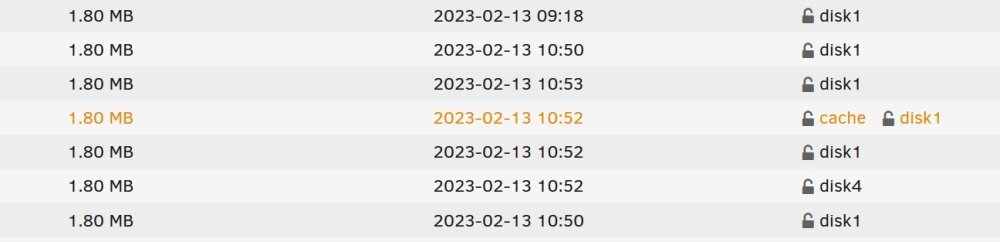
Finally got all the data off the cache drive but for one file...it's still listed as being on the cache drive but going into the share, it's listed as being on the cache drive and disk 1. Surely it can't be on both disks at once? Mover refuses to move it regardless.
-
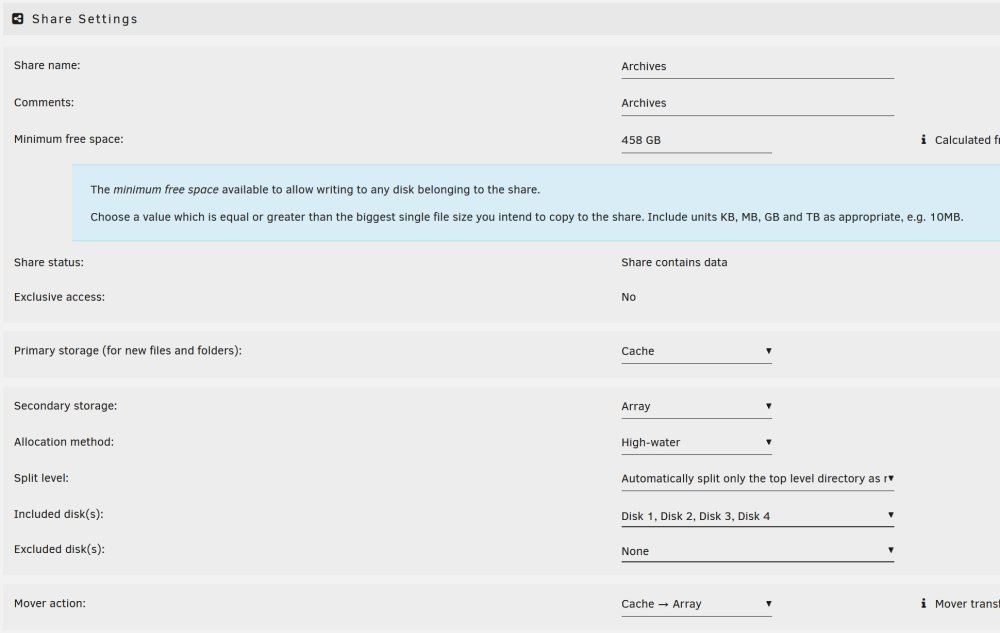
Thank you! It's moving off the cache on to another disk now.🙏 I set the levels up as per a video when I was fist setting up (I don't really understand what they all mean tbh) but that's what was suggested... So is it okay just to use that split level for all shares and does it matter if the data is scattered around various disks? I assume you can at any point move all the data of a share onto a single bigger disk. As for the minimum free space, I tried setting it to 0 as some of my other shares (grayed out 0) but it keeps spitting out 458GB anyway. Does it really matter what it's set to? I just want it to not interfere with copying data over.
-
I finally got around to trying this again. Thought I'd try writing direct to the array but after a short time it was obvious it would take forever. So I upped my cache to 5TB SSD (raid 0) and also threw in an extra 10TB HDD while I was at it, and was able to copy everything I needed over to the cache. I ran mover to get all this data off the cache to the array as I have another 3TB+ to copy but after some time the mover stopped and some of the data would not come off the cache, even though this share is set up to use All disks...so I manually selected all 4 disks to be used and still the mover won't move. It looks like my Disk 1 is absolutely full and none of the other disks are being used at all. Settings attached.
-
Why do files beginning with "._" refuse to copy over? If I rename the file (take out or change the _ to something else) it will copy over okay but renaming it back results in "Item Not Found" error. Is this a Linux thing and is there any work around?
-
Long story short, I wanted to copy a folder that was just over 3TB to my Unraid server and I used robocopy to copy it over. I watched it for a little bit and left it to copy as it was all going fine. But when I returned some time later, I found that it only copied just under 500GB. Trying to copy anything else to that share now showed that there was "not enough space". I have an array of 3 usable disks with around 14TB of free space and a 500GB cache SSD. So it seems the cache got filled up possible? But why does it not write directly to the array instead? Should I just disable the cache drive completely if moving such large files at once? The mover is now active and moving all these partial files over to the array but all those files will have to be copied over again... My shares are setup as per some videos I saw. I did some copying in the past and it was okay but it wasn't so much data at once.
-
This is way over my head but I think I understand. I only ever use /COPYALL for flags but I tried /copy:DAT and I got 0 errors and no fails! And of course, "S=Security=NTFS ACLs". Thank you for your help. Even though it wasn't stopping it from copying it's good to know what was causing this error.



