





lovol2
Members
-
Joined
-
Last visited
Everything posted by lovol2
-
Thank you, face plant moment, didn't press 'yes' and 'apply', just clicked 'done', hence it doing... nothing... doing to many things, thanks for your help, much appreciated.
-
I should add, I can start the array, and disk 2 and 3 work fine.
-
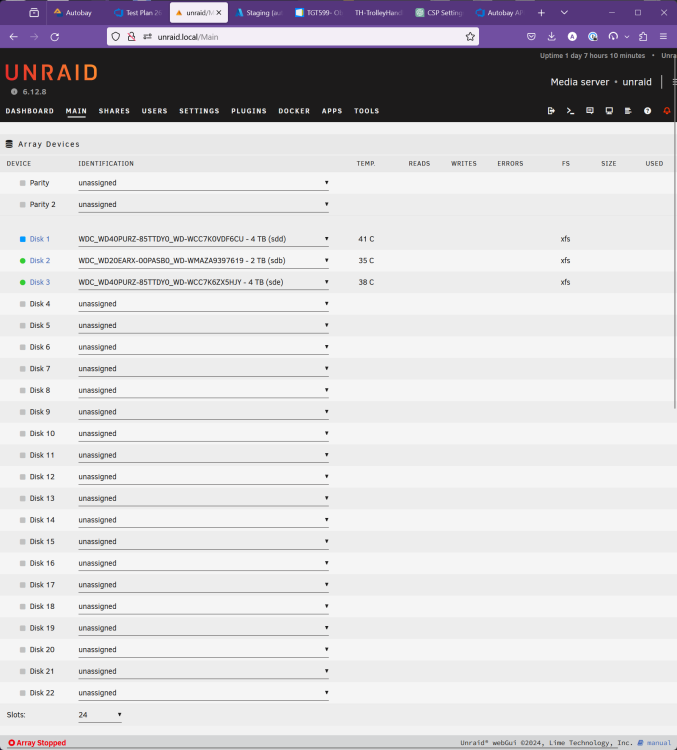
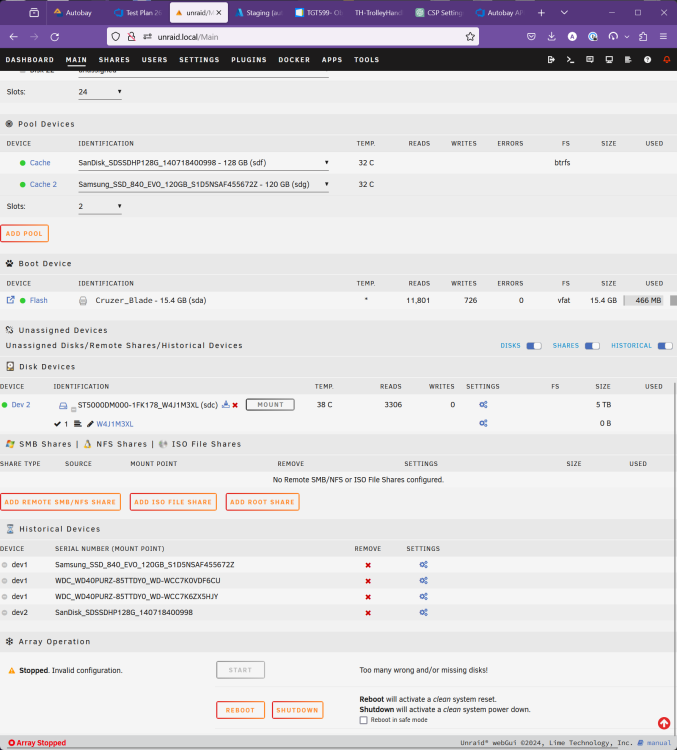
@JorgeB could you perhaps assit a little more, so i've got my data off as documented above. However, I can't seem to 'fix' the array. I've done pre-clear on both my 4TB and 5TB drive, both are fine. so I just want to put them back in the array but whatever I do, It just says "Stopped. Configuration valid." Things I've tried 1. Doing just 1 drive edit at a time - adding parity back, nope - adding disk 1 back, nope 2. Going to Tooles-> new config - with and without preserving anything, no chages at all. any help with this hopefully final hurdle appreciated. unraid-diagnostics-20240307-1713.zip
-
Thanks for that. We got close to having parity, it did say it was emulating at one point, but given the disk was running perfectly fine at one point, I swapped some cables round and the partity disk dropped out. Another update. So I decided I need to run some kind of full disk check prior to adding them back to the array, don't want to go through this again. found this video about preclear, seems as good as anything *Do you have any suggestions/better ways to do a full and complete disk check (and ideally get SMART to 'know' where the bad sectors are and ignore them)?* The plot continues... So, the array said Disk 1 was in need of a format, but I... stopped the array set 'disk 1' (the problem disk we have) to 'no device' on the array start array 'unassigned.devices.plg' showes both the Parity Disk (5TB) and the problem disk (4TB) now. I clicked Mount on the 4TB problem drive can browse folders. using Krusader as setup here ( and I can access my files, which is great. the only real downside is having to setup all my dockers again since I didn't know this was avaialble until after they were half setup, but oh well. thanks for your help.
-
unraid-diagnostics-20240302-1157.zip Hi, thanks for the reply. they are attached. Having engaged chatGPT, not looking good. I also got the following output root@unraid:~# sudo badblocks -v /dev/sdd Checking blocks 0 to 3907018583 Checking for bad blocks (read-only test): 73724752 73724753 73724754 73724755 73726692 73726693 73726694 73726695 73728624 73728625 73728626 73728627 73728628 73728629 73728630 73728631 73730568 73730569 73730570 73730571 73734448 73734449 73734450 73734451 73777368 73779308 73781244 73781245 73781246 73781247 73783184 73783185 73783186 73783187 73785120 73785121 73785122 73785123 73785124 apparently, XFS has no way of marking bad sectors like NTFS.
-
Hi All, I hope you can help in some way. I migrated over data from Windows etc. to Unraid Then added parity disk after during the parity create process - disk1 failed with an x. It was working fine before this, yes I'm sure there were some files that were unradable as the disk is old 4TB. Ok, in Windows you do a chkdisk and mark the sectors bad and then all continues fine. It would seem I can't do that in Unraid? I run the check and get Phase 1 - find and verify superblock... superblock read failed, offset 0, size 524288, ag 0, rval -1 fatal error -- Input/output error the parity creation got 98% complete, close! SMART test short and complete were both ok prior to parity build overnight Thanks for any help. the disk is xfs format 4TB.
-
I've been looking into this, a lot. Here is my experience so far. I'm sharing here just as much to keep my notes, but this is 2 weeks of videos and tinkering. I share this to give you a real sense of the challenge, it also separates the target customer base of unraid vs something like proxmox. TLDR: proxmox is amazing because it's features are great, but generally orders of magniture more challenging to setup than unraid. unraid is what I went for in the end, because having something working is better than not, and meets most of my needs, oh, and saves me hours of time, I just click the GUI and it works, oh, and I can use my old HDDs however I like and they spin down saving £$£$ when not in use, which is most of the time. But you can install unraid inside proxmox to get what you want. I started looking for 'free' products, so found proxmox to be a great solution for HA, storage and backup etc.. Watched many videos, thought it was 'the one' and off I went. Windows bye bye and proxmox installed. Ok, I have friends with unraid, so immediatly expected similar functions. I was wrong. HA and Proxmox are really for super users, I mean, really super, I'm a dev, but don't want to tinker with this thing forever. I would like something to work. Proxmox has some great features, but the simplicity at any level is not there. You can run many more services with less RAM and less CPU usage compared to Docker for example AND they will just magically migrate to another proxmox server if one fails. BUT, to get that working you'll need.... two servers, they don't use Unraid file system, so now you're at spinning disks spinning... all the time £$£$. There is no unraid, so you need 'real raid' lol, so now you're at what, Raid 5, performance is pants, ok, mirror. So now you need 2 disks just get somewhere. But you can't just 'add another drive'. You can if you use this LVM filesystem, oh man, I know more about file systems than I ever should (but I can see why the unraid crewe want to use ZFS now, lol). But if you just want to add another drive to LVM, get used to the CLI. OK, so you've got your mirrored drive. But if you buy a new hard drive, well, you can't 'just add it', there is lots of work to do, but lets ignore this (this is clealry the killer feature of unraid) Now you need that on another system so, for 4TB of storage, you'll be using 16TB of disk space, that can't easily be expanded to just add that old 1GB disk you had laying around. Oh, did I mention the GUI that is in Proxmox wants your mirror disks to be 'exactly' the same size, otherwise you're up for some pretty intense CLI sessions. Don't think you can just use a Seagate here and an WD there, oh no sir, they are 'slightly' every so *slightly* different sizes. hello cli. OK, so you've got your 16TB of disks given 4TB of storage, you now need to setup ceph, which to be fair, looks quite simple, but I didn't get this far so that's from videos only. Once you have this setup, you'll want a separate physical network for the servers to keep all the disks in perfect sync, and then the normal network for actual usage (e.g. connecting to the docker containers) - you can use the same one if you want, but, you're building a cluster here! ahh, docker containers, well, you'll be installing a VM and then 'something' to host the docker containers, because proxmox dosn't support those nativly. It does support VMs and LXCs though, so you may find moving to LXCs much better, they are designed for proxmox and migrate really well (according to videos). BUT, they are not the same level as sepration as docker, so there may be some security things to worry about. There are actually many people that install unraid, inside proxmox to try and get the best of both worlds. This might actually be a good solution for you. You'll need a HBA card, it's a PCI Express card, with 1 or more 'mini SAS' connectors and you can pass through that to unraid, and a USB port for the key/boot. Now you can have unraid, just add disks etc. and 'share back' to proxmox the files through the linux share system (NFS? not used it). Proxmox actually lets you 'add storage' like unraid, and it will appear for all the LXCs/VMs as a drive, but you can point it right at the unraid NFS share. I assume you can tell proxmox 'don't auto migrate this (unraid) VM, as that will cause chaos' but for the odd LXC you could have that on, or even a different VM hosting dockers. But you'll have say your databases on proxmox storage not unraid storage, since that won't be migrating to the new proxmox. I hope this helps a little. and serves as a refrence for some. In the end, I just installed unraid. and here i am :)

