





Ace319
Members
-
Joined
-
Last visited
Everything posted by Ace319
-
Yes connect via display port. So i need an older driver? It was working before without any drivers installed.
-
I thought I did in the first post? or did you want me to pull a specific file out of there? tank-diagnostics-20240327-0848.zip
-
Okay so its a white label 3.3v issue. Why did it work before????? still having the gui issue
-
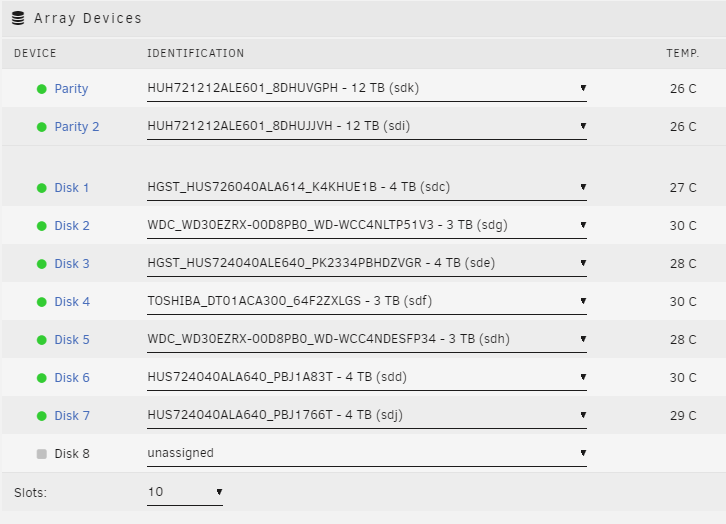
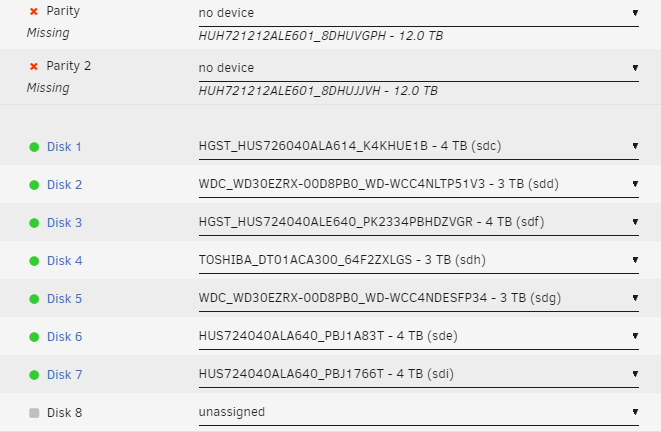
tank-diagnostics-20240326-1525.zip Im at a loss guys. Unraid has been working amazingly well for years and after this last string up upgrades and having to upgrade a couple of drives ive been having so many issues. 1) I've recently upgraded to 2 refurb 12tb hdds which were swapped to be the 2 parity drives. Things were going reasonably okay and were running. At one point in the process 1 of the 12tb wasnt able to be located so I changed some wires around and it worked find. I had to change cases to support the additional drives so things werent just hanging out on the ouside of the case. Now its currently happening again with both drives. So both 12tb drives are unable to be found by unraid. They appear when I put them on an external usb attachment as an unassigned drive. 2) gui issue. When i powerup the server on the screen i see the bios then unraid opens and asks how to boot so I select GUI mode. Once its finished booting I used to get a login screen and then the main page but now it just goes to a blinking cursor after it finishes booting. Im able to log in remotely on another PC
-
Does Unbalance work for this?
-
It was an issue with the router! Network port wasnt working even after a couple router reboots while wifi was working fine. Fios in my area had been having issues so I restarted the router a couple times over the last few days. But one final reboot solved the issues. Thank you! Super happy it was something stupid
-
The monitor was the issue- was able to move my primary montior to plug it in. I get the the Unraid GUI and now it looks like a network issue. Im pulling a 169.254 ip address. Trying to delete network.cfg to see if it will fix.......
-
No bios screen. Tried using HDMI and DVI and nothing is coming on the monitor lol. I am obv very unfamiliar with a lot of this and I really hope its just something stupid I'm doing wrong.
-
Haven't really had major issues ever - I recently upgraded to 6.12.x and added another 4tb hdd. Everyone was running smoothing for a week or so. Recently noticed that I lost the ability to communicate to the server occasionally. Had to hard reboot a couple times. Just recently everything was working fine (parity check was good) and lost connection again. This time I cannot access the server at all - tried multiple PCs and I tried to connect a monitor but nothing is being detected via the montior (I havent connected a monitor for years but it was a hail mary). Not even sure how to attach diagnostics because I cant access the server.....
