jvanoort
Members
-
Joined
-
Last visited
-
Ultimately, I had to force a shutdown. Luckily everything came back up as normal upon startup and I had a valid parity check with only 2 errors. Stemming from a support ticket I put into Unraid, I changed settings in order to enable to syslog server. This way I can send this information onto support to help diagnose why it happened in the first place. I used the following support article: https://docs.unraid.net/unraid-os/troubleshooting/diagnostics-information/#persistent-logs-syslog-server. This thread can be closed.
-
Version 7.0.0 My Unraid server has been inaccessible via the web GUI. My files shares are still running as well as my Windows VM. Since I cannot access the GUI I've been trying various methods to shutdown and restart the sytem as a first step to resolve the GUI issue. First I tried to unplug the UPS since I had it set to perform a clean shutdown when the UPS reached 10%. I ran that down to less than 10% and it did not shut down, so I plugged the UPS back in less I risk corrupting data. I then connected directly to the server with a keyboard and monitor. I've tried multiple commands and it still will not shut down. I've tried: "powerdown", "poweroff", "shutdown -h now", "and shutdown -hP now. Please help.
-
Thank you JorgeB. That worked. I also used the following video from SpaceInvader One to assist I had to go to ASUS' website and download the correct driver for the second NIC but once I did that, updated the driver, and then disabled the "RedHat" NIC, it shows up on my alternate VLAN with it's own distinct IP address.
-
Awesome, how do I do that? Is there an existing thread or guide somewhere?
-
My motherboard has one 10G ethernet port and one 2.5G ethernet port. My Unraid server currently exists for (2) sole purposes. Host Plex on a docker and host Windows 11 running Blue Iris w/ Code Project AI on a VM. I would like to set it up such that all traffic related to the Win 11 VM (i.e. IP cameras) gets segregated and funneled through one physical ethernet port and all other traffic gets funneled through the other ethernet port. Currently Unifi shows two separate IP addresses for my Unraid Server. Unraid Server is 192.168.107.104 and the Windows VM is 192.168.107.55. I can see that both IP addresses are being funneled through the same port on my network switch, which tells me that all traffic is being relayed through the one ethernet cable and one physical port on my mobo even though I have two ethernet cables plugged into my server on two separate ports. I've read through various threads on network settings with bonding/bridging etc, but I have not found anything definitive on how to set this up. I've also found horror stories of folks that are unable to reach their server remotely after changing these settings. I do not care about redundancy/fail over so much as maximizing performance and throughput. I want to make sure that Plex is able to run smoothly even though I'm constantly recording with 12 IP cameras on Blue Iris. Specs: Motherboard: ASUS ProArt Z790-CREATOR CPU: Intel i9-14900k Memory: 128 GB DDR5 Network: UDM with Unifi Standard 24 PoE (can't maximize speed of ethernet jacks on mobo, limited to 1Gbps per connection) If someone could provide the proper settings to achieve this, I would be very grateful.
-
I'm new to Unraid and I've been watching Spaceinvader One tutorials on YouTube to get my initial Unraid setup completed. My array currently consists of a 20 TB parity with (2) 18 TB array drives both formatted in XFS. I plan to add another HDD in the near future formatted in ZFS for sending snapshot backups from the Cache pool(s). I have (3) 2TB Samsung 990 NVME drives. I currently have each drive formatted in ZFS but in separate Cache pools so the I/O would be faster with separate lanes for each. It essentially mirrors this video from Spaceinvader with the caveat that I formatted in ZFS. After doing some additional research on this Forum, I'm thinking I should setup the (3) NVME drives in a Raidz configuration to allow for some redundancy if a drive fails and for the self-healing abilities of ZFS, etc. The main functions my server will perform is a Plex server on docker and running BlueIris on a Windows VM. I'll likely expand the functionality of the server in the future, but these are mission critical. Right now, I'm jus trying to get my Array and Cache Pool(s) setup as best as possible. Server specs are as follows: Mobo: Asus ProArt Z790 Processor: Intel Core i-9 14900k Ram: 128 GB DDR 5 Hard Drives as listed above. I'm looking for opinions/advice on whether to leave (3) Cache pools separate or if I should run the (3) NVME's in a RaidZ as one Cache pool. Thanks!
-
Somehow this issue has resolved itself. I've been successful at transferring multiple files that are collectively north of 1 TB with few issues now since 3/4/24. Thank you for your prompt responses.
-
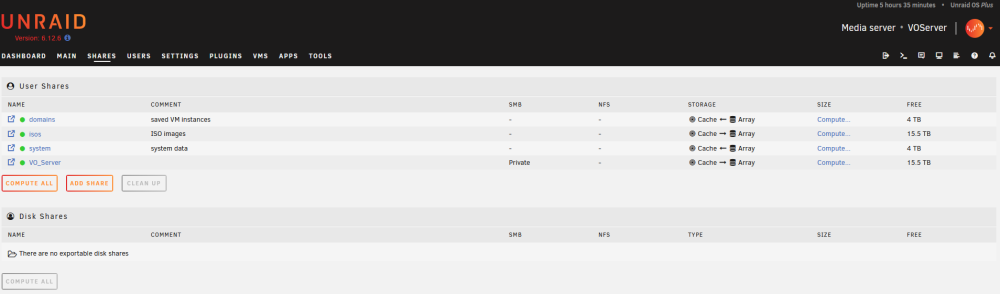
See attached screenshot. There could certainly be something I am misinterpreting.
-
VO_Server
-
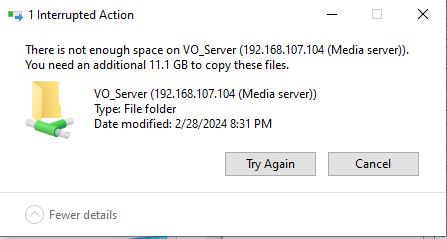
I just built a new server and it's my first time using UNRAID so I am very new to this. I am trying to transfer MKV files from old server running Windows 10 to new server running UNRAID. I've been getting the error "Not enough space on VO_Server. You need an additional XX GB to copy these files." I have 4 TB free on the CACHE and 15.5 TB free on the ARRAY. The largest files I'm transferring are 80 GB or so and UNRAID has set Minumum Free Space set on the share to 390.7 GB. I have had success in small doses transferring 2.5 TB of movie files so far but no it won't even let me transfer an 11 GB MKV file. Please help. voserver-diagnostics-20240302-1413.zip