





Acradavos
Members
-
Joined
-
Last visited
Everything posted by Acradavos
-
The problem is solved, thank you so much @JorgeB
-
I made the adjustment. I turned the power off and back on. Removed the Docker image and rebuilt it. Now to wait, thanks so far.
-
It's happened again. Two containers stopped, but all my dockers stopped working. After a reboot, both SSDs are missing. Attached are the logs. nas-diagnostics-20241012-2258.zip
-
The problem occurs sporadically, at random times. All my docker containers stop one by one. When I reboot the system, my two cache drives are gone. After another reboot, the disks come back online, but I can't start the docker service. My Ubuntu VM also gets corrupted. When I perform a scrub on my Cache pool. it sometimes works again. Not always. If I now delete docker.img and then recreate my containers from the template, it works again. After a while I have the same problems again. Is this the same problem? https://forums.unraid.net/topic/154783-samsung-990-pro-4tb-disappeared-for-the-3e-time/
-
After a normal reboot both cache drives are recognized again. Here are my logs. nas-diagnostics-20241009-2028.zip

-
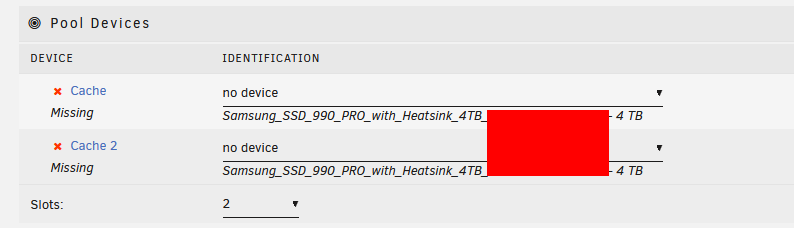
The problem only started after I replaced my cachepool with 2x 990 Pro 4TB NVME from Samsung. Now everything worked for 2 days and the same again.
-
Unfortunately I have done this before, hence the question how this can be solved permanently.
-
Exact the same problem here/
-
About 2 weeks ago I replaced my Cache Pool. 2x 970 Evo Plus 1TB replaced by 2x 990 Pro 4TB. (NVME) They are in a RAID 1 configuration. That all went well, until my drives suddenly went 'missing'. After a bios reset they were available again but I could not start my Docker Service. I removed vDisk from docker.img and then rebuilt everything. Now I had the same problem again. Firmware of NVME is up-to-date. Anyone have any ideas? nas-diagnostics-20240927-1152.zip
-
Yes, I see the correct info. Maybe do I need a checkdisk on the USB stick after parity is completed?
-
I had just neatly stopped my array, turned off the machine and moved my USB stick to another input. After starting I get the message "Your flash drive is corrupted or offline. Post your diagnostics in the forum for help." My parity check has also restarted, my data is still on Disk 1. (One parity and one data disk) I cannot access my shares at the moment. I will run the parity check, but I don't know what else to do with my USB stick. I hadn't made a backup. Just now. Cane someone help me? tower-diagnostics-20240412-1522.zip


