





Connor19
Members
-
Joined
-
Last visited
Everything posted by Connor19
-
My Nextcloud logs just say “Transcode failed - Transcoder returned 408”
-
So I have done that and restarted the container, but when I click a video I just get a black screen with the swirling logo as if the video is loading but nothing happens
-
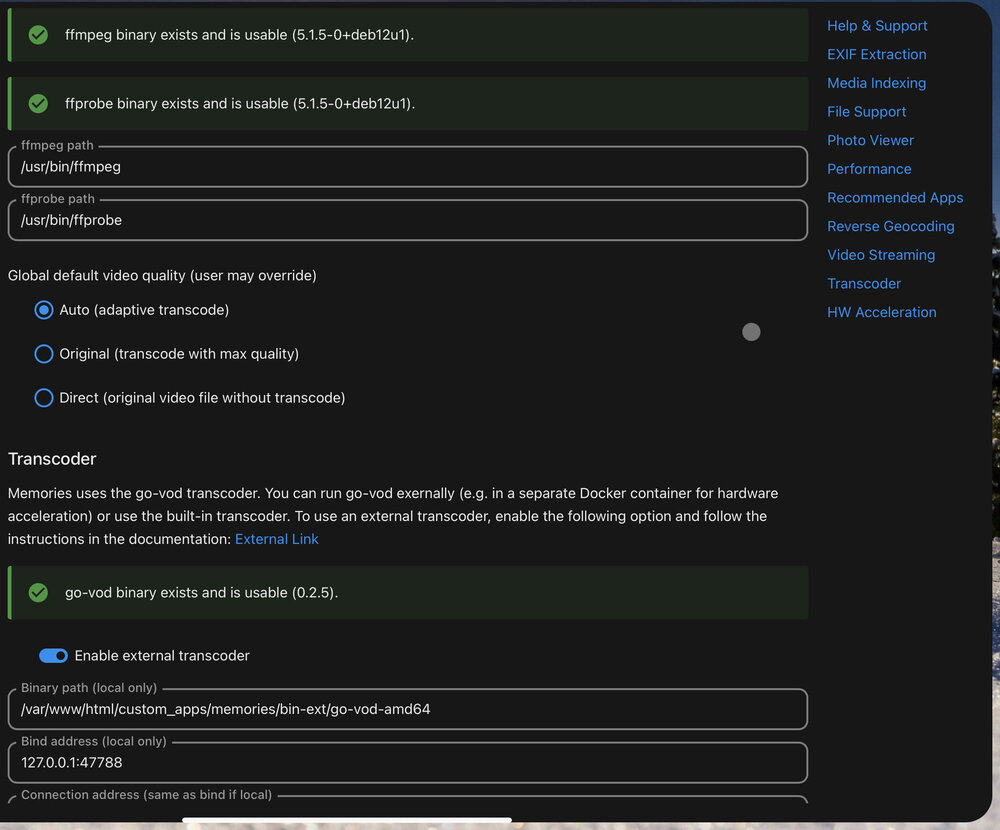
I have sorted me previous issues out with transferring via WebDAV, the only issue I have currently is getting transcoding working on the memories app. I have Intel GPU TOP installed and have added /dev/dri as an extra device, this works great for Transcoding on Plex but I presume there’s some extra setup needed on memories, I have tried to type the video command in the terminal but it says its not defined so I am a bit stuck, do I need to edit anything on the memories setup page?


-
I’ll try to include as much info as I can: I’ve had Nextcloud running through NGINX Proxy manager for a few months now and all is fine, I have and upload limit of 50GB as an extra parameter on the Nextcloud-ffmpeg docker container, and I am able to upload large videos (5GB+) to my Nextcloud via the iOS app and via the windows app without issue. I’m trying to use the iOS app PhotoSync which uses WebDAV to connect to Nextcloud, I’m doing this so I can upload my iOS images in an organised manner and keeping the quality and also keeping the dates etc. The issue is I seem to have a limit somewhere so I can’t upload larger video files, so videos that are around the 2GB+ mark are going to 100% and then giving me the 413 error. I’ve googled and it’s mainly saying that it’s related to NGINX. I Have edited the nginx.conf file in etc/nginx/ and have changed client_max_body_size to 0. i have also looked for the lines such as max_upload_size in a file like php.ini. I have a php.ini file in /etc but there isn’t any references to upload sizes or anything like that and I don’t have any php folders with anything of relevance in either as I have checked all the .ini files. Does anyone have any info on this? Does WebDAV still go through nginx? I’ve been searching for a solution for a couple of days now and I’m totally lost so any help would be appreciated
-
Does anyone know what needs editing in order to increase the file size limit to upload via WebDAV? I have no issues uploading large files to the iOS app or via PC however I am using the iOS app Photosync as it can upload all my images without removing any of the metadata and preserves quality, plus its very easy to upload and keep your folder and album structure, however when I try to upload videos of around 2GB I get “413 Request too large” My Nextcloud dashboard has the correct numbers with a 200GB Upload limit but just want to know if there is something separate that needs editing for WebDAV uploads?
-
RIght I wasnt aware that you could change the startup order, after doing so all is working and my issue has been resolved, thanks again!
-
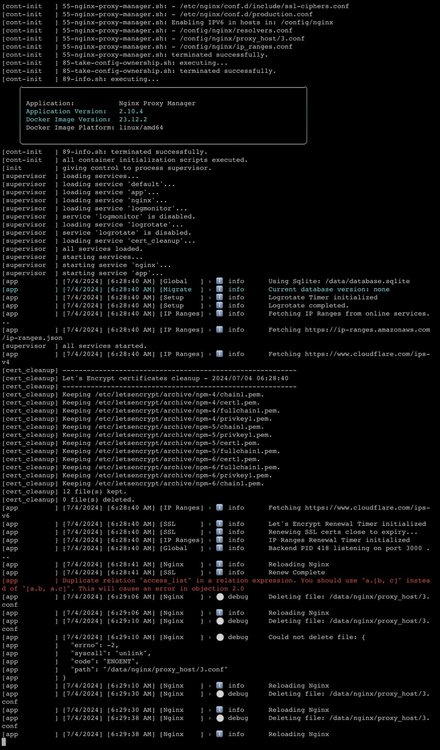
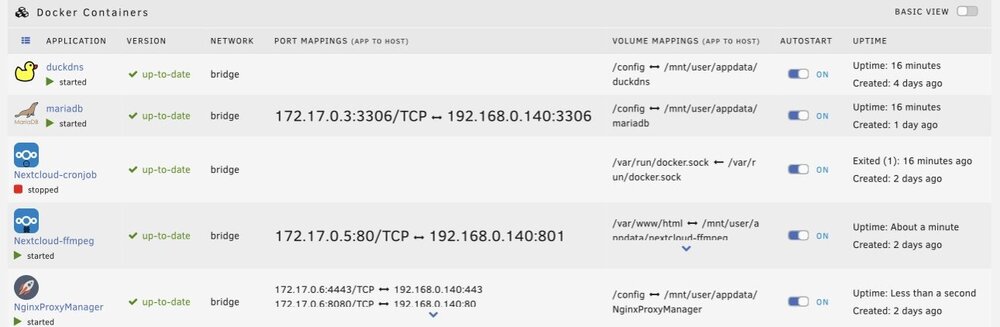
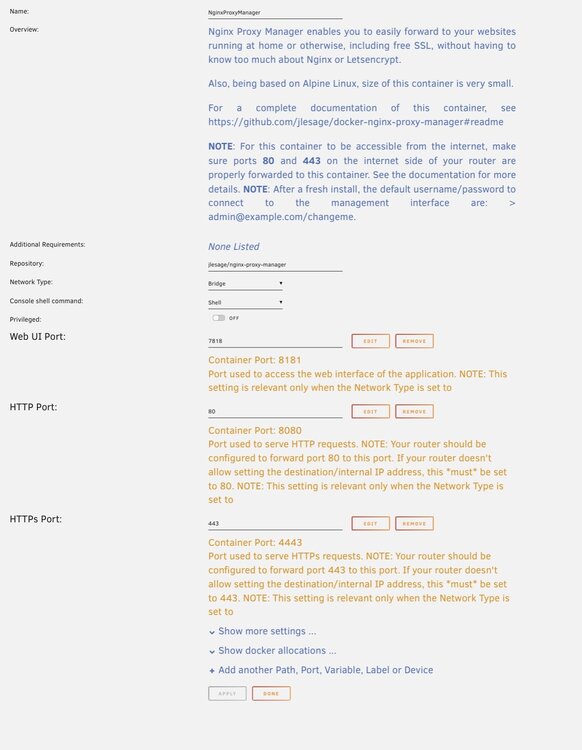
Hi, me again with some slight issues. Firstly sometimes when I boot my Nas I can’t get into Nextcloud, I normally have to mess about restarting apps and messing in Nginx to try to get it going, though this doesn’t happen every time. It’s happening right now so I can’t get into the webUI at the moment. Secondly even when it does work, cron jobs don’t run by default, I have to manually restart the cron job docker container to get that going for some reason as it’s stopped by default despite auto start being on. Below are some log screenshots to see if there’s any red flags in there

-
Sorted it! I removed the sh from the command and that did it! Thanks for the assistance
-
Both other issues are sorted now so thank you very much, just the OCC one I am struggling with, so I did the PHP before OCC but get this:

-
I am using Cron yes, I will tackle the proxy issue afterwards but as for the first issue with the PHP error I hope I am getting this right, I added a variable to the container as screenshotted below but I am getting a similar error. As for running the command in terminal I am also getting an error there too, forgive the ignorance as I am out of my depth here. Also regarding the trusted proxies, is it the IP address and port of the NGinx webui that I should put?



-
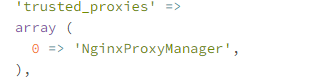
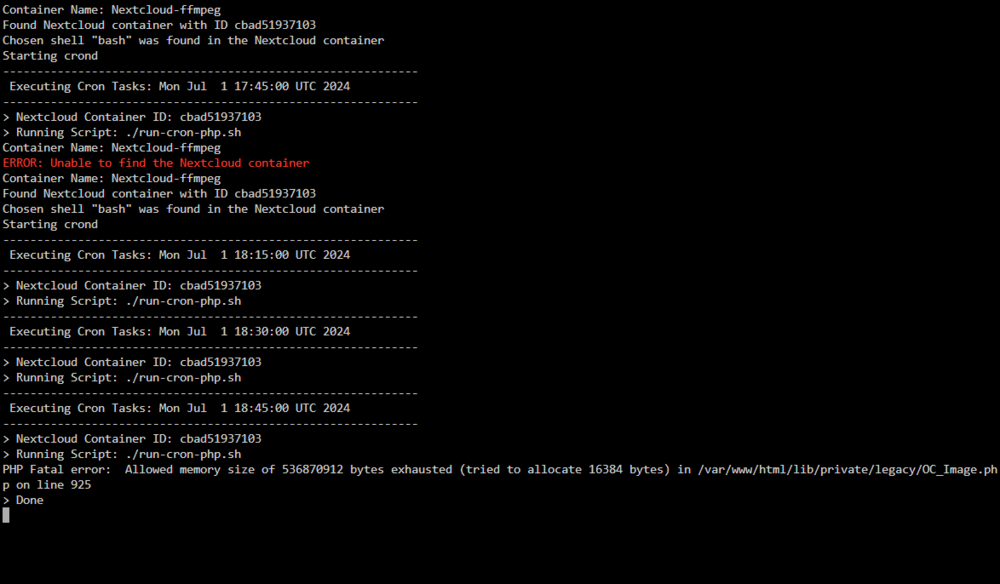
Thanks for the response, I was on 6.12.8 and updating it to 6.12.10 did indeed allow me to install the Nextcloud-Cronjob container. Though I am now faced with 3 errors that I cant shift. 1 - The Cronjob container is installed and I left everything on default, however what seems to happen is every 15 mins I hear the fans spin up so something is happening however the Nextcloud overview still says that a cron job hasnt been executed in 4 days. I have screenshotted below the nextcloud-cronjob log. 2 - Another error on my overview is "The database is missing some indexes. Due to the fact that adding indexes on big tables could take some time they were not added automatically. By running "occ db:add-missing-indices" those missing indexes could be added manually while the instance keeps running. Once the indexes are added queries to those tables are usually much faster. Missing optional index "schedulobj_lastmodified_idx" in table "schedulingobjects"." - How do I get rid of this? I have tried entering the command in the main terminal and the console of the nextcloud-ffmpeg container but to no avail. 3 - Final error I am seeing is "Your "trusted_proxies" setting is not correctly set, it should be an array of IP addresses - optionally with range in CIDR notation. For more details see the documentation ↗." I have also screenshotted below how the proxies look in my config as dont know how to rectify Thanks very much and sorry for being a nuisance!
-
I see, when you say delete and recreate, what is it exactly that I should delete and Recreate?
-
I have my Nextcloud FFMPEG up and running but have two issues. Bearing in mind that I am very much new to Unraid and Linux so using the Terminal and entering commands is something thats new to me hence me struggling. Issue #1 is that I have an error on my nextcloud stating "The database is missing some indexes. Due to the fact that adding indexes on big tables could take some time they were not added automatically. By running "occ db:add-missing-indices" those missing indexes could be added manually while the instance keeps running. Once the indexes are added queries to those tables are usually much faster. Missing optional index "schedulobj_lastmodified_idx" in table "schedulingobjects"." Now I am struggling to find where to run that command and get it to work, I have used the main terminal and entered it and I have also clicked on Nextcloud-FFMpeg in docker and clicked console and entered it there but get "bash: occ: command not found" Issue #2 is I cant get the Cron jobs to work. I have Cron (Recommended) selected and I just see "Last job execution ran 2 days ago. Something seems wrong." at the top. I have tried to download the nextcloud-cronjob app and when I try to download it I just get: "docker run -d --name='Nextcloud-cronjob' --net='bridge' -e TZ="Europe/London" -e HOST_OS="Unraid" -e HOST_HOSTNAME="NAS" -e HOST_CONTAINERNAME="Nextcloud-cronjob" -e 'NEXTCLOUD_CONTAINER_NAME'='Nextcloud-ffmpeg' -e 'NEXTCLOUD_CRON_MINUTE_INTERVAL'='15' -e 'NEXTCLOUD_EXEC_USER'='www-data' -e 'NEXTCLOUD_EXEC_SHELL'='bash' -l net.unraid.docker.managed=dockerman -l net.unraid.docker.icon='https://github.com/kilrah/unraid-docker-templates/raw/main/icons/nextcloud-cronjob.png' -v '/var/run/docker.sock':'/var/run/docker.sock':'ro' -v '':'/cron-scripts':'ro' 'rcdailey/nextcloud-cronjob' docker: invalid spec: :/cron-scripts:ro: empty section between colons. See 'docker run --help'. The command failed." I am leaving the settings on defaults as to be honest I dont understand it all that much. Does anyone have any info on how I can solve either of these issues? I can provide any info if needed Thanks
-
Hi guys, I am having an issue installing nextcloud-cronjob. I have Nextcloud-ffmpeg set up and working with NGinx proxy manager and all works well, i have an error saying last job was ran 2 days ago and theres a problem so I have tried to install nextcloud cronjob but get this: docker run -d --name='Nextcloud-cronjob' --net='bridge' -e TZ="Europe/London" -e HOST_OS="Unraid" -e HOST_HOSTNAME="NAS" -e HOST_CONTAINERNAME="Nextcloud-cronjob" -e 'NEXTCLOUD_CONTAINER_NAME'='Nextcloud-ffmpeg' -e 'NEXTCLOUD_CRON_MINUTE_INTERVAL'='15' -e 'NEXTCLOUD_EXEC_USER'='www-data' -e 'NEXTCLOUD_EXEC_SHELL'='bash' -l net.unraid.docker.managed=dockerman -l net.unraid.docker.icon='https://github.com/kilrah/unraid-docker-templates/raw/main/icons/nextcloud-cronjob.png' -v '/var/run/docker.sock':'/var/run/docker.sock':'ro' -v '':'/cron-scripts':'ro' 'rcdailey/nextcloud-cronjob' docker: invalid spec: :/cron-scripts:ro: empty section between colons. See 'docker run --help'. The command failed. My Nextcloud-ffmpeg and my NGinx are pretty much set to default and I left the settings on nextcloud-cronjob on the defaults as well. Any ideas?
-
In the Tailscale video on this, the guy was on linux and he said just SSH to the app and type tailscale up, I have been trying for hours and i know nothing about SSH so as of now I am totally lost
-
I dont understand, in my tailscale I just have my server and my iphone, do I put the server IP in there?
-
Im in the process of trying it now, I have my phone and Unraid server connected but how do I get nextcloud connected to tailscale?
-
Hi guys, I will try to keep this as short as possible. I have followed Spaceinvaderones guide from 2 years ago which details getting nextcloud running through a reverse proxy and using a domain name. I now own a domain name and spent hours trying to get this working yesterday but it turns out my router does allow port forwarding but it does not allow the forwarding of one port to another, so I cant forward 443 to 1443 for example, which as far as I am aware was causing my issues as I couldnt connect to the reverse proxy. I have currently got it all up and running through a Cloudflare tunnel which is working however I am seeing people mention potential security issues as your traffic is visible (this is all very alien to me so forgive the ignorance) and potential limits when uploading lots of files especially large ones. My plan is to install Nextcloud on my main Pc and my phone and use it to transfer files between and also store lots of old photos and videos. I am seeing people using things like Tailscale and Wireguard (I do have wireguard set up in order to remote access my server) and I am just wondering are those VPN systems better in terms of security and not running into the limits that I would have with cloudflare tunnels? I also see the term VPS going around and have no idea what that is but basically just would like to know what the best way to get this running is if I cant use a reverse proxy. Thanks!
-
Ok I’ve downloaded the file manager and will try it out, thank you 😄
-
Ok I’ll have a look at that, thanks. Out of intrigue how come mover wouldn’t work?
-
I currently run 3x 16TB Seagate ironwolf pro HDDs, in a raidZ1 so one parity drive. I recently got a great deal on two more which I have purchased and thankfully I haven’t yet used much of the space so my plan was to plug in an external HDD that’s 20TB (enough for all my data in the pool as of now) Make a temporary pool with it and use the mover to move my shares where the data is to the external. Then I remove the existing pool and make a new one with the extra two drives and use the mover again to get the data from the external drive to the new pool. Does this sound like the best/easiest option for this? I can also do it on windows on my main PC if that’s a better option.
-
Just done it, totally forgot about the ability to move secondary to primary, sorted now, thanks!
-
The intention was to store my VM data on cache drive, however itll work on my main array as it is a 500GB M.2 with the same drive as parity so Im assumg thatll still give me a big performance increase
-
Okay so mover is done and has moved from main to array but now when I try to set primary to array, I can not set secondary to cache, or anything for that matter
-
Ok I set it to 100GB and am running now and looks like its moving, thanks


