





bear0328
Members
-
Joined
-
Last visited
-
Hi there, I have struggled with NFS share a few days. now I know that if I tunred off the "Tunalbe(support hard link)" it worked. and I can discover the media from my Oppo 203 Blu-Ray player.But the truth is I have to turn on this option when I manage the media files.so I need to turn it on/off often. Is there any better way to fix this? I knew I can use SMB share, but Oppo 203 only support SMB V1 which speed only up to 100Mb/s, some movie will be stucked.
-
Hi there, I updated to OS 7 beta 2, I found that SMB V1 can not work with my Oppo 203 Blu-Ray Player, but the same setting it worked in OS 6.12.10. As the attachment, whatever I set WSD Yes or No, it still didn't work. BTW. I have a wireguard tunnel.
-
Yes, I had Wireguard tunnel. But, how to make sure, the wireguard and the NetBIOS?
-
Hi there,I'm sure the same setting oppo blu-ray player can work in unraid OX 6.X. but didn't work in OS 7 and I found another way to solve this. Use the nfs share, but I have to turn off the option Tunable(Support Hard Links) which on Global Share Setting.
-
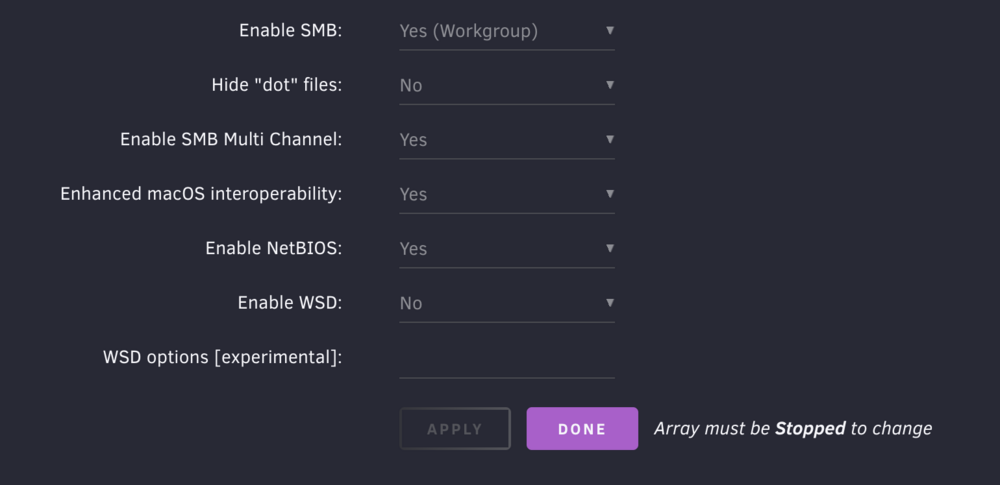
the picture is my setting. I will try your setting.
-
bear0328 changed their profile photo
-
It worked on OS 6.12, when I updated to OS7, SMB V1 does not work. How to fix this?
-
I uploaded the diagnostics. tower-diagnostics-20240406-1648.zip
-
Mover的schedule设置,每天一次,有时候不能满足需求,可以设置让他超过多少百分比,自动开启像机械盘转移么?
-
-
按照如下的方式,发现硬解开启不成功,我已经安装了intel驱动 -------------- 开启核显转码 cd /dev/dri ls chmod -R 777 /dev/dri Plex/Emby/Jellyfin-编辑-添加另一个路径、端口、变量、标签或设备-保存 值 /dev/dri ---------------------

