





Angora
Members
-
Joined
-
Last visited
-
Thanks, will do so.
-
I found the Pro.key in the config folder. When i renamed the basic config, unraid tells me that the pro lincense does not belong to this usb guid. (I had to switch the flash usb stick today). When i try transfering the pro license in the registration manager it tells me that it belongs to another user. How can i solve this problem? Do i have to contact someone?
-
Hey again, i bought the pro license as an upgrade from my basic license, but recently i noticed that only the basic license is activated. When i tried to activate it again (vie link and the registration manager) it tells me to stop the array, but nothing changes. Any idea how to solve this problem? With best regards
-
Thanks already for your help. I bought a new (sadly) SanDisk USB Stick, just to find out, that the usb creater does not like it. Yet i was able to install unraid manually. I copied my old config over, and replaced the kay. So far everything went okay, i guess. I am still wondering how a 3 month? Old Usb-Stick can get this degraded within this time. Anyways, for now everything is up and running again. Hopefully for longer now than the last time. Thanks guys, have a nice weekend.
-
Thats what i figured until now, the more precise question is: how to recover all the settings etc? (i made a backup a while ago, but i can only access it via unraid -.-, since i need linux for it) And how do i get unraid to acknowledge the new usb stick with the bought license?
-
No progress so far. fsck did not do its thing. So, you suggest turning the system off, getting the usb stick and trying it at my pc? Will i be able to turn the system back on again? I turned it off, but chkdsk tells me that there is an unrecoverable error. So... what to do now?
-
In this case is the usb-stick still installed in the server and unraid still running. For that reason i would use fsck -a /boot/ Sorry if i am asking many questions, i just want to be cautious.
-
Just to make sure i do the right thing: reiserfsck --fix-fixable /boot Is that correct?
-
Hey guys, today unraid started to show me the message, that my flash drive is corrupted or offline. Since its only 3? month old i am a little confused. What would be the best steps to get it to work again? I thought about restarting but am afraid, if my server wont come back up again. Also my boot/config/ folder looks a little weired. (See screenshot) Any suggestions or tips, how to handle this? Thanks. homestation-diagnostics-20240517-1410.zip
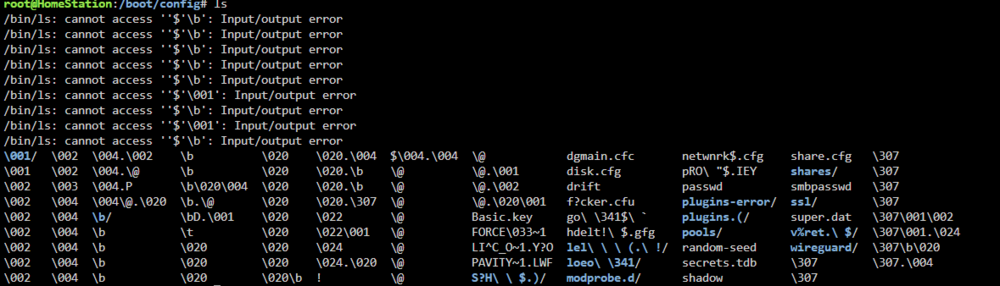
-
Alright, thanks for your help. I will have an eye on it and make a diag, if that should happen again. Thank you very much!
-
Is what i get for the first command. Probably you meant zpool? -------------------------- Done with zpool detach [...]. See Diag. It looks green at this time beeing. So it might be solved. But how could i prevent this from happening? homestation-diagnostics-20240406-1637.zip
-
Thanks for your response. When i tried to unassign the device i couldnt start the array (was grayed out). Only when i set the number of devices for the cache to 0 i could start the array, and so i did. Then i stopped again. Then i reacreated the pool with 2 devices, added the original one and startet the array once more. It starts but with "Device is disabled, contents emulated". As i said, i added another 1TB nvme in the meantime to be able to start the array again. But i dont want that to be the normal case. Any new ideas? ------------------------------ I just noticed that i have an historical device shown at the bottom of the page: dev1 WD_Red_SN700_1000GB_23465W800450 Does this lead to anything? Thanks again! homestation-diagnostics-20240406-1427.zip
-
Angora joined the community
-
Hey unraiders, I already searched the forum, but didnt find any solution that would help me currently. I have following setup: Cache: 1 nvme 1TB (to get it somehow to work, i added another nvme to that pool, but that wasnt installed at the start) Array: 1 ssd 256GB (just to make unraid happy to have a disk there, not really used) Data: 2 nvme 2TB I stopped the array to exchange the 256GB ssd, but since that wasnt that easy either, i just wanted to go back to my "normal" and start the array again. When i did that i got the error message you can see as the topic name. I already unassinged the cache drive, rebooted and reassinged it. Didnt help. Does anyone have a good idea, why this is happening and how i could solve that problem? I just found following message under the cache itself: pool: cache state: DEGRADED status: One or more devices could not be used because the label is missing or invalid. Sufficient replicas exist for the pool to continue functioning in a degraded state. action: Replace the device using 'zpool replace'. see: https://openzfs.github.io/openzfs-docs/msg/ZFS-8000-4J scan: scrub repaired 0B in 00:00:11 with 0 errors on Mon Feb 12 10:21:24 2024 config: NAME STATE READ WRITE CKSUM cache DEGRADED 0 0 0 mirror-0 DEGRADED 0 0 0 8514342029840584511 FAULTED 0 0 0 was /dev/nvme0n1p1 /dev/nvme3n1p1 ONLINE 0 0 0 errors: No known data errors How can this happen with a restart? And how can i solve this? Thanks. homestation-diagnostics-20240406-0958.zip

