Lethi
Members
-
Joined
-
Last visited
Everything posted by Lethi
-
the download works now and it can handle a already downloaded version. However I have to include a version on the folder name to make it recognize it, so instead of "BePiNex" I have to use something like "BepInEx-v5.4.18" and I think that makes some follow up code fail since the mods don't load (the server as such does), I believe if you download the .zip using your code it extracts it and the folder in there is always BePiNex without a version. So maybe it's sufficient to do a folder check on Bepinex instead of Bepinex-*?
-
This now happened again, is there a way to stop checking for new versions and just use what Bepinex is in the folder?, it looks like the latest tag of Bepinex uses (and includes .1) and you have .0 now coded like the previous versions had

-
Thx for the fast reply, it's working now
-
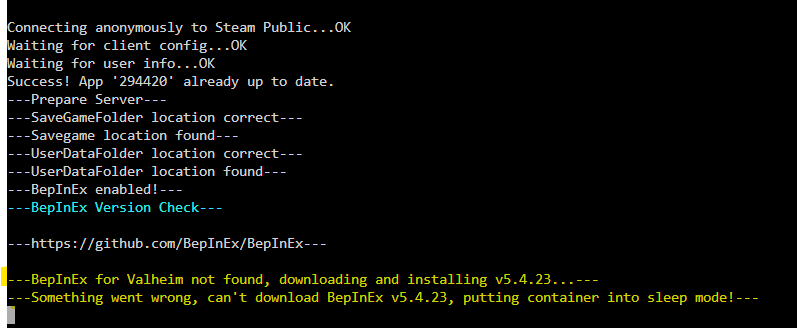
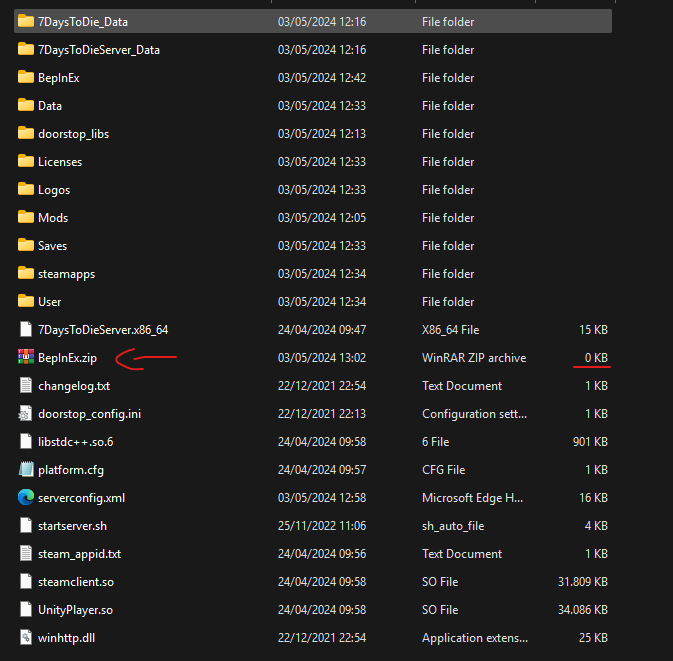
Has anyone seen this issue while trying to run the 7 days to die undead legacy mod? (Link) BepInEx is in the folder where it should be and "enable BepInEx" is set to true in the cointainer (but that doesn't seem the issue). It just seems like it can't find what it's looking for and then tries to download a new version since I always end up with an empty zip file after I try and start the container.