





chowpay
Members
-
Joined
-
Last visited
Everything posted by chowpay
-
Ah I forgot to say that "based on age" is set to "No" currently. So I wasn't sure what gets moved when its no or how it chooses what it should move in that case. BUT I just noticed that I have it set to I'm guessing no + auto = oldest gets move first as in the description.

-
The mover is working correctly now and , at 70% it moved till there was only 50% left. Ive been looking around but I couldnt figure out what is the logic of the files selected to be moved? For example is the 50% left on the cache considered the 50% of the newest files ? I don't have age-based moving setup. Does it randomly select the files that are not considered cache-only ? thanks.
-
AH got it. I though those messages were from the debug being turned on. I've disabled it now. Im guessing with it on it never actually moves anything it just tells you what it would have done. Is that correct?
-
AH ok I don't have any shares that are array > cache. That explains why its not being re-primed after a move. Since I dont have any shares that move in that direction I suppose I can just ignore "Fill up/prime...." as whatever setting it has in there won't be doing anything anyways. Thanks for explaining it. It makes so much more sense now.
-
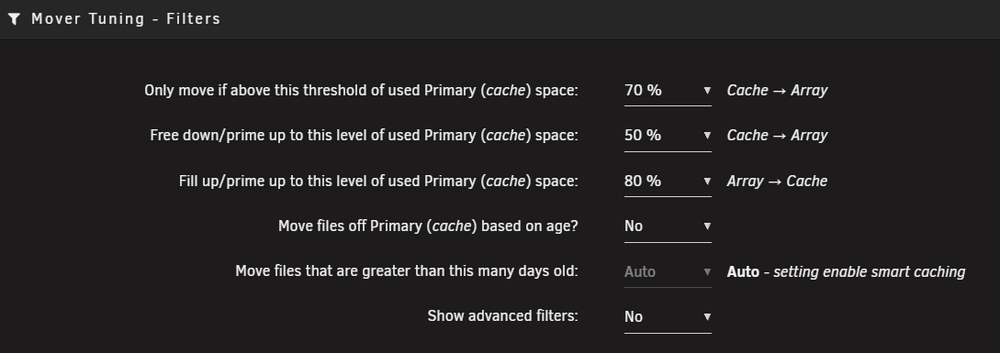
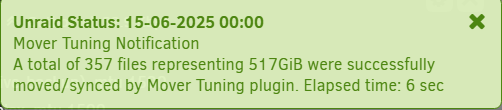
Trying to understand how this works and its little confusing to me (n00b). My filter settings are here: Here is how I read what will happen: once my cache gets to 70% it will attempt to move stuff to the array, basically this is what triggers mover ca Even though it will get triggered at 70% it will always keep at least 50 % of the data in cache The mover will move data back to cache until its up to 80 % What I see happening is this : So Reading this I expect that 517GiB was moved off my 2TB cache. Not the case I don't know what it moved but my cache level didn't change Currently my cache sits at 78% so I'm wondering what this notification is actually four and once I get over 80% cache should it then stay that way all the time and mover is just moving things to keep it at 80% Am I totally misunderstanding the help hints? TIA
-
Not sure what this is called so I had trouble searching it. I have a share : /data/ it has a lot of directories under it such as: data/usenet/nzb/ data/usenet/complete/ data/.. I have a system on the network that I don't want to have access to the full data share but I want to allow it r/w access to /data/ but I would like it to have r/w access only to /nzb/ so the system can ad hoc drop in nzb files to be picked up by sab. Is it possible to create a share to a single directory that exists in another share? I can only find the option to create a share but no option to specify the share's path?
-
@itimpi finally started working. Now all drives spin down thanks for the help it just took a while. I think the issue ended up being the system share didnt get moved to cache or didnt finish.
-
**edit: When doing the steps below the containers were off but docker service wasn't disabled. After disabling the docker service the mover worked. The drives now spin down correctly Ok I changed System to be cache, Stopped all the containers, enabled the mover. Once the mover was complete I enabled the dockers again. But I see its still utilizing disk1. Is there something I should do to ensure that docker.img is in cache and not on disk 1? I also tried these steps: except for exclusive. From what I can tell it didnt move the docker.img to cache /mnt/cache/system/docker# ls -lah total 0 drwxr-xr-x 1 root root 0 May 7 09:07 ./ drwxrwxrwx 1 nobody users 26 May 7 09:07 ../
-
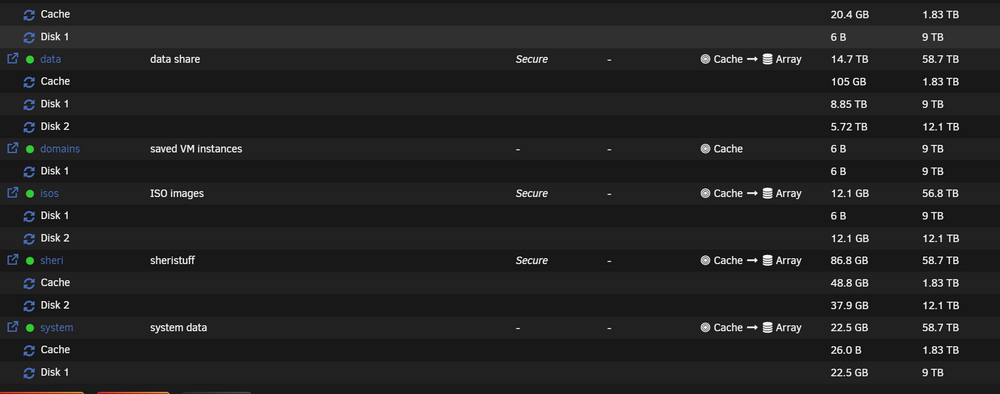
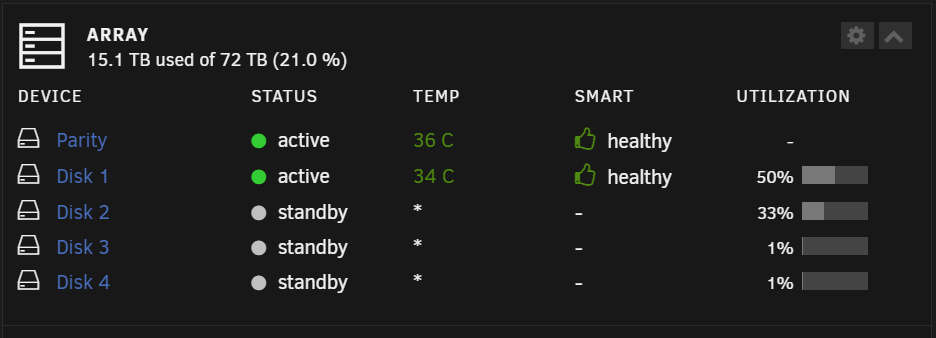
Pretty new to unraid, I think I have everything setup the way I want but what im noticing is that 2 drives always spin back up after spin down Dianosticpotatostore-diagnostics-20240520-1744.zip Layout: These are the 2 drives that always spin back up : When I try to run the Disk Activity plugin I dont see anything other than Cache. But then again I think its only showing the first 150 lines Any tips on how to find whats going on ? TIA
-
Thanks, Ended up not doing split and letting unraid just use highwater to drop it into the next drive as it fills up. I think the odds of having a media file thats spread across drives is low . Feel free to tell me other wise but I assume everything kinda sticks together except for the item that is at that watermark line. For those curious this ended up being my process: Drop in 2 array drives preclear them and add to array mount one of the two mirrored NTFS drives from my original server and rsync the data across to the array Migrate all starr services and get swing them away from the old server to and get it writing to the array added in SSD mirrored cache drive pool preclear the drive from #3 and add it to the array enable cache pool add in pre-cleared parity drive (currently in parity-sync stage) once its built preclear remaining NTFS drive and add it in to the array once parity is established add in
-
Just got my unraid server setup and precleared a couple of drives to start my migration. Following the Trash hard link tutorial I created a data share. My goal is to first mount my existing 18T drive and migrate the data to the new array w/o cache. The current array is 2X18T drives. After its migrated I'll add it to the array and enable caching etc. But my end result ideally is that data fills up one drive then spills onto the next one, so on and so forth. I don't want the array to spin up all drives because a user is watching a movie or show where bits and pieces are in other drives . Because of this I disabled splitting and just left it as high water mark. Currently I have 2 drives in the array and I made my share /data -usernet --complete ---movies ... Question: Now lets say I rsync my mounted media drive from media/.../movies to(mounted drive) to >>> /data/usenet/complete/movies (array share) because I set highwater mark it should all go to 1 drive first then spill over to the next as it fills right? Once this is done I'll add in the parity drive but does this sound ok? Anything I need to watch out for?




