





1topgazza
Members
-
Joined
-
Last visited
-
Superb Confirms what I thought. Thank you so much
-
I have a very nice home build NAS but it’s very power hungry. Considering buying a bespoke NAS like Ugreen or Terramaster which run Unraid. I’ve read that it’s as simple as fitting my drives in the new NAS and plugging the USB flash drive in the appropriate port. Is it really as simple as that ? Just FYI I have everything backed up just in case 😀
-
Sorted Turns out I was looking in the wrong settings section for Connect To Server DOH! Found it under GO. Typed in IP for NAS and everything is there now in Finder.......told you it was something simple....me!
-
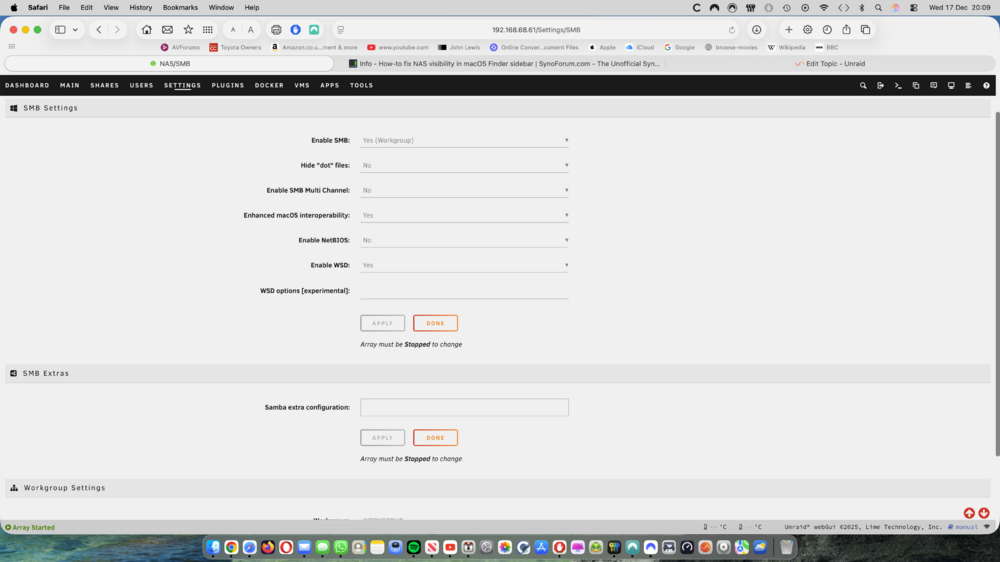
Since rebuilding my NAS OS everything works OK. I can stream media to my TV and I can access my NAS on my Mac via IP. But it doesnt show in finder. I dont have a "Connect to Server" option in finder despite it being selected in OS settings on Mac. SMB is set to Yes in UNRAID settings. I get the feeling this is a MAC issue but I just dont know. I get the feeling it is something simple...... Any help appreciated
-
Just to update that everything now works. Had to buy a licence upgrade at £27 but that’s ok as I’d loaded the latest version OS. Happy to support Unraid even in that little way. So thanks for everyone’s help
-
Thank you That’s what I love about Linux/unraid. I’m still prone to overthink it as I learn 😀
-
Is it OK to continue with related questions ? Correct if its not and i'll raise another post. And a huge thank you for the help to everyone. I'm learning Unraid and its a steep curve..... I have the following. A fully restored Unraid OS. It shows my 4 x 8TB drives, my USB OS flash drive and my SSD which I use for cache. The array is not running so the 8TB drives and SSD just show as a list of drives. All the hardware remains the same including the USB Flash and the USB OS licence is recovered from my account so presumably still tied to the USB ID. No containers/dockers or apps such as Plex downloaded. So its a pretty bare bones install Given the above if I copy the config file from my USB backup to the NAS USB will it set everything up where it was before ? Array, Parity, apps, docks, SSD as cache etc. Is it as simple as that ? Everything I read seems to suggest so but am I missing something ?
-
Mem tests ran for an hour with no issues. Since reloading the OS the NAS has been stable. Just need to sit down and reconfigure. All my media is still on the disks of course, I do have full backups but I'm hoping I can use the config files from my copy of the USB OS flash drive. Regarding licence. I can't remember was version i was on but my original licence expired in May 2025. But loading 7.2.2 from Unraid's website prompted me to use my original licence. But in any case it's all working in that respect and I was very impressed by how straightforward it was.
-
I must have had a dumb moment. Of course, checksum usually equals memory. It was late mind you. I’ll do that. I’ve actually started a rebuild with fresh Unraid 7.2.2 and I’m quite happy to do that. But metes will be run… DOH!
-
I reformatted the USB and copied back the files to it but still no joy. I now get bzfirmware checksum error. Not sure what to do next so any help appreciated. I paid for a licence but it has expired so do I need to buy another ? Or I'm supposed to have a backup on the ssd I installed but of course no way of accessing it now. Help !
-
So my NAS decided overnight to become unavailable. Doesnt sho up on my router table or using LanScan. I've done all the usual cbales, sockets etc and they are all fine. Moved it to my study and booted into the unraid "bios" terminal window. Lots of checksum and critical medium errors on sda (presumably my USB boot drive). Then it suddenly decided to work. Appeared on the network and I could access it on my TV. So I moved it back upstairs where it lives and it stopped working on reboot. Back down again and it booted ok so did a reboot and it stopped again. I suspect either a corrupt file on the USB OS or even a faulty sector on the USB flash drive. Should I try a reformat ? And if so how do I recover a backup from the ssd installed ? Assuming I can get the NAS to boot up again Or should I just buy a new flash drive and start again. My disks and media files are OK I assume but I do have backups
-
That makes total sense I don't mind experimenting. So I could put in the groups text " /movie /tvshows /other media" with a space between each, which covers the 3 folders I have But as you say I could equally just disable groups as the spin down/up. For instance at the moment I have 4 x 8TB drives. I only have 5TB data. Approx 4 TB (50% full) on disk 1 and a less than 1TB on disk two. So most of my media is on 1 with some over spill on 2.
-
Ah, now I fully understand 😀 That makes total sense in grouping drives. I think I was overthinking it. I'll rename the group as /movies on each drive affected. Just for the exercise but I can see how no groups would be required in "normal" circumstances My learning curve is steep but I'm glad to see this community is so active and helpful. I cant thank you enough
-
Just to add to my comment above in case anyone else reads this for help I've set all times for spin down on each disk to 30 mins (rather than default - although thats as valid) I've enabled groups And called the group on each drive as "1 2 3 4" Hope thats correct
-
Ok Just tried this and all drives went into standby. Opened Plex and played a movie and disk 1 fired up and movie played fine. Excellent. Just working out how to set all drives at the same time I assume on 30 mins as I set delay for, it will spin down again ? It then spins up on demand ? I’m liking Unraid even more

