





alayavijnana
Members
-
Joined
-
Last visited
-
Hi, Before restarting my server, I wanted to reach out to see if anyone is able to assist with identifying why my "Fix Common Problems" plugin is reporting this error message: "Out Of Memory errors detected on your server". Attached is my diagnostics. Thanks in advance!
-
Just added more (potentially) pertinent info in my original post. I do have an integrated GPU (i5-12600k w/ UHD 770 iGPU).
-
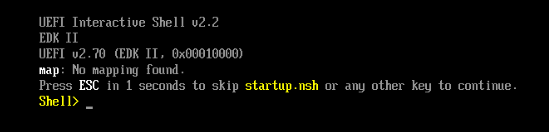
I also had this issue and was able to boot back into Unraid after deleting the vfio-pci.cfg file from the /boot/config/ folder in my Unraid USB boot disk. Before deleting this file, I confirmed that the hardware ID and PCI bus/slot/function listed in the vfio-pci.cfg indeed correlates to my discrete GPU and it's audio component (found under Tools > System Devices). They are: IOMMU group 14:[1002:73ff] 03:00.0 VGA compatible controller: Advanced Micro Devices, Inc. [AMD/ATI] Navi 23 [Radeon RX 6600/6600 XT/6600M] (rev c7) IOMMU group 15:[1002:ab28] 03:00.1 Audio device: Advanced Micro Devices, Inc. [AMD/ATI] Navi 21/23 HDMI/DP Audio Controller My question is then, how do I bind my GPU to VFIO for passthrough to a VM if the vfio.pci.cfg is the file causing the boot to hang? ------------------------------ ADDENDUM: Adding the following info for context - perhaps somewhere in here lays the problem: Yesterday evening, I installed a new EVGA 650W PSU and an Asus Dual Radeon RX 6600 graphics card on my existing Asrock Z690 Pro RS motherboard with an Intel i5-12600k CPU (w/ UHD 770 iGPU) Tasks performed: I dumped the vBIOS as described by S.I.1. I updated my existing Ubuntu VM config with the GPU, it's sound card, and the vBIOS. I navigated to Tools > System Devices and selected the GPU and audio (see devices above) to bind to VFIO at boot I restarted my server I started my VM and boom! It worked! I confirmed Ubuntu was using the GPU, was able to run glmark2 test (score ~14k), and played a demo game on Steam. Great, I thought. Turned off the VM and went to bed. This morning, the VM would not boot. I recalled someone suggested making sure in the primary GPU in the BIOS is set the onboard iGPU, not the discrete GPU. So I did that, and while I was at it, I noticed SR-IOV support was disabled, so I enabled that too (thinking that might be a good idea as well). Ever since, I have not gotten my GPU to work. In fact, I am no longer able to boot Ubuntu VM using VNC. Instead, I get a UEFI Interactive Shell v2.2: I don't know what to try next. Any insights or suggestions would be appreciated!
-
Good to know. Thank you!
-
Thanks guys! Disclaimer: I’m a newb. I have an Intel i5 12600k on a AsRock z690 Pro RS motherboard and am hoping to set up my Unraid server to handle docker containers (Jellyfin and Immich) whilst also running a Win11 VM for light gaming and a Linux VM for “daily driving”. When I get a discrete GPU (leaving the iGPU to handle the docker container tasks) can I leverage it for both VMs at the same time? Or is passthrough of a discrete GPU (or any PCIe controller for that matter) only limited to one VM at a time?
-
Does doing this make the iGPU inaccessible to docker containers, such as Jellyfin, for transcoding tasks?
-
I would also like to know! I currently have a redis running for an immich container. Considering following ibracorp's instruction for installing Authelia, but not sure if I'll need a seperate Redis container for that.
-
Thank you! I just completed my first Unraid build using the Cooler Master N400 case. Now I get to enjoy a clean depiction of my PC on my Unraid login and dashboard pages - thanks to you! Kudos!
