





SeRiusMe
Members
-
Joined
-
Last visited
-
Still container network is hanging after a while if attached to Bridge or Host. 🤷♀️
-
Same on me. But I have Adguard installed on my router machine. Listening on port 53 and I changed the routers DNS server to 53530. Adguard resolves to router and router to upstreams.
-
No, by now there's no interface with an empty gateway. DOCKER: IPv4 custom network on interface eth0: Subnet: 10.1.3.0/24 Gateway: 10.1.3.251 DHCP pool: not set IPv4 custom network on interface eth0.2: Subnet: 10.1.2.0/24 Gateway: 10.1.2.251 DHCP pool: not set IPv4 custom network on interface eth0.5: Subnet: 10.1.5.0/24 Gateway: 10.1.5.251 DHCP pool: not set UNRAID: # ifconfig docker0: flags=4099<UP,BROADCAST,MULTICAST> mtu 1500 inet 172.17.0.1 netmask 255.255.0.0 broadcast 172.17.255.255 ether REDACTED txqueuelen 0 (Ethernet) RX packets 4 bytes 168 (168.0 B) RX errors 0 dropped 0 overruns 0 frame 0 TX packets 4 bytes 268 (268.0 B) TX errors 0 dropped 0 overruns 0 carrier 0 collisions 0 eth0: flags=4163<UP,BROADCAST,RUNNING,MULTICAST> mtu 1500 inet 10.1.3.30 netmask 255.255.255.0 broadcast 0.0.0.0 ether REDACTED txqueuelen 1000 (Ethernet) RX packets 8061 bytes 1604692 (1.5 MiB) RX errors 0 dropped 0 overruns 0 frame 0 TX packets 6701 bytes 5185374 (4.9 MiB) TX errors 0 dropped 0 overruns 0 carrier 0 collisions 0 eth0.2: flags=4163<UP,BROADCAST,RUNNING,MULTICAST> mtu 1500 inet REDACTED netmask 255.255.255.0 broadcast 0.0.0.0 ether f4:52:14:c6:05:c2 txqueuelen 1000 (Ethernet) RX packets 2879 bytes 863444 (843.2 KiB) RX errors 0 dropped 0 overruns 0 frame 0 TX packets 2278 bytes 4808849 (4.5 MiB) TX errors 0 dropped 0 overruns 0 carrier 0 collisions 0 eth0.5: flags=4163<UP,BROADCAST,RUNNING,MULTICAST> mtu 1500 inet 10.1.5.30 netmask 255.255.255.0 broadcast 0.0.0.0 ether REDACTED txqueuelen 1000 (Ethernet) RX packets 3589 bytes 265242 (259.0 KiB) RX errors 0 dropped 0 overruns 0 frame 0 TX packets 690 bytes 74546 (72.7 KiB) TX errors 0 dropped 0 overruns 0 carrier 0 collisions 0
-
If I change the order for the DNS at the host and put the 10.1.5.251 at the top, The container at VLAN5 resolves DNS. BUT ALSO OTHER ONE IN VLAN2. (But it takes a while, I suppose because is trying 10.1.5.251 first? # ip addr 1: lo: <LOOPBACK,UP,LOWER_UP> mtu 65536 qdisc noqueue state UNKNOWN group default qlen 1000 link/loopback 00:00:00:00:00:00 brd 00:00:00:00:00:00 inet 127.0.0.1/8 scope host lo valid_lft forever preferred_lft forever 2: tunl0@NONE: <NOARP> mtu 1480 qdisc noop state DOWN group default qlen 1000 link/ipip 0.0.0.0 brd 0.0.0.0 45: eth0@if36: <BROADCAST,MULTICAST,UP,LOWER_UP> mtu 1500 qdisc noqueue state UP group default link/ether 02:42:0a:01:02:19 brd ff:ff:ff:ff:ff:ff link-netnsid 0 inet 10.1.2.25/24 brd 10.1.2.255 scope global eth0 valid_lft forever preferred_lft forever # nslookup google.com Server: 127.0.0.11 Address: 127.0.0.11#53 Non-authoritative answer: Name: google.com Address: 142.250.201.78 Name: google.com Address: 2a00:1450:4003:803::200e WTF??
-
RESOLUTION IN CONTAINER IN VLAN5 WORKS IF DNS OF VLAN5 IS FORCED INSTEAD OF THE DEFAULT (10.1.3.251) # nslookup google.com 10.1.5.251 Server: 10.1.5.251 Address: 10.1.5.251#53 Non-authoritative answer: Name: google.com Address: 142.250.201.78 Name: google.com Address: 2a00:1450:4003:803::200e The host DNS server doesn't work, and I guess the internal docker DNS is trying the same: # nslookup google.com 10.1.3.251 ;; communications error to 10.1.3.251#53: timed out ;; communications error to 10.1.3.251#53: timed out ;; communications error to 10.1.3.251#53: timed out ;; no servers could be reached # nslookup google.com 127.0.0.11 Server: 127.0.0.11 Address: 127.0.0.11#53 ** server can't find google.com: SERVFAIL Even if I add the other DNS servers to unraids network, it doesn't work: # UNRAID HOST # cat /etc/resolv.conf # Generated by rc.inet1 nameserver 10.1.3.251 nameserver 10.1.2.251 nameserver 10.1.5.251
-
Yes, even removing the docker configuration file from /boot and rebooting. # cat /boot/config/docker.cfg DOCKER_ENABLED="yes" DOCKER_IMAGE_FILE="/mnt/services/system/docker/docker.img" DOCKER_IMAGE_SIZE="20" DOCKER_APP_CONFIG_PATH="/mnt/services/appdata/" DOCKER_APP_UNRAID_PATH="" DOCKER_READMORE="yes" DOCKER_CUSTOM_NETWORKS="eth1 eth2 " <=== IF THOSE REFER TO HOST INTERFACES, THEY ARE DISABLED. ONLY ETH0 IS UP BUT I EDIT THE FILE AND AFTER DOCKER STARTS REVERTS TO THOSE VALUES. DOCKER_TIMEOUT="10" DOCKER_LOG_ROTATION="yes" DOCKER_LOG_SIZE="50m" DOCKER_LOG_FILES="1" DOCKER_AUTHORING_MODE="no" DOCKER_USER_NETWORKS="remove" Host routing table: # route -n Kernel IP routing table Destination Gateway Genmask Flags Metric Ref Use Iface 0.0.0.0 10.1.3.251 0.0.0.0 UG 1 0 0 eth0 0.0.0.0 10.1.2.251 0.0.0.0 UG 2 0 0 eth0.2 0.0.0.0 10.1.5.251 0.0.0.0 UG 3 0 0 eth0.5 10.1.2.0 0.0.0.0 255.255.255.0 U 1 0 0 eth0.2 10.1.3.0 0.0.0.0 255.255.255.0 U 1 0 0 eth0 10.1.5.0 0.0.0.0 255.255.255.0 U 1 0 0 eth0.5 172.17.0.0 0.0.0.0 255.255.0.0 U 0 0 0 docker0 Resolution in container in Bridge works: # dig google.com ; <<>> DiG 9.18.19-1~deb12u1-Debian <<>> google.com ;; global options: +cmd ;; Got answer: ;; ->>HEADER<<- opcode: QUERY, status: NOERROR, id: 53262 ;; flags: qr rd ra; QUERY: 1, ANSWER: 1, AUTHORITY: 0, ADDITIONAL: 1 ;; OPT PSEUDOSECTION: ; EDNS: version: 0, flags:; udp: 1232 ;; QUESTION SECTION: ;google.com. IN A ;; ANSWER SECTION: google.com. 300 IN A 142.250.201.78 ;; Query time: 23 msec ;; SERVER: 10.1.3.251#53(10.1.3.251) (UDP) ;; WHEN: Fri May 24 19:51:18 CEST 2024 ;; MSG SIZE rcvd: 55
-
Unfortunately deleting the docker image didn't work. 😢 But docker did create the missing routes: # route -n Kernel IP routing table Destination Gateway Genmask Flags Metric Ref Use Iface 0.0.0.0 10.1.3.251 0.0.0.0 UG 1 0 0 eth0 0.0.0.0 10.1.2.251 0.0.0.0 UG 2 0 0 eth0.2 0.0.0.0 10.1.5.251 0.0.0.0 UG 3 0 0 eth0.5 10.1.2.0 0.0.0.0 255.255.255.0 U 0 0 0 vhost0.2 10.1.2.0 0.0.0.0 255.255.255.0 U 1 0 0 eth0.2 10.1.3.0 0.0.0.0 255.255.255.0 U 0 0 0 vhost0 10.1.3.0 0.0.0.0 255.255.255.0 U 1 0 0 eth0 10.1.5.0 0.0.0.0 255.255.255.0 U 0 0 0 vhost0.5 10.1.5.0 0.0.0.0 255.255.255.0 U 1 0 0 eth0.5 172.17.0.0 0.0.0.0 255.255.0.0 U 0 0 0 docker0
-
I've seen that post, but I can't understand what is being said there. BTW, I've seen the route table you posted there and I'm missing several routes that are there, for example docker0. Can you please explain me how did the other guy solved it? Now, I can't make changes on network. Because docker is stopped, but it's still saying that has to be stopped for changes:

-
Restarting docker brings this two errors, that I found online tht are related to trying to create routes and failing because they exist. # /etc/rc.d/rc.docker restart stopping dockerd ... ... Waiting to die. starting dockerd ... RTNETLINK answers: File exists RTNETLINK answers: File exists
-
I found a container for network diagnosing: # dig google.com ; <<>> DiG 9.18.19-1~deb12u1-Debian <<>> google.com ;; global options: +cmd ;; Got answer: ;; ->>HEADER<<- opcode: QUERY, status: SERVFAIL, id: 47311 ;; flags: qr rd; QUERY: 1, ANSWER: 0, AUTHORITY: 0, ADDITIONAL: 0 ;; WARNING: recursion requested but not available ;; QUESTION SECTION: ;google.com. IN A ;; Query time: 4001 msec ;; SERVER: 127.0.0.11#53(127.0.0.11) (UDP) ;; WHEN: Fri May 24 13:56:00 CEST 2024 ;; MSG SIZE rcvd: 28 # ping www.google.com ping: www.google.com: Temporary failure in name resolution # host www.google.com Host www.google.com not found: 2(SERVFAIL) From one container to other works, but not to host: # nslookup d10ef2ae9349 Server: 127.0.0.11 Address: 127.0.0.11#53 Non-authoritative answer: Name: d10ef2ae9349 Address: 10.1.5.28 # nslookup deathshadow Server: 127.0.0.11 Address: 127.0.0.11#53 ** server can't find deathshadow: SERVFAIL Seems like dockers DNS gateway is not working??
-
My router listens for DNS queries on all interfaces. LAN, IOT and SYS. I don't have any blocked DNS entries on my router, but anyways I've created a firewall rule allowing access for DNS address in 10.1.3.xx segment and the problem still persists. This is a traceroute inside a container on vlan 5 to a computer in vlan 2: # traceroute 10.1.2.100 traceroute to 10.1.2.100 (10.1.2.100), 30 hops max, 46 byte packets 1 10.1.5.251 (10.1.5.251) 0.091 ms 0.121 ms 0.072 ms 2 10.1.2.100 (10.1.2.100) 1.211 ms 1.347 ms 1.230 ms I can't find any way of inspecting a DNS request inside any of may containers, but all have in resolv.conf 127.0.0.11 as DNS resolver and fails. Yes, it seems a docker configuration problem with the DNS resolver. If I could "see" what requests are really coming from the containers... Now I'm trying with bridging active. I found in the release notes of unraid (https://docs.unraid.net/unraid-os/release-notes/6.12.4/#fix-for-macvlan-call-traces) a writeup talking about a problem and trying it, but doesn't change anything. Perhaps you are right when you say that perhaps the docker networking configuration is not reconfiguring and it's frozen at some point. I don't know, but I'm not advancing anything. EDIT: There isn't any problem that I know it the routing at the router. My computer, for example has total access to the devices in other vlans, and devices in all vlans can resolve DNS queries. LXC containers on a Proxmox server in ITO segment can resolve DNS. Even the Unraid Host can perfectly resolve. Something is wrong between the host and the dockers. And if the containers use the default bridge (dropouts). If I put a container manually in the 10.1.3.xx net it runs without dropouts (with no DNS): I also checks the DHCP in case there where conflicts, but no.

-
You mean that set the Id to an unused/fake vlan so traffic doesn't go anywhere? I think I could do the same by changing vlan 3 on that port from untagged to tagged. (It's already tagged) But I would want to take that IP configuration out there. I think something messed as I started the server in just one network, as every other appliance and evolved to vlans. EDIT: I was missing permissions for the proxmox server in 10.1.5.xx for mounting backups share. As soon as I added them, I accessed properly. So the only server that fails at mounting and accessing shares is at 10.1.3.xx segment. That is the configuration that I want to fix in the main section of the interface. I bet that the server is trying to serve all the DNS requests through the 10.1.3.xx gateway/route, and it's failing. (It must be the default route)
-
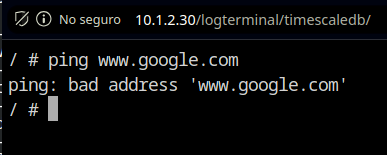
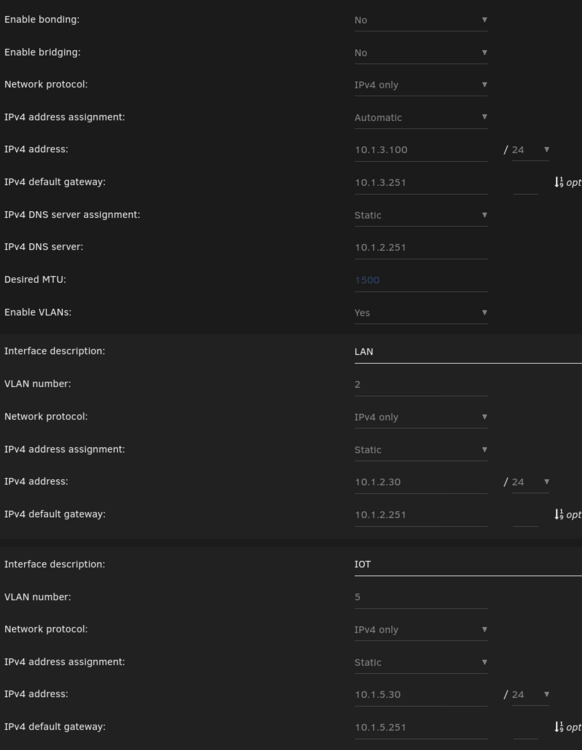
Thanks @Vr2Io for all your help. My current docker configuration is: And I can't change the empty gateway in eth0.2. And you can see that it's not creating a custom network for eth0. BTW I've managed to rearrage the interfaces. The mellanox now it's the eth0 and the two RJ45 are eth1 and 2. I've only left attached the link to eth0 (10Gb). Network is stable without disconnects. Still I don't have DNS resolution inside dockers. Krusader on eth0.2 hangs here: And other container on eth0.5 fails to resolve: The containers are present on the network, and for example, Home Assistant that s on another machine records to influxdb correctly. Samba shares work as expected, but NFS shares do not. I'm trying to mount a backup share on my proxmox server and it can't communicate with the nfs server. My computer can mount NFS shares and it's on the vlan 2. I think the problem is related to being unable to reset the main IP configuration of the interface and to raise an address in 10.1.3.xx segment as vlan: Proxmox let's you leave the parent interface unconfigured, and configure the bridge:



-
With the graph I meant in the 3th image I posted of the switch configuration, the picture of the switch, the top or the bottom ones. No, no... I don't have tree APs for covering vlans 😄 I have 3 but for covering all the space. Each AP can broadcast different SSIDs and I have one dedicated for IOT. That's what I do. One AP in the basement, one in the first floor and other on the 2nd. Solid stone house, is what it requires. Nope. Trunk is an interface that processes frames from different Vlans: https://www.geeksforgeeks.org/access-trunk-ports/ LAGG/Bond is the link aggregation that can be for redundancy online/offline or for bandwidth. Yes, of today there are prtocols that allow bandwidth aggregation. https://docs.netgate.com/pfsense/en/latest/interfaces/lagg.html So sad. Thanks for your help. For what is worth, I didn't mean to offend anyone. And also english is not my native language. Perhaps I'm tired and my eyes hurt. I all started with a failing drive in my NAS and the system I programmed failed to send me a warning. Repair, test a new system+migrate... Plus the paid workload...
-
I could have a problem here: unraid:~# route -n Kernel IP routing table Destination Gateway Genmask Flags Metric Ref Use Iface 0.0.0.0 10.1.5.251 0.0.0.0 UG 0 0 0 eth2.5 10.1.2.0 0.0.0.0 255.255.255.0 U 1 0 0 eth2.2 10.1.3.0 0.0.0.0 255.255.255.0 U 1 0 0 eth0 10.1.5.0 0.0.0.0 255.255.255.0 U 1 0 0 eth2.5 172.17.0.0 0.0.0.0 255.255.0.0 U 0 0 0 docker0 I think you're referring to LAGG/Bond here.


